
Livraison le jour même et le lendemain

Qualité garantie

Débloquez vos offres de bienvenue: Livraison GRATUITE | Jusqu'à -80 % | 30 jours d'essai gratuits à JoyPlus
Téléchargez l'application
A colour e-reader might seem like a straightforward choice on paper, but there are significant differences between models. Some devices use colour only for covers and highlights, while others combine Android apps, mobile data, cameras and document features. If you focus only on storage capacity or a high megapixel count, you could end up with a device that’s less enjoyable to use for everyday reading.
The Bigme HiBreak Pro Color e-reader is designed for people who want more than just e-books. It combines a 6.13-inch Kaleido 3 e-paper display, Android 14, 5G, cameras and OCR. The specifications make it an interesting option, but check first whether you really need these features.
A Kaleido 3 e-paper display is designed to offer a different viewing experience from an LCD or OLED screen. According to Bigme’s product information, the display offers 300 ppi for black-and-white content and 150 ppi for colour content. You can therefore view colour pages, comics and diagrams, but colours generally look softer and less saturated than they do on a tablet.
That can make it a good choice for reading, but less suitable for films, fast-paced games or graphics apps. Also consider the refresh rate: e-paper works differently from a conventional screen. Bigme lists its own SSS refresh technology, but performance may vary between apps.
A 5G e-reader can be useful for travelling, cloud storage and using apps without Wi-Fi. However, you should compare its supported bands with those offered by your network provider. According to the product specifications, the Bigme HiBreak Pro Color supports various 5G and 4G bands and offers Dual SIM Dual Standby. Before buying, check that your SIM card, plan and usual locations are a good match.
A model with mobile data also uses more power than a device that works solely over Wi-Fi. Turn off 5G, GPS and syncing when you don’t need them.
An e-reader with a camera and OCR can digitise documents, till receipts or notes. According to Bigme’s product description, the rear camera is designed for document scanning and automatic OCR recognition. In practice, recognition quality depends on the lighting, contrast, font, camera angle and language of the document.
So use OCR as a tool and check important details manually. Bear privacy in mind, too: don’t scan confidential documents without first checking where the processing takes place and which app permissions you’re granting.
A 6.13-inch e-reader is compact enough to carry in a bag and suitable for novels, news and short documents. A larger tablet may be more practical for PDFs with wide tables or technical drawings. The Bigme has a colour e-paper display with a resolution of 300 ppi in black and white and 150 ppi in colour.
Matte e-paper technology reflects light differently from a tablet. Bigme says the screen is designed to reduce reflections and make reading more comfortable; this is a product claim, not a medical guarantee. Taking breaks and having enough ambient light remain important.
According to the product specifications, the Bigme HiBreak Pro Color 256GB has 8GB RAM and 256GB storage. This is useful if you want to keep multiple Android apps, documents, audio files and scanned pages on the device. Do check how much storage is actually available after installing Android and system apps.
If you mainly read books, you may not need as much storage. For students, professionals and travellers who keep lots of PDFs and scans, 256GB offers more space. You can also browse our range of products with 256GB storage.
According to the product information, the Bigme has 5G, dual SIM, a compass, a 20MP rear camera and a 5MP front camera, as stated in the product title. The battery capacity is 4500 mAh, and the product specifications state that it supports charging at up to 18W.
Bear in mind that battery life depends on screen refresh, 5G use, cameras and apps. Using an e-reader as an Android phone means charging it more often than you would a basic reading device.
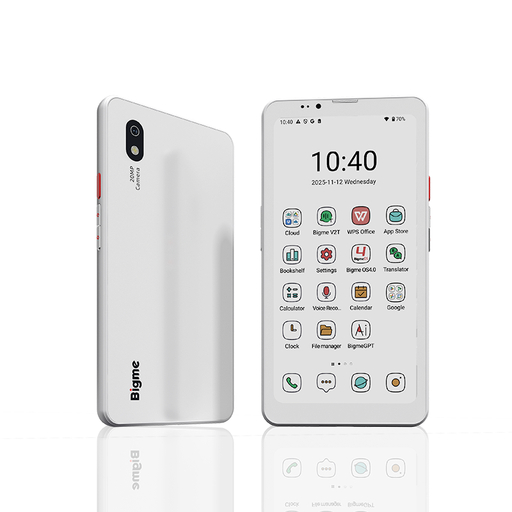
Why it suits this profile: This model combines reading with Android apps, 5G and colour in one compact device. That means you don’t have to buy a separate e-reader and a second mobile device straight away.
The product specifications list screen resolutions for both black-and-white and colour content. This helps you get a more realistic idea of what the colour display can do before you buy.
6.13-inch Kaleido 3 display, Android 14, 8GB RAM, 256GB storage and Dual SIM 5G, according to the product information.
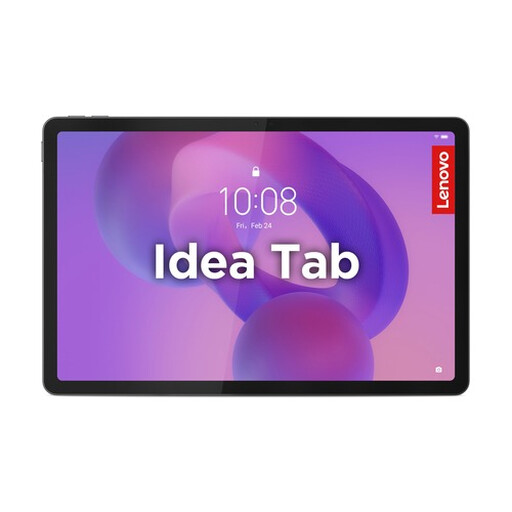
Why it suits this profile: If documents, video, notes and apps matter more to you than e-paper, this tablet offers a larger screen and a higher refresh rate.
The 11-inch IPS display and 2.5K resolution make wide PDFs and colour content easier to view than on a compact e-paper screen.
11-inch 2.5K screen, 8GB RAM, 256GB storage, Android 15 and a pen included, according to the product details.
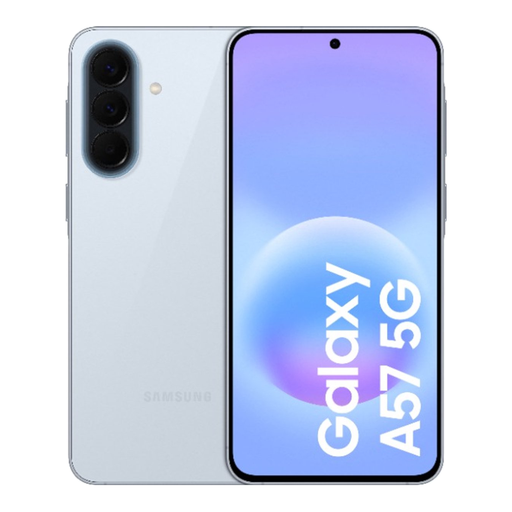
Why it suits this profile: Travellers and heavy mobile users looking for maximum app compatibility, a bright OLED screen and full smartphone functionality may be better off choosing a smartphone.
If you need smooth video, photography and full-colour apps, choosing an OLED smartphone helps you avoid the limitations of e-paper.
6.7-inch OLED screen, 120Hz refresh rate, 8GB RAM, 256GB storage and 5G Dual SIM, according to the product information.
We’ve put together a complete, up-to-date list of products that meet these strict selection criteria and the current European safety regulations.
According to the product information, the e-reader runs Android 14, so you can install Android apps. Check each app for e-paper compatibility, Google services, language settings and mobile data support. Not every app is designed for a black-and-white or colour e-paper display.
According to the product specifications, the Bigme has a 4500 mAh battery. Actual battery life depends on 5G, camera use, screen refresh, brightness, syncing and installed apps. Power consumption will generally differ between reading and continuous mobile internet use or OCR scanning.
According to the product description, OCR can automatically recognise text in scans. The results depend on lighting, sharpness, contrast and document layout. Always check important names, amounts and numbers manually before archiving or sharing a scan.
