
Vandaag of morgen in huis

Kwaliteit gegarandeerd

Welkomstaanbiedingen ontgrendelen: GRATIS bezorging | Tot 80% korting | Gratis 30 dagen JoyPlus-proefperiode
Download de app
Desktop cable clutter is a thing of the past. A great wireless mouse offers you freedom and a clean, organised workspace. But with so many options available, finding the right one can be a challenge. Are you looking for a silent mouse for the library, an ergonomic mouse for long workdays, or a lightning-fast gaming mouse for competitive performance?
This guide will help you understand the key specs and find a model that perfectly suits your needs. We'll highlight several popular choices for different budgets and use cases, so you can make an informed decision when buying a new wireless mouse.
Before we dive into our recommendations, it's helpful to understand a few key specifications. This will ensure you know exactly what to look for.
You often use a mouse for hours on end, so a comfortable design is essential. An ergonomic mouse is designed to support the natural posture of your hand and wrist, which can reduce strain. Pay attention to the shape, size, and whether the mouse is suitable for left- or right-handed use. For example, models with a thumb rest provide extra comfort during long sessions.
Wireless mice connect in two main ways:
DPI indicates the sensitivity of the mouse sensor. A higher DPI value means the cursor on your screen travels a greater distance with a small movement of the mouse. For standard office work and browsing, a DPI between 800 and 1600 is perfectly fine. Gamers often prefer a mouse with a much higher and adjustable DPI (e.g., 8000 or more) for fast and precise movements.
Based on specifications, functionality and intended use, we have selected three compelling models.
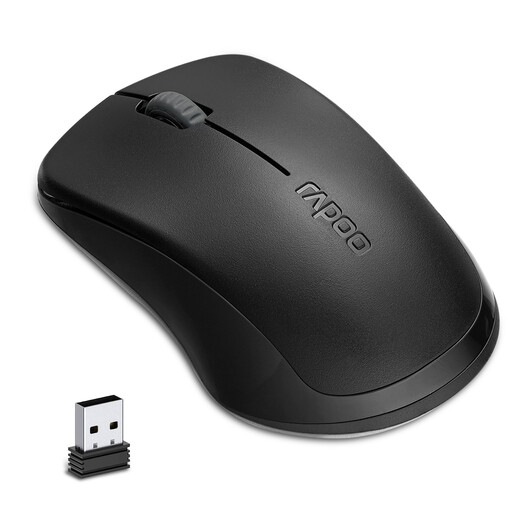
Why It Stands Out: The RAPOO 1680 is a no-nonsense silent mouse that gets the job done without unnecessary frills. Its focus is on silence and reliability. According to the manufacturer, Rapoo, the design effectively reduces click noise, making it ideal for quiet environments such as an office, a library or a home where housemates are sleeping.
Key Features:
Who Is It For? This is an excellent choice for students, home users and professionals seeking an affordable, reliable, and especially quiet mouse for daily tasks.

Why It Stands Out: The Logitech mouse from the MX Master series has long been known as a productivity powerhouse. The MX Master 4 continues this tradition with a highly ergonomic mouse design and advanced features. According to Logitech, its MagSpeed scroll wheel can scroll 1,000 lines per second, yet can also switch to line-by-line precision scrolling.
Key Features:
Who Is It For? Ideal for professionals, programmers, designers and anyone who spends many hours a day at the computer and demands maximum efficiency and comfort.
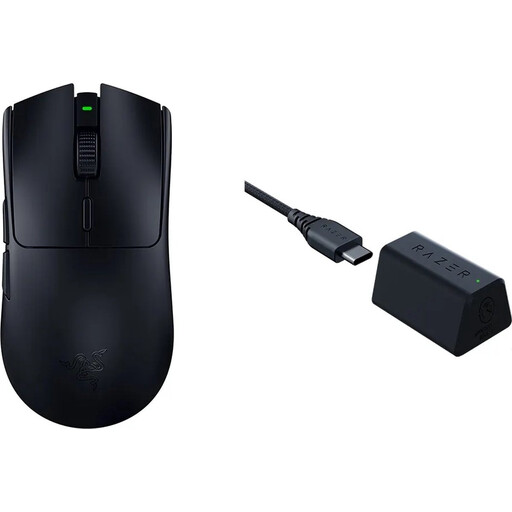
Why It Stands Out: When it comes to competitive gaming, every millisecond counts. The Razer mouse DeathAdder V3 Pro is designed with this in mind. It is ultra-lightweight (only 63 grams) and comes with the HyperPolling Wireless Dongle. According to Razer, their HyperSpeed Wireless technology provides a connection that is 25% faster than other wireless technologies, which is essential for high-level gaming.
Key Features:
Who Is It For? This gaming mouse is aimed at serious and competitive gamers who are looking for top-tier performance, a rapid response, and an ultra-lightweight build to stay one step ahead of their opponents.
If one of these three models isn't quite what you're looking for, or if you simply want to compare more options, don't worry. For a broader overview of different models and accessories, you can visit our Wireless Receiver category.
1. What is the difference between a Bluetooth mouse and a mouse with a USB receiver? A mouse with a USB receiver (2.4GHz) often provides a slightly more stable and faster connection, which is important for gaming. A Bluetooth mouse does not require a USB port, making it more convenient for devices with limited ports, such as a laptop or tablet.
2. How important is DPI for a wireless mouse? For general office and home use, an extremely high DPI is not necessary; a value around 1200 is often sufficient. For gamers and graphic designers, however, a high and adjustable DPI is crucial for fast, precise cursor movements on high-resolution screens.
3. How long does the battery of a wireless mouse last? This varies greatly by model. Some mice, like the RAPOO 1680, can run for months on a single AA battery. Rechargeable models like the Logitech MX Master 4 and Razer DeathAdder V3 Pro last for dozens of hours on a full charge and can be quickly recharged via a USB-C cable.
