
Vandaag of morgen in huis

Kwaliteit gegarandeerd

Welkomstaanbiedingen ontgrendelen: GRATIS bezorging | Tot 80% korting | Gratis 30 dagen JoyPlus-proefperiode
Download de app
Buying a new wireless mouse seems simple until you get tangled in a web of technical specifications and marketing promises. Manufacturers throw around terms like sky-high DPI values and vague "ergonomic" claims. The result? You overpay for features you don't need, or you end up with a mouse that becomes a source of frustration after just a few months.
Before you make a decision, it's important to recognise the most common pitfalls:
ergonomic mouse. A poorly designed shape can actually cause discomfort or even issues like RSI by forcing the hand into an unnatural position.bluetooth mouse that constantly stutters or loses its connection is a major source of annoyance. For both focused work and competitive gaming, a stable, lag-free connection is essential.To avoid a bad purchase, it's better to focus on a few concrete specifications that directly impact your daily use.
The way your wireless mouse connects is crucial for its performance.
wireless gaming mouse and for users who demand absolute reliability.bluetooth mouse connects directly to the built-in Bluetooth receiver in your laptop or PC. The advantage is that you don't sacrifice a USB port, which is useful for a laptop mouse with limited ports. Some models can pair with multiple devices simultaneously. However, the connection can be slightly more prone to interference and have a fraction more delay than 2.4GHz.Don't be dazzled by the highest DPI value.
A mouse is an extension of your hand, so comfort is personal and important.
ergonomic mouse, such as a vertical model, is specifically designed to keep the wrist and arm in a natural posture and can help prevent strain.rechargeable mouse with a USB-C port is a sustainable and practical choice that saves you money on batteries in the long run. Check the estimated battery life; it can range from tens of hours for a high-performance wireless gaming mouse to months for an energy-efficient office mouse.Below is a selection of wireless mice, matched to specific user profiles. These recommendations are based on objective specifications that avoid the pitfalls mentioned earlier.
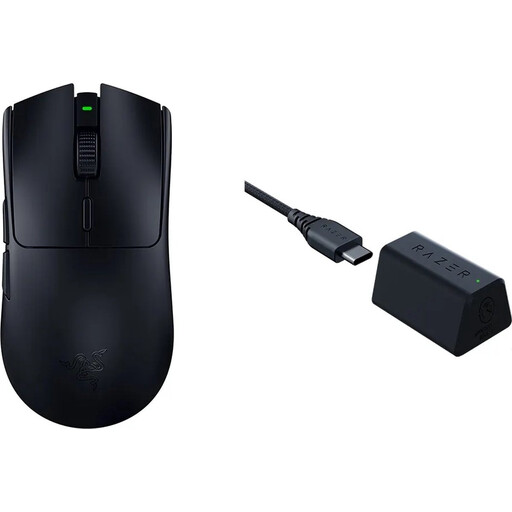
Why This Fits Their Persona: Designed for esports athletes where every millisecond counts. Its ultra-lightweight build and refined ergonomic shape for right-handed users provide the speed and control needed at the highest level.
Instead of just offering a high DPI, the combination of the Focus Pro 30K sensor and the HyperPolling receiver delivers extremely low and stable latency. This isn't an empty marketing promise, but a technical advantage that makes a real difference in competitive games.
Razer HyperSpeed Wireless with a polling rate up to 8000Hz for unprecedented responsiveness. Ultra-lightweight (63g) and a proven ergonomic design.
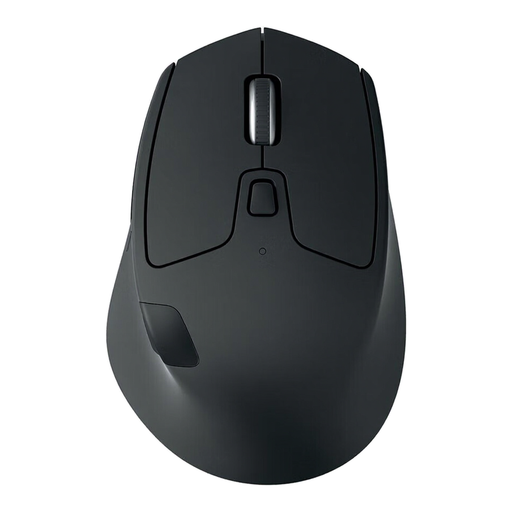
Why This Fits Their Persona: Perfect for those who seamlessly switch between a work laptop, a personal desktop, and even a tablet. Its comfortable shape is built for long, productive workdays.
This model avoids the 'false ergonomics' trap with a thoughtful, contoured design for right-handed users. The Easy-Switch technology solves the multi-device connectivity problem without the instability of a basic `bluetooth mouse`.
Switch between 3 devices with a single button (via Bluetooth or Unifying receiver). According to Logitech, the battery life lasts up to 24 months on a single AA battery.

Why This Fits Their Persona: Ideal for anyone who spends long days at a computer and is actively looking to prevent or reduce wrist, arm, or shoulder strain.
This is a genuine `ergonomic mouse`, not a marketing gimmick. The unique 57-degree vertical angle is designed to reduce muscle strain by placing the hand in a natural 'handshake' position, which alleviates wrist pressure.
According to Logitech, the natural handshake position reduces muscle activity by 10%. The `rechargeable mouse` features a USB-C port and can connect to multiple devices.
We have compiled a complete, up-to-date list of products that fully meet these strict selection criteria and local regulations.
Battery life varies greatly by model and usage. An energy-efficient office mouse like the Logitech MX Vertical can last up to four months on a full charge, according to the manufacturer. A high-performance wireless gaming mouse with a high polling rate and RGB lighting consumes significantly more power and often has an active use time of 80 to 100 hours. In the long run, a rechargeable mouse is almost always more cost-effective and better for the environment than models with disposable batteries.
That depends on your use case. For general use, presentations, and on-the-go work, a bluetooth mouse is very convenient because you don't need a USB port for a dongle. For gaming or precision work like photo editing, a 2.4GHz laptop mouse with its own dongle provides a more stable and faster connection. Many premium mice now offer both options, so you can choose.
DPI (Dots Per Inch) is a measure of the mouse sensor's sensitivity. A higher DPI means the cursor moves faster across the screen. For a standard pc mouse for office work and browsing, a value between 800 and 1600 DPI is more than enough. Gamers often set their DPI between 1600 and 4000 for a good balance of speed and precision. Extremely high values of 10,000 or more are rarely practical and serve mainly as a marketing tool. The quality and accuracy of the sensor itself are far more important.
