
Vandaag of morgen in huis

Kwaliteit gegarandeerd

Welkomstaanbiedingen ontgrendelen: GRATIS bezorging | Tot 80% korting | Gratis 30 dagen JoyPlus-proefperiode
Download de app
Do you have a fast fibre connection, but your Wi-Fi still feels sluggish? Is your 8K stream buffering, are you experiencing lag during gaming, or are your smart devices fighting for bandwidth? It might be time to rethink your network setup. The arrival of WiFi 7 offers a solution to these bottlenecks.
As a Joybuy Product Recommendation Officer, I'm here to help you navigate the options. In this article, we'll explain what to look for when buying a WiFi 7 router and highlight some top choices for 2026, helping you find a model that fits your needs.
Router specifications can be overwhelming. We'll focus on three key points that make a difference for a modern, demanding household.
Many households now have fibre internet plans faster than 1 Gbps. A standard router with only 1 Gbps ports creates a bottleneck. A multi-gigabit router with 2.5G or even 10G Ethernet ports is essential to harness the full speed of your internet plan. This is crucial for a fibre-optic router that future-proofs your network. Always check the number and speed of the LAN and WAN ports.
A tri-band router broadcasts signals on three frequency bands: 2.4 GHz, 5 GHz, and the newer 6 GHz band.
For demanding applications like online gaming and AR/VR, the 6 GHz band is a significant advantage.
WiFi 7 introduces several key improvements. The most notable is Multi-Link Operation (MLO). This allows a device to connect to multiple frequency bands simultaneously (for example, 5 GHz and 6 GHz). According to the technology's developers, this leads to higher throughput, lower latency, and a more reliable connection. Another enhancement is 320 MHz channels, which double the theoretical speed compared to WiFi 6.
Based on specifications and features, we have selected a few models that meet the needs of power users, gamers, and tech enthusiasts.
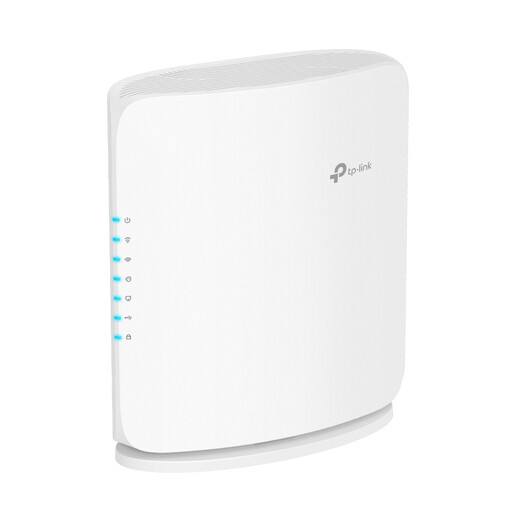
Why It Stands Out The Archer BE450 is a compelling entry point into the world of WiFi 7. It combines the new standard with a 10G port, making it immediately suitable for the fastest fibre internet plans. Although it's a dual-band model, it delivers the core benefits of WiFi 7, such as higher efficiency and throughput on the 2.4 and 5 GHz bands.
Pros
Who Is It For? For the user who wants to future-proof their network and has a multi-gigabit internet plan. This model offers a solid upgrade from an older WiFi 5 or WiFi 6 router, especially thanks to its high-speed ports.
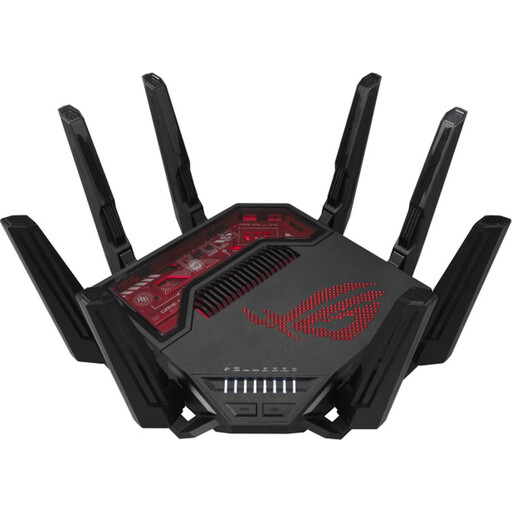
Why It Stands Out This gaming router from the ASUS Republic of Gamers (ROG) line is engineered for maximum performance. With a combined wireless speed of up to 19 Gbps and an impressive array of multi-gigabit ports, this is a model for those who accept no compromises. Its powerful 2.6 GHz quad-core processor ensures the router runs smoothly even under heavy load.
Pros
Who Is It For? For the competitive gamer, the 8K streamer, and the tech enthusiast who demands the highest possible network performance. If you have multiple high-end devices and a lag-free experience is crucial, this is a highly capable choice.
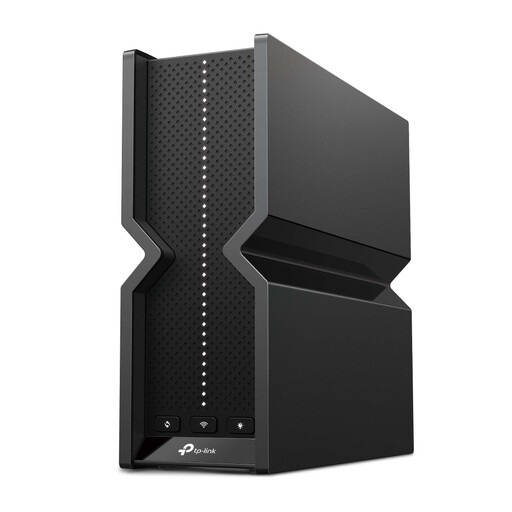
Why It Stands Out The Archer BE550 targets the power user who wants to connect many wired devices at high speed. A unique feature of this model is that all five Ethernet ports support 2.5 Gbps speeds. This makes it an excellent hub for a modern home network with a high-speed PC, a NAS, and a game console. The tri-band WiFi 7 support ensures that wireless devices aren't left behind.
Pros
Who Is It For? For the user with a busy household and multiple devices requiring a fast, wired connection. Think content creators, remote workers handling large files, or families where gaming and streaming happen simultaneously.
The world of networking equipment is vast. The models listed above are aimed at the demanding user who is ready for the next generation of Wi-Fi. If you're looking for a different type of router, such as a model without Wi-Fi or a more standard option, there are plenty of alternatives.
Check out our full range of wired routers for more choices.
If you have a multi-gigabit internet plan (faster than 1 Gbps) and use demanding applications, a WiFi 7 router is a wise investment. It's not just an upgrade in speed, but more importantly, in stability and capacity. It prepares your network for future devices and technologies like AR/VR and 8K streaming.
To leverage the maximum speed of a WiFi 7 router, a fibre plan exceeding 1 Gbps is recommended. However, even with a 1 Gbps plan, you can still benefit from WiFi 7's advantages, such as lower latency, less interference on the 6 GHz band, and faster communication between devices on your local network.
Both WiFi 6E and WiFi 7 use the 6 GHz band. The key technological leap for WiFi 7 is Multi-Link Operation (MLO). This allows devices to send and receive data across different frequency bands simultaneously. According to its developers, this results in noticeably higher speeds and a more robust connection. Additionally, WiFi 7 supports wider data channels (320 MHz), which further increases the theoretical top speed.
