Joybuy Insights

Smart Plugs for Convenience and Energy Savings: Our Top Picks

By the Joybuy Product Recommendation Officer | July 16, 2026

Ever forget to turn off the lamp in the corner? Curious about the power consumption of that old coffee maker? Or do you simply want the house to be lit up by the time you get home? A smart plug is a simple and affordable first step to making your home smarter.

With a smart plug, you can turn almost any device with a plug into a smart device. You can control it via your phone, with your voice, or on a fixed schedule. But not all smart plugs are created equal. In this article, we'll help you make the right choice based on specifications and use cases, without the unnecessary marketing jargon.

What to Look for When Buying a Smart Plug?

Before you make a choice, it's helpful to know which features are important to you. Here are a few key points to consider.

1. Connectivity: Wi-Fi, RF, or Bluetooth?

Most smart plugs operate via your home network. A Wi-Fi plug connects directly to your router and is controlled via an app on your smartphone, wherever you are. Other models, such as a remote-controlled plug, use a radio signal (RF). These don't require an internet connection or an app and are ideal for places without stable Wi-Fi or for those looking for a simple wireless switch. Bluetooth plugs are useful for short-range control but are less flexible.

2. Functionality: More Than Just On and Off

A basic plug can turn a device on and off. However, many models offer more. Consider:

  • Schedules: Set your lights to turn on automatically at sunset. This functions as an advanced timer outlet.
  • Energy Monitoring: A smart plug with an energy meter provides insight into the power consumption of the connected device via the app. This is useful for identifying devices with high standby power and reducing energy costs.
  • Voice Control: Link the plug to assistants like Google Home or Amazon Alexa to control devices with your voice.

3. Ecosystem: Does It Work with Your Other Devices?

If you already have smart devices at home, such as Philips Hue lights, it's practical to choose a plug that works within the same system. For example, a Philips Hue Smart Plug integrates seamlessly with the Hue app and Bridge. Check if the plug is compatible with the platforms you use or plan to use, such as Google Home, Apple HomeKit, or the emerging Matter protocol.

Our Recommended Product Picks

Based on functionality and application, we have compiled a list of popular choices for you.
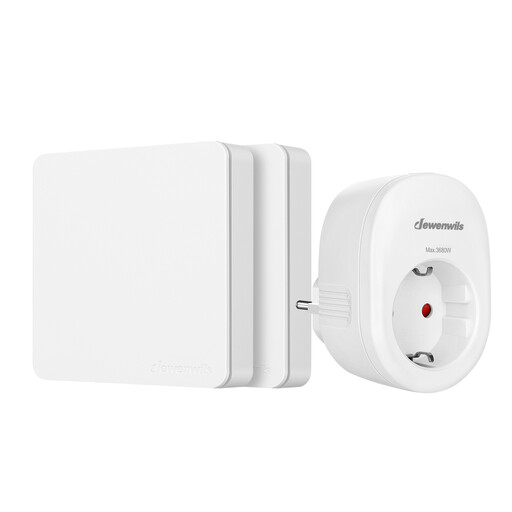
Dewenwils Wireless Switch: Simplicity Without the Fuss

Dewenwils Remote-Controlled Power Sockets

  • Why it stands out: This set requires no Wi-Fi, app, or installation. You plug the receiver into the socket and use the included wall switch as a remote control. The setup is as simple as it gets.
  • Pros:
    • Works right out of the box (pre-paired).
    • Strong RF signal with a range of up to 30 metres, even through walls.
    • Flexible switch placement without running any wires.
    • No internet connection or smartphone app required.
  • Who is this for?: Ideal for anyone looking for a reliable remote-controlled plug for hard-to-reach devices, such as Christmas lights or a floor lamp behind the sofa. Perfect for users who don't need app control or complex schedules.

View the Dewenwils Wireless Switch

TP-Link Tapo P115: The Smart Plug with Energy Monitoring

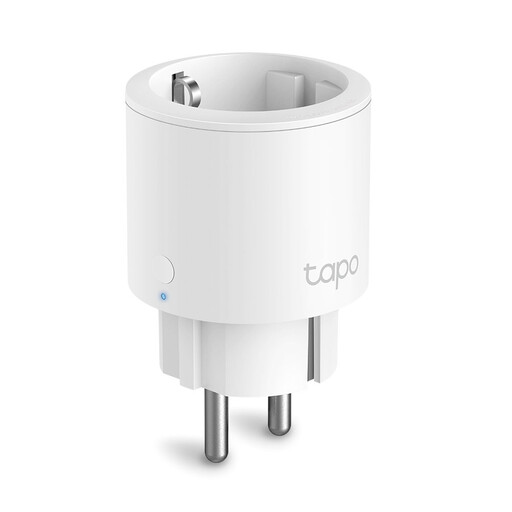
TP-Link tapo P115 Smart Plug

  • Why it stands out: The Tapo P115 combines all the core features of a modern Wi-Fi plug in a compact design. Its key feature is the built-in energy monitoring, which allows you to see exactly what a device is consuming via the Tapo app.
  • Pros:
    • Real-time energy monitoring to save on costs.
    • Remote control via the user-friendly Tapo app.
    • Works with voice assistants like Amazon Alexa and Google Assistant.
    • Compact design that doesn't block adjacent outlets.
    • Schedules and timers continue to work even if the internet connection is lost.
  • Who is this for?: For anyone who wants to get a handle on their energy consumption or is looking for a versatile and reliable smart plug. The Tapo P115 is perfect for both beginners and advanced users.

View the TP-Link Tapo P115

Philips Hue Smart Plug: Seamless Integration into Your Hue System

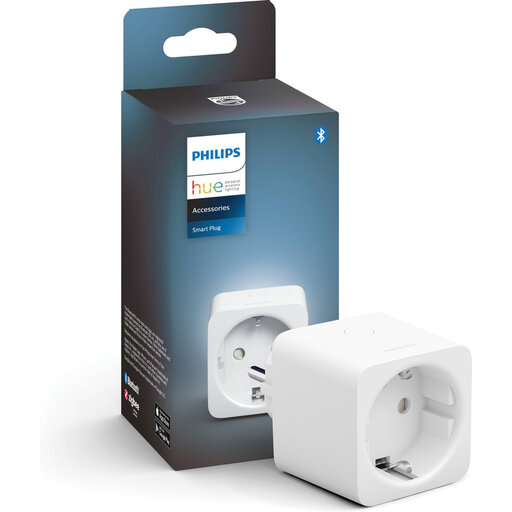
Philips Hue Smart Plug

  • Why it stands out: This plug is designed to work perfectly with the Philips Hue ecosystem. If you already have Hue lights, you can easily add this Philips Hue Smart Plug in the app and control traditional lamps and appliances as if they were Hue products.
  • Pros:
    • Direct control via Bluetooth or full functionality with a Hue Bridge.
    • Integrates with all Hue scenes, timers, and routines.
    • Compact and discreet design with a physical on/off button.
    • Supports Matter, the new standard for smart home devices.
  • Who is this for?: A logical choice for households that have already invested in the Philips Hue system. It's the smoothest way to make non-smart lighting or appliances part of your existing light scenes.

View the Philips Hue Smart Plug

Didn't Find What You Were Looking For?

The world of smart plugs is vast, and there are many variations for specific situations. Are you looking for an outdoor model, a power strip with multiple smart outlets, or a different type of connector? Then check out our broader selection.

Discover more plug connectors

Frequently Asked Questions About Smart Plugs

What can you do with a smart plug?

With a smart plug, you can remotely turn any device with a plug on or off via an app, your voice, or a schedule. Popular uses include controlling lighting, turning off devices with high standby power (like TV set-top boxes), switching on a coffee maker from your bed, or simulating presence when you're on vacation.

How much power does a smart plug consume itself?

A smart plug itself consumes a small amount of power to stay connected to the network. This is typically very low, usually between 0.5 and 1.5 watts. The savings you achieve by eliminating the standby power of connected devices is almost always greater than the consumption of the plug itself.

Does a smart plug work without Wi-Fi?

Most smart plugs require an active Wi-Fi connection to be controlled via an app or voice assistant. However, there are alternatives, such as the Dewenwils set mentioned above, which work with their own RF remote and therefore do not need an internet connection. Additionally, on many models, set schedules are stored locally and will continue to function if the Wi-Fi temporarily drops.