
Vandaag of morgen in huis

Kwaliteit gegarandeerd

Welkomstaanbiedingen ontgrendelen: GRATIS bezorging | Tot 80% korting | Gratis 30 dagen JoyPlus-proefperiode
Download de app
The search for a good security camera can feel like navigating a maze. Manufacturers promise the world with terms like "AI detection" and "crystal-clear image," but the reality often falls short. Before you make a choice, it's wise to know where the pitfalls lie. Many people fall for the same marketing ploys:
smart camera with advanced features seems like a great deal, until the trial period ends and you discover that person detection or extended storage requires a monthly fee.camera with night vision isn't just any camera with night vision.wireless security camera that constantly loses its connection to your Wi-Fi network offers a false sense of security. The frustration of having to reset it repeatedly outweighs the convenience of "no cables."To avoid buyer's remorse, it's better to focus on a few concrete specifications rather than marketing promises. These features determine whether a camera will actually do what it's supposed to do: keep an eye on your property, loved ones, or business.
Image quality is often expressed in resolution: Full HD (1080p), 2K, or even a 4K security camera. A higher resolution means a sharper image, which is useful for identifying details like faces or license plates. But don't get fixated on it. The quality of the sensor and lens is at least as important.
Focus especially on the night vision. Standard infrared (IR) produces a black-and-white image. This may be sufficient, but for more detail, a camera with a "starlight" sensor or built-in spotlights is a better choice. These technologies make it possible to see in color at night, which makes a world of difference for identification.
How is the camera powered? The choice directly impacts installation and maintenance.
outdoor camera with a battery combined with a solar panel is a popular solution. With sufficient sunlight, you rarely, if ever, need to charge the battery manually.For a Wi-Fi camera or IP camera, the network connection is crucial. A camera that supports both 2.4GHz and 5GHz Wi-Fi often provides a more stable and faster connection than models that only operate on the more crowded 2.4GHz band.
Where are the recorded images stored?
Some cameras offer both options, giving you the most flexibility.
Based on these practical criteria, we have selected a number of cameras that suit different users.
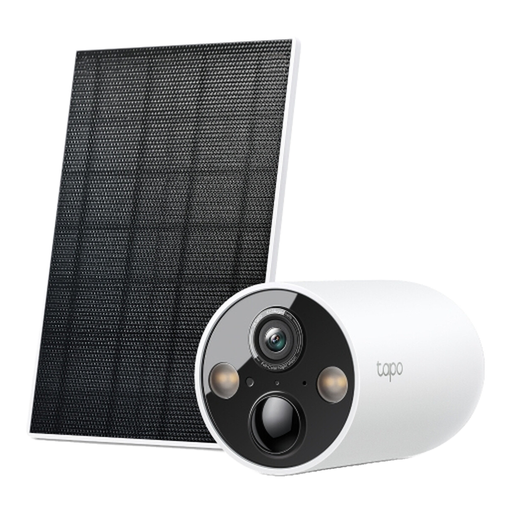
Why This Fits Their Persona: Ideal for those seeking a reliable `outdoor security camera` without the hassle. The combination of a battery and solar panel means minimal maintenance. You can place it wherever you want, without running cables to the shed or driveway.
The smart AI detection for people, pets, and vehicles is free to use. You are not locked into a mandatory subscription for core functions. The starlight sensor provides clear color night vision, avoiding the pitfall of unusable night footage.
2K QHD Resolution: Sharper images than standard 1080p.
IP66 Weatherproof: Engineered for any climate, from rain to dust.

Why This Fits Their Persona: Perfect for those who can't or prefer not to drill holes. This camera is specifically designed to film from the inside, through a window. You simply adhere it to the glass for an instant view of your balcony, front yard, or parked car.
The anti-reflection technology prevents the glare and distortion that normal cameras produce behind glass, especially at night. This completely solves the problem of useless night vision. The dual-band Wi-Fi (2.4/5GHz) ensures a more stable connection than many budget cameras.
No-Drill Installation: Mounts without drilling, ideal for rental properties.
Color Night Vision: The F1.0 lens captures colorful images even in low light.
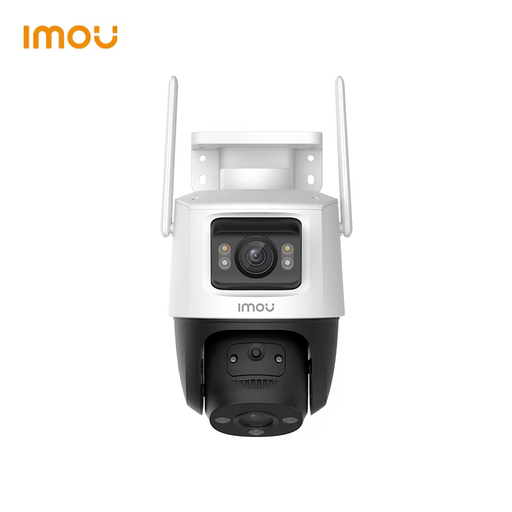
Why This Fits Their Persona: For those who want maximum control and coverage. This camera combines a fixed lens for a general overview with a second, controllable Pan & Tilt (PT) lens. This allows you to actively zoom in and track moving objects, ensuring no corner is left unwatched.
Where many cameras have a limited viewing angle, this model eliminates blind spots thanks to its PT function. The four different night vision modes (infrared, color, smart, and off) offer flexibility for any situation, so you're not stuck with a single night mode that might not be optimal.
Dual Lens: A fixed and a controllable lens for complete coverage.
Smart Tracking: Automatically follows detected people and vehicles.
We've compiled a complete, up-to-date list of products that fully meet these strict selection criteria and local regulations.
Not always. Many cameras, like some of the models mentioned above, offer the option to store footage locally on a microSD card. This incurs no monthly fees. A subscription is usually required for cloud storage (saving footage on a remote server) and sometimes for advanced AI features like specific facial recognition. Always check the product details to see which features are free and which require a subscription.
No, there are rules you must follow. Privacy laws generally state that you may film your own property, but not public spaces (like the street) or your neighbors' property (such as their yard or front door). Therefore, aim the camera carefully. Many modern cameras have a privacy zones feature, which allows you to 'black out' parts of the image to protect the privacy of others. It is also mandatory to indicate that video surveillance is in use, for example, with a sticker.
Although both transmit video and audio, there are key differences. A baby monitor with a camera often works via a direct, secure connection (like FHSS) to a dedicated parent unit. This is less dependent on your Wi-Fi network. They also have specific features like temperature sensors and lullabies. A regular IP camera is designed for general security, connects via Wi-Fi, and is controlled with an app on your smartphone. For monitoring a child at home, a dedicated baby monitor can be a more focused and reliable solution.
