
Vandaag of morgen in huis

Kwaliteit gegarandeerd

Welkomstaanbiedingen ontgrendelen: GRATIS bezorging | Tot 80% korting | Gratis 30 dagen JoyPlus-proefperiode
Download de app
By the Joybuy Product Recommendation Officer
Are you looking for an edge in your favorite games, but feel your standard controller is holding you back? You're not alone. For serious gamers, the right equipment can mean the difference between victory and defeat. A pro controller offers more than just basic functions; it's about personalization, responsiveness, and durability.
However, the controller market is vast and flooded with marketing jargon. It can be difficult to determine which features are genuinely useful and which controller fits your platform and playstyle. This guide is designed to help. We'll highlight some popular choices and provide practical tips, so you can make an informed decision for your next gaming controller.
Before making a choice, it's wise to consider a few key specifications. These determine how the controller performs and whether it's the right fit for you.
Not every controller works on every system. Always check if the controller is compatible with your PlayStation 5, Xbox, or PC. Some models, like the GameSir G7 Pro, offer multi-platform support, which is convenient if you play on different systems. Also, consider the connection. A wireless controller provides freedom of movement, while a wired connection is often preferred in competitive settings due to minimal input lag.
Modern pro controllers distinguish themselves with specific hardware upgrades. Two common and useful features are:
The ability to customize your controller is a core part of the pro experience. Think of swappable thumbsticks, adjustable trigger stops (to shorten the travel distance), and software to change sensitivity and button layouts. The DualSense Edge is a prime example of this, with extensive options to tailor the controller completely to your preferences.
Based on specifications, features, and use cases, we've selected a few controllers that are worth considering.

Why It Stands Out: The DualSense is the standard PS5 controller, but it's anything but standard in its features. The haptic feedback and adaptive triggers provide an immersive experience supported by many games, allowing you to literally feel the in-game actions.
Pros:
Who Is It For? The PS5 gamer looking for the unique, immersive experience that Sony envisioned for the PlayStation 5. It's the perfect all-rounder for both single-player adventures and casual online multiplayer.

Why It Stands Out: This controller combines pro-level features with exceptional versatility. As a Hall Effect controller, it's built for durability and precision. Its tri-mode connectivity makes it suitable for almost any platform.
Pros:
Who Is It For? The multi-platform gamer who wants one high-quality controller for their Xbox, PC controller, and mobile devices. Also ideal for competitive players who value the durability and precision of Hall Effect sensors.
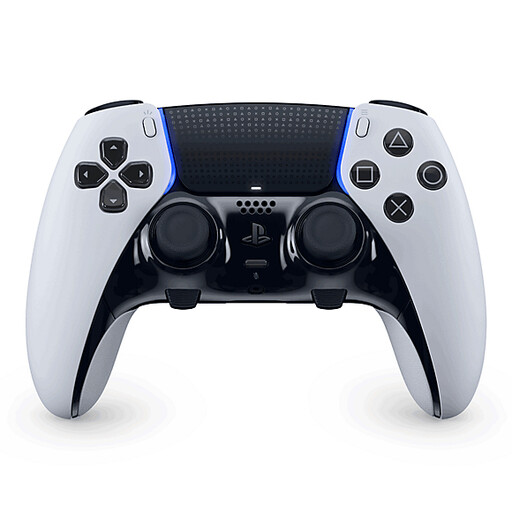
Why It Stands Out: The DualSense Edge is Sony's official answer to the demand for a pro controller for the PS5. It builds on the foundation of the standard DualSense and adds a deep level of personalization, specifically for competitive players.
Pros:
Who Is It For? The serious and competitive PS5 player who demands maximum control and personalization. If you want to fine-tune your gameplay down to the smallest detail for an edge in tournaments and online matches, this is the upgrade for you.
The right controller is a personal choice. If the models above aren't exactly what you're looking for, or if you're curious about other brands and price points, there are more options available.
Check out our full range and compare different models to find the perfect match for your setup.
? Discover more in the Wireless Game Controller category
A Hall Effect controller uses magnets and sensors to measure the position of the joysticks and triggers. Unlike traditional controllers, which use physical contact points (potentiometers) that wear out over time, this system is contactless. The result is a much longer lifespan and a significantly reduced chance of stick drift.
For many competitive players, yes. Back paddles allow you to perform key actions (like jumping, sliding, or switching weapons in a shooter) without taking your thumbs off the joysticks. This lets you aim and move while simultaneously performing another action, which can enhance your in-game responsiveness and mobility. It takes some getting used to, but it can provide a significant advantage.
Yes, both the standard DualSense and the DualSense Edge can be used on a PC. You can connect them via a USB-C cable or Bluetooth. Steam offers extensive support for the DualSense, including the ability to configure the controller. For some advanced features, like the adaptive triggers, the game may need to specifically support them on PC.
