
Vandaag of morgen in huis

Kwaliteit gegarandeerd

Welkomstaanbiedingen ontgrendelen: GRATIS bezorging | Tot 80% korting | Gratis 30 dagen JoyPlus-proefperiode
Download de app
Building a high-end PC is a significant investment. You carefully select a powerful processor and graphics card, but the case is often overlooked. This can lead to disappointment. A poor choice not only results in a build that looks cluttered but can also throttle the performance of your expensive components. Let's go over the most common pitfalls and see how to avoid them.
Pitfall 1: The "Airflow" Marketing Gimmick Many manufacturers advertise "high-airflow" designs, often featuring a mesh front panel. But true cooling performance depends on the internal layout. A poorly designed interior can obstruct airflow, causing your components to run hotter than necessary. This leads to thermal throttling, where your CPU and GPU reduce their clock speeds to prevent overheating. You pay for top-tier performance, but you don't get it.
Pitfall 2: Unrealistic Space Claims A case that is "E-ATX compatible" doesn't automatically mean all your components will fit. The real challenge arises when you combine a large graphics card (like an RTX 40-series) with a large liquid cooling radiator. Often, you'll discover during the build that the radiator and the graphics card interfere with each other. Checking the maximum graphics card length and radiator compatibility (top, front, side) is crucial.
To ensure you get the most out of your investment, focus on the following objective specifications. These determine the functionality and future-proofing of your build.
The foundation is the motherboard form factor, such as E-ATX PC case or ATX. But look further. The most important dimensions are:
A good gaming PC case is more than just a box. Pay attention to:
We have selected a few popular choices that suit different builders, based on their specifications and how they address the pitfalls mentioned.
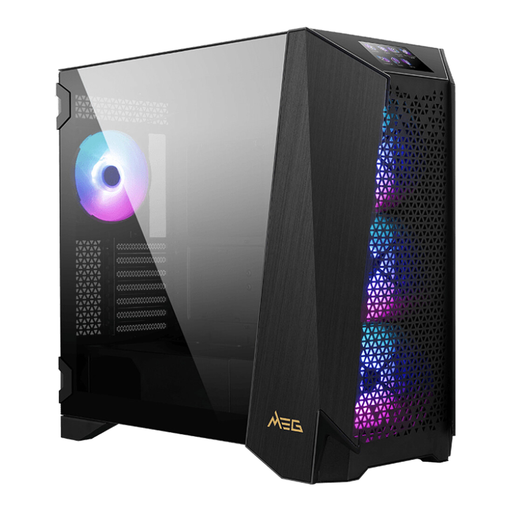
Why This Fits Their Persona: For the builder who refuses to compromise and is creating a system that will last for years. This person wants space for the largest components and maximum flexibility for future upgrades, including complex custom water cooling loops.
Directly addresses the pitfall of unrealistic space claims. With support for E-ATX, a GPU length up to 400 mm, and the ability to mount 360 mm radiators on the side, top, and front, there's virtually no combination that won't fit.
The 4.3-inch IPS touchscreen on the front panel for system information and personalisation is a standout feature. The modular design, including interchangeable side panels, offers extreme flexibility for custom builds.
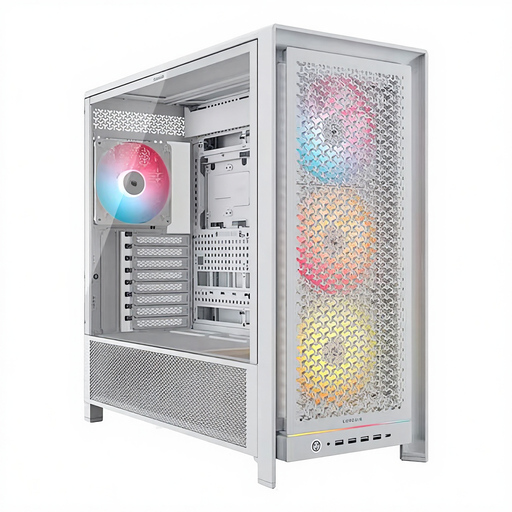
Why This Fits Their Persona: This gamer wants a visually stunning build that steals the show, without compromising on cooling performance. The combination of a clean white design, tempered glass, and integrated ARGB lighting is the priority here.
Avoids the "airflow" pitfall with an optimised front panel and four included 140 mm ARGB fans. The spacious interior (450 mm GPU clearance) and the InfiniRail system for flexible fan placement prevent compatibility issues.
The combination of aesthetics and performance is its strength. The case comes with a complete set of ARGB fans, offering great starting value. The modular FRAME system provides additional customisation options.
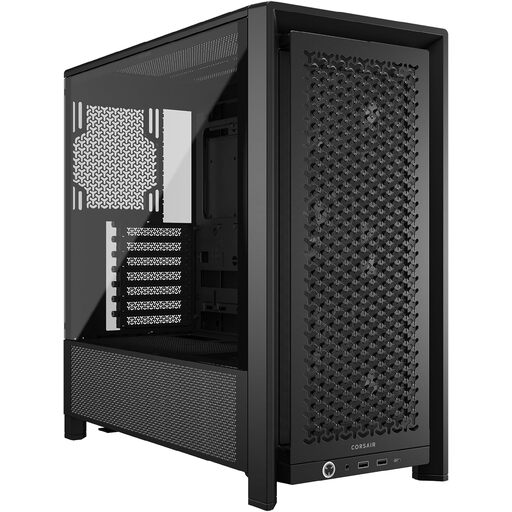
Why This Fits Their Persona: This builder seeks the functionality of a high-end case, like good airflow and build space, but doesn't need to pay for extras like a touchscreen or extreme modularity. Performance-per-dollar is key here.
Offers excellent airflow thanks to its ventilated front panel and included fans. With 430 mm of GPU clearance and support for 360 mm radiators, it avoids the most common compatibility issues for most builds.
Delivers the essential features for a powerful build in a more compact and affordable package. It's a no-nonsense Mid-Tower case that focuses on what truly matters: cooling, space, and a clean look.
We've compiled a complete, up-to-date list of products that fully meet these strict selection criteria and local regulations.
Yes, the MSI MEG PROSPECT 700R supports graphics cards up to 400 mm in length. Most models of the NVIDIA GeForce RTX 4090 fall within this dimension. However, it is always advisable to check the specific dimensions of your chosen model before purchasing.
No, it is not strictly necessary. An ATX motherboard fits perfectly in an ATX case. However, the advantage of a larger E-ATX PC case is the extra space. This makes building more comfortable, provides superior cable management options, and allows more room for large air coolers or extensive liquid cooling systems.
The included fans provide a good baseline for airflow. A premium case like the MSI case often comes with several high-quality fans. More important, however, is the total capacity for fans and radiators. This gives you the freedom to adapt the cooling in the future for more powerful components.
