
Vandaag of morgen in huis

Kwaliteit gegarandeerd

Welkomstaanbiedingen ontgrendelen: GRATIS bezorging | Tot 80% korting | Gratis 30 dagen JoyPlus-proefperiode
Download de app
A mouse is more than just a cursor on your screen. It's a tool you use for hours every day. The wrong choice can lead to frustration from a laggy connection or, worse, physical discomfort in your wrist and arm. Whether you're a professional, student, or home user, the right mouse can significantly boost your productivity and comfort.
This guide is designed to help you make an informed decision. We'll cut through the marketing jargon and focus on the specifications and features that truly matter. This way, you can buy a mouse that perfectly suits your workflow and preferences.
Before we look at some popular models, it's helpful to know which factors influence your choice.
Do you spend a lot of time at your computer? Then an ergonomic mouse is not just a luxury, but a necessity. These mice are designed to keep your hand, wrist, and arm in a more natural position. This can help reduce the tension that often leads to RSI-related strain.
A vertical mouse is a great example of this. It keeps your hand in a "handshake" position, which many users find reduces wrist strain. When choosing, pay attention to the shape and size; the mouse should fit comfortably in your hand.
The choice between a wired and a wireless mouse depends on your workspace and preferences.
For those who do more than just browse and email, extra features can make all the difference. Think of programmable buttons to which you can assign specific tasks, or a horizontal scroll wheel for navigating wide spreadsheets. These kinds of features make a mouse a great choice for work and study.
Based on functionality, design, and user needs, we've highlighted a few interesting options for you.
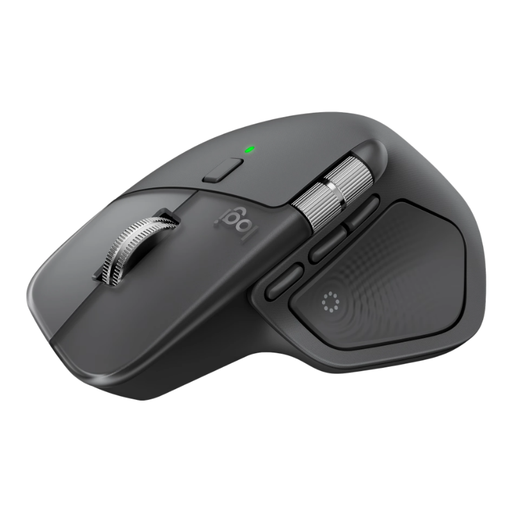
Why It Stands Out The Logitech MX Master 4 is designed for users who demand a lot from their equipment. What immediately stands out is the combination of the MagSpeed scroll wheel and the horizontal scroll wheel. This allows you to navigate through long documents and wide spreadsheets at lightning speed. The mouse also features an Action Ring and a Haptic Sense touch panel, which you can fully customise via the Logi Options+ software for quick access to your favourite functions.
Pros
Who Is It For? This mouse is a popular choice for professionals, programmers, and creatives looking for an advanced, customisable mouse to optimise their workflow.
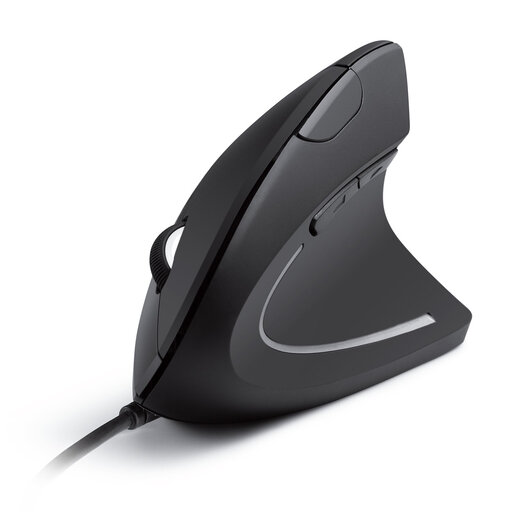
Why It Stands Out The Anker CE100 is an accessible vertical mouse that focuses on one thing: ergonomic comfort. The design promotes a natural "handshake" posture, which can reduce strain on the wrist and forearm. It's a wired model, so you don't have to worry about batteries; just plug it in and get started.
Pros
Who Is It For? Ideal for office workers, students, and anyone who spends long days at a desk and is looking for an affordable solution to prevent or reduce discomfort from an unnatural posture. A great option if you're considering a mouse for RSI.
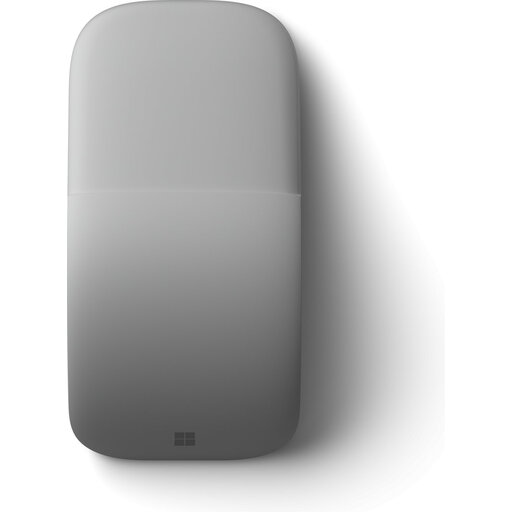
Why It Stands Out The Microsoft Surface Arc Mouse is one of a kind. Its most striking feature is the design: you snap it into a curve to turn it on and flatten it to turn it off. When flat, it's ultra-slim and slips easily into any bag or even your pocket. This makes it an excellent laptop mouse for users who are often on the go.
Pros
Who Is It For? Perfect for travellers, consultants, and anyone who needs a stylish, compact, and portable mouse for use with a laptop or tablet. Its symmetrical design makes it suitable for both left- and right-handed users.
The perfect mouse is a personal choice. You might be looking for a specific model for gaming, a left-handed version, or a mouse in a different price range. Every hand and every task is different.
If the recommendations above don't quite match what you're looking for, check out our full range. There you'll find a wide selection of models with different shapes, features, and specifications.
? Explore all mice on Joybuy.nl
1. What is the difference between an optical and a laser mouse? Both types of mice use light to detect movement. An optical mouse uses an LED light, while a laser mouse uses a laser beam. In practice, modern optical mice perform excellently on most surfaces, such as desks and mouse pads. Laser mice often have the advantage of working on glossy or glass surfaces as well. For most office tasks, a good optical mouse is more than sufficient.
2. How important is DPI for an office mouse? DPI (Dots Per Inch) indicates the mouse's sensitivity. A higher DPI value means the cursor on the screen travels a greater distance with a small movement of the mouse. For general office work and browsing, an extremely high DPI is not necessary; a value between 800 and 1600 is usually fine. Some mice, like the Logitech MX Master 4, offer adjustable DPI, which can be useful when switching between tasks that require precision and those where speed is important.
3. Can an ergonomic mouse really help with wrist pain? An ergonomic mouse is designed to place the hand and wrist in a more neutral, relaxed posture. Many users experience less tension and discomfort during prolonged computer use as a result. While it is not a medical device and does not guarantee prevention of conditions like RSI, it can make a significant contribution to a more comfortable workspace. It is always advisable to combine its use with regular breaks and good posture.
Written by: Joybuy Product Recommendation OfficerDate: July 28, 2026
