
Vandaag of morgen in huis

Kwaliteit gegarandeerd

Welkomstaanbiedingen ontgrendelen: GRATIS bezorging | Tot 80% korting | Gratis 30 dagen JoyPlus-proefperiode
Download de app
Looking for a new keyboard but feeling overwhelmed by the options? The world of mechanical keyboards is vast, with choices for avid gamers, remote professionals seeking comfort, and customization enthusiasts. The clicking, responsive keys offer a distinctly different experience compared to standard membrane keyboards.
In this article, we'll guide you through the process. We'll provide practical tips on what to look for and highlight several popular models for 2026. This will help you make a choice that fits your needs and budget, without getting lost in technical jargon.
Before we dive into the products, here are a few key points to help you filter through the available options.
Each key on a mechanical keyboard has its own switch, which determines how the keystroke feels and sounds. There are three main types:
Want the freedom to change switches later? Look for a hot-swappable keyboard. This allows you to easily replace the switches without soldering, which is ideal for creating a truly custom keyboard.
Keyboards come in various sizes. The right choice depends on your desk space and how you use the keyboard.
Also, pay attention to the layout. In most English-speaking regions, a QWERTY keyboard with a US-International layout is the standard.
A wireless mechanical keyboard helps create a clean, clutter-free desk. Most models offer connectivity via Bluetooth or a 2.4GHz dongle. For competitive gamers, a wired connection may be preferable as it guarantees the lowest possible latency. Many wireless models now also offer a wired option, giving you the best of both worlds.
Below is a selection of mechanical keyboards that stand out for their specifications and features.
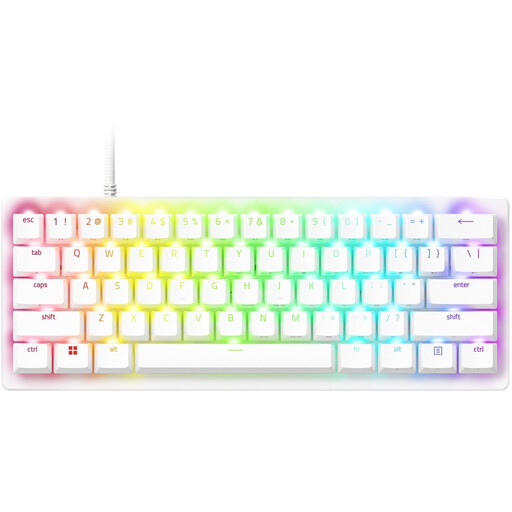
Why it stands out This keyboard is engineered for speed. According to Razer, its second-generation analog optical switches are extremely responsive. You can customize the actuation point (the point at which a keystroke is registered), which can be a significant advantage in competitive games.
Pros
Who it's for? For the serious gamer looking for a compact and ultra-responsive gaming keyboard for maximum performance.
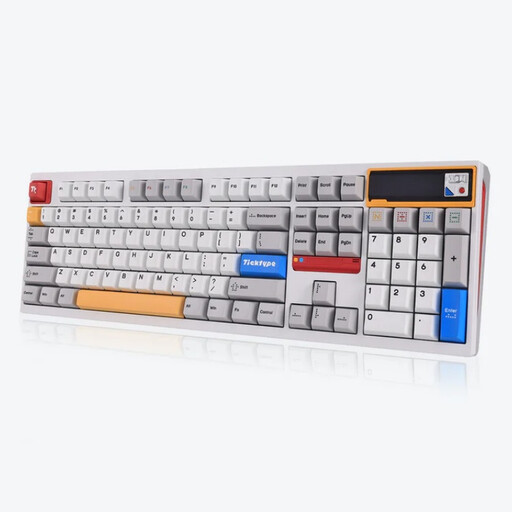
Why it stands out The Ticktype DP104 is aimed at the enthusiast who values customization and a premium feel. Its full aluminum case, leaf spring mounting, and large battery make it a heavyweight in its class. The customizable pixel screen is a unique addition.
Pros
Who it's for? For the keyboard enthusiast seeking a fully-featured, heavy, and customizable custom keyboard with both wireless freedom and a premium build quality.
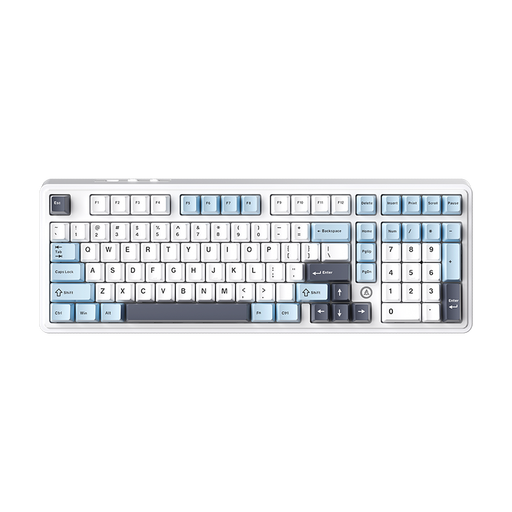
Why it stands out The AJAZZ AK980 V2 is a versatile all-rounder. It combines a near-full-size layout (98%) with a convenient metal knob, triple-mode connectivity, and a focus on a pleasant sound profile thanks to multiple layers of sound-dampening material.
Pros
Who it's for? For the professional or all-around user who wants a functional, comfortable, and wireless mechanical keyboard for both work and play, without compromising on features.
If your perfect match isn't here, or if you're curious about other styles, perhaps you're specifically looking for a model with a sleek, white finish and vibrant RGB lighting.
Check out our extensive collection of RGB White Keyboards for more options to suit your desk setup.
The main advantages are durability, typing experience, and customizability. The switches last much longer than the rubber domes in membrane keyboards (often 50 million keystrokes or more). The distinct feedback and responsiveness are considered more pleasant by many users. Additionally, on many models, you can replace the switches and keycaps to customize the look and feel.
A hot-swappable keyboard means you can remove and replace the mechanical switches without needing to solder. This makes it very easy to experiment with different types of switches (linear, tactile, clicky) to find the typing experience that is perfect for you.
Keep the keyboard clean by dusting it regularly and, if necessary, using a keycap puller to remove the keys for cleaning underneath. Use a soft, dry cloth for the case. According to most manufacturers, you should not expose the keyboard to liquids or extreme heat. Always consult the manufacturer's manual for specific maintenance instructions.
