
Vandaag of morgen in huis

Kwaliteit gegarandeerd

Welkomstaanbiedingen ontgrendelen: GRATIS bezorging | Tot 80% korting | Gratis 30 dagen JoyPlus-proefperiode
Download de app
You're on the move, in the middle of a critical task, when that dreaded notification appears: 'Low Battery'. A dead laptop battery is more than a minor inconvenience; it can bring your productivity to a complete halt, whether you're on a train, working in a café, or waiting at an airport. A standard power bank for your phone can't handle the power demands of a laptop. You need a laptop power bank that is both powerful and reliable.
This guide is designed to help you make an informed choice. We'll cut through the marketing jargon and focus on the specifications that truly matter, so you can find a portable charger for travel that fits your devices and lifestyle.
Before we dive into specific models, it's essential to understand three core factors. These will determine if a power bank is suitable for your laptop.
Power output, measured in Watts (W), determines how quickly a power bank can charge your devices. A laptop, especially a model like a MacBook Pro, requires significantly more power than a smartphone. Look for a fast-charging power bank with Power Delivery (PD). For most modern laptops, a minimum output of 65W is recommended. Models with 140W and the PD 3.1 standard offer the fastest charging speeds for the latest generation of high-end laptops and other demanding devices.
Capacity, measured in milliampere-hours (mAh), indicates how much energy the external battery for your laptop can store. A higher mAh rating means you can charge your devices more times before the power bank itself needs recharging. For charging a laptop, a capacity of at least 20000mAh is a good starting point. This is typically enough to fully charge an average laptop battery at least once.
Most modern laptops and devices use USB-C for charging. A good laptop power bank will have at least one, but preferably multiple, high-output USB-C ports. Additional USB-A ports are useful for charging older devices or accessories. Check if the power bank can charge multiple devices simultaneously and what its combined maximum power output is.
Based on specifications focused on performance and convenience, we've selected several models suitable for professionals, students, and tech users.
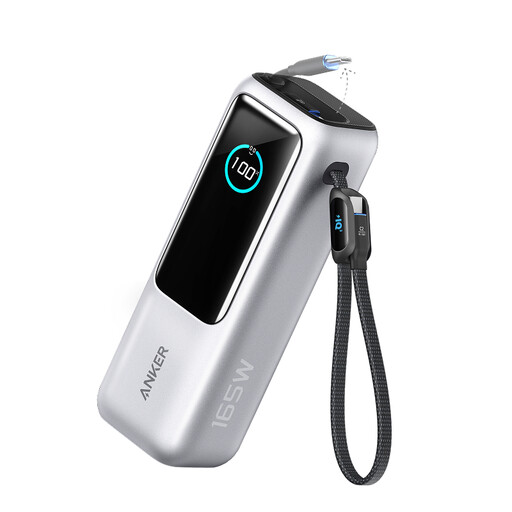
This model tackles a common problem: forgotten or tangled cables. With two integrated USB-C cables (one retractable and one that doubles as a carrying loop), you always have a charging solution on hand. The total output of 165W, distributed across four ports, makes it a true multitasker.
Ideal for the busy professional or student seeking maximum efficiency and convenience. If you often charge multiple devices simultaneously and hate dealing with loose cables, this is a highly practical choice.
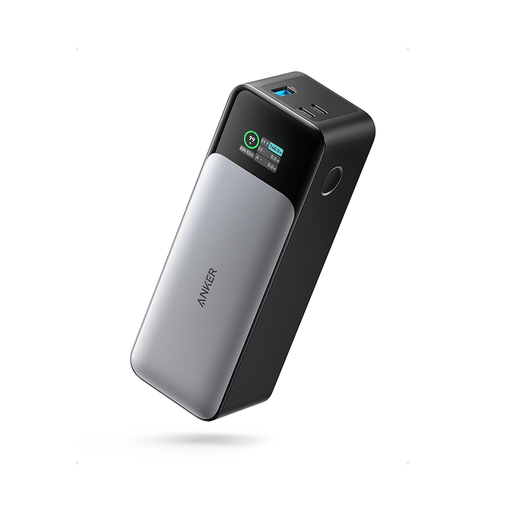
The Anker 737 is all about pure speed and control. Thanks to Power Delivery 3.1 technology, this power bank can deliver up to 140W from a single port, allowing it to charge even the most demanding laptops at maximum speed. The smart digital display shows not only the battery status but also the real-time input and output in Watts.
This is an excellent choice for tech enthusiasts and users of high-end equipment, like a power bank for a MacBook Pro (16-inch), who demand the fastest possible charging speeds. The detailed display is a bonus for anyone who likes to keep a close eye on their gear's performance.
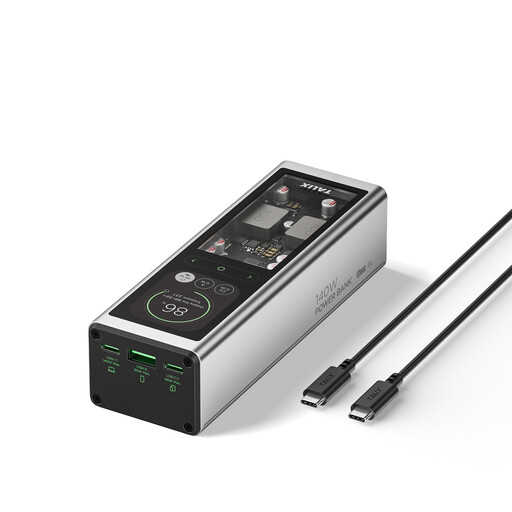
This power bank introduces a unique feature: 'Hybrid Digital Charging'. It allows you to recharge the power bank itself (with a 65W adapter) while it simultaneously powers your laptop with an output of up to 140W. This turns it into a mini-docking station for on-the-go use or at a hot-desking spot with limited outlets.
Perfect for the multitasker who needs to work uninterrupted. The hybrid charging function is especially useful for digital nomads, travellers, and anyone who frequently works in locations where power outlets are scarce.
The right choice depends on your specific devices, travel habits, and budget. The models above are strong contenders in the high-performance segment, but many more options are available. If you're looking for different capacities, sizes, or price points, it's worth exploring further.
Explore more portable chargers in our Port Charger category
Yes, in most cases. Airlines have a limit expressed in Watt-hours (Wh). A 20,000mAh power bank (at 3.7V) is approximately 74 Wh, which is well below the common 100 Wh limit. However, you must always carry the power bank in your carry-on luggage. To be safe, always check the specific regulations of your airline.
This depends on your laptop's battery capacity and the efficiency of the power transfer (usually around 80-90%). As a rule of thumb, you can fully charge an average laptop (with a battery of about 50-70 Wh) approximately 0.8 to 1 time with a 20000mAh power bank.
You can think of it like a water tank. Capacity (mAh) is the total amount of water in the tank. Power output (W) is the speed at which the water flows from the tap. For a laptop, you need both a reasonably large tank (high mAh) and a tap that can deliver water quickly (high power output in W).
