
Vandaag of morgen in huis

Kwaliteit gegarandeerd

Welkomstaanbiedingen ontgrendelen: GRATIS bezorging | Tot 80% korting | Gratis 30 dagen JoyPlus-proefperiode
Download de app
Keeping an eye on things when you're not home provides peace of mind. Whether you want to see what your pet is up to, check if the kids are safe, or simply secure your home without drilling holes in the wall. Choosing an indoor security camera can be overwhelming due to the vast number of options and technical specifications.
As a Joybuy Product Recommendation Officer, my job is to help you make a clear choice. In this guide, we'll highlight some popular options and provide practical tips, so you can find a camera that fits your specific needs.
Before we dive into the products, here are a few key considerations to help you choose the right indoor Wi-Fi camera.
A sharp image is essential. Most cameras today offer Full HD (1080p), but models with 2K or even 4MP resolution provide significantly more detail. This is useful for distinguishing faces or other important details.
Also, pay attention to the camera's night vision. Standard infrared provides a black-and-white image in the dark. However, some advanced cameras offer colour night vision, which delivers a clearer and more informative picture, even in low light.
Think about the space you want to monitor. A camera with a fixed lens is fine for a doorway or a specific corner. If you want to keep an eye on an entire room, a 360-degree camera with pan and tilt functionality is a better option.
A special consideration is a camera for behind a window. Many standard cameras suffer from reflection and glare, which can render the footage unusable at night. There are specific models designed to prevent this problem.
Modern indoor cameras are often a smart camera. Features like an indoor camera with motion detection are standard, but also look for AI features that can distinguish between people, pets, and other movements. This reduces the number of unnecessary notifications.
Other useful features include two-way audio (to talk and listen) and a privacy mode that physically covers the lens. For parents, a camera that also functions as a baby monitor with a camera and app can be ideal. For pet lovers, a pet camera with a tracking function is a great solution.
For storage, you usually have two choices: a local microSD card or a cloud subscription. Local storage has no monthly fees, while the cloud keeps your footage securely stored off-site.
Based on the criteria above, we have selected a few cameras with interesting specifications for various situations.

Why it stands out The ZOSI C680 is specifically designed to solve a common problem: recording through glass. According to the manufacturer ZOSI, its special anti-glare technology reduces reflections from sunlight and indoor lighting, giving you a clear picture, even through double-glazed windows. This makes it ideal for renters or anyone who prefers not to mount a camera outside.
Pros
Who is it for? This camera is an excellent choice for residents of apartments and rental homes who want to monitor their driveway, front yard, or entryway without drilling.
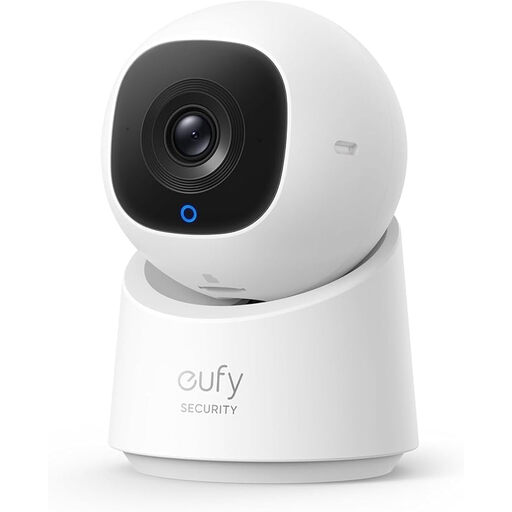
Why it stands out The eufy C220 is a versatile 360-degree camera that can survey an entire room. Its built-in AI automatically tracks moving people, ensuring they always stay in frame. A handy feature is the privacy mode, which rotates the lens away to a preset position with a single click.
Pros
Who is it for? Ideal for monitoring larger spaces like a living room or playroom. Also very suitable as a pet camera to follow your four-legged friend when you're away.
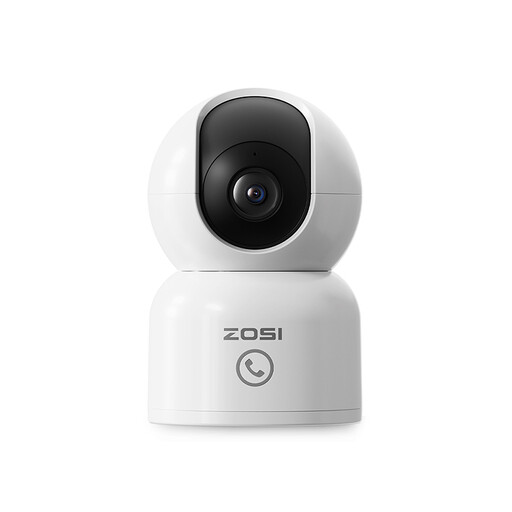
Why it stands out This ZOSI indoor IP camera combines high image quality (4MP, or 2.5K) with a unique communication feature: 'One-Touch Call'. With the press of a button on the camera, children or the elderly can instantly send a call notification to your app. This makes it more than just a security camera; it's also a communication tool.
Pros
Who is it for? A perfect solution for families who want to use the camera as a baby monitor with a camera and app, or for those caring for elderly relatives remotely. The call function provides extra peace of mind.
These recommendations cover some common scenarios, but there are, of course, many more options available. Are you looking for a different type of camera or want to compare more options?
Check out our full range of home cameras for more choices.
Yes, but not all cameras are equally good at it. Standard infrared night vision reflects off glass, creating a white, unusable image at night. Opt for a model specifically designed for use behind a window, like the ZOSI C680, which uses technology to minimise glare and reflection.
Not necessarily. Many cameras, including the eufy C220 and the ZOSI models mentioned above, offer the option to store footage locally on a microSD card. This means you can use basic functions like live viewing, receiving notifications, and reviewing recordings without monthly fees. A cloud subscription is an optional extra for those who want to store footage off-site for added security.
Privacy is a major consideration. Choose cameras from reputable brands that offer privacy features. Look for a physical privacy mode that blocks the lens (like on the eufy C220) or the ability to set up privacy zones. Using local storage instead of the cloud also gives you more control over your own data. Additionally, always use a strong, unique password for your camera account.
