
Vandaag of morgen in huis

Kwaliteit gegarandeerd

Welkomstaanbiedingen ontgrendelen: GRATIS bezorging | Tot 80% korting | Gratis 30 dagen JoyPlus-proefperiode
Download de app
Keeping an eye on things when you're not home provides peace of mind. Whether you want to check if the kids are safe, see what your pet is up to, or simply secure your property, an indoor security camera is a practical solution. However, the market offers countless options, which can make choosing the right one difficult.
This article is intended as a straightforward guide. We'll help you understand what to look for and highlight several popular choices based on their specifications and features. This way, you can find a camera that fits your specific needs without getting lost in marketing jargon.
Before making a choice, it's useful to consider a few key features. These will determine how well the camera fits into your daily life.
A sharp image is essential. Most modern cameras offer 1080p (Full HD) resolution, which is sufficient for seeing details clearly. Even more important is a security camera with night vision. Standard infrared provides a black-and-white image in the dark. However, some cameras also offer colour night vision, which can be useful for distinguishing more details at night, for example, when monitoring a nursery.
How much of the room do you want to see? A camera with a fixed lens is fine for a specific corner, but a 360-degree camera with a pan/tilt function gives you a complete overview of the room. You can easily control this via the app.
Additionally, a camera with motion detection is a standard feature. A smart indoor camera goes a step further and can distinguish between people, pets, or other movements. This significantly reduces the number of unnecessary notifications on your phone.
An indoor Wi-Fi camera connects wirelessly to your home network, making installation simple. Some models support both 2.4 GHz (for a wider range) and 5 GHz (for a faster connection).
Also, think about how you want to store the footage. The two main options are:
Below is a selection of cameras that stand out for their specific features.
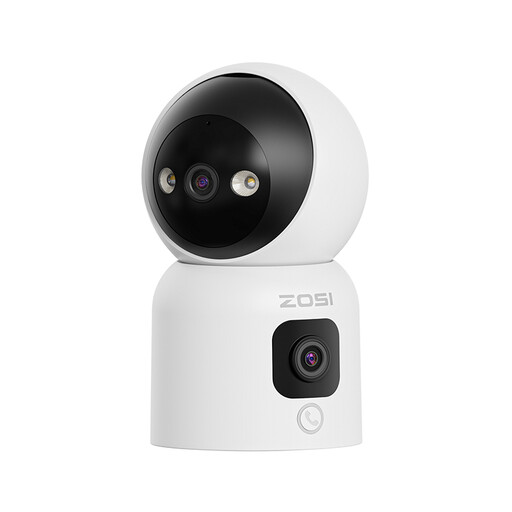
Why It Stands Out: This ZOSI camera combines two lenses in one device. The top lens can rotate 360 degrees for a complete overview, while the bottom lens provides a fixed panoramic view. A unique feature is the ability to start a video call by pressing a button on the camera or making an 'OK' gesture.
Advantages:
Who Is This Camera For? Ideal for families looking for a versatile monitor that does more than just security. The call function makes it a modern alternative to a baby monitor with a camera and app or a useful tool for caregivers.
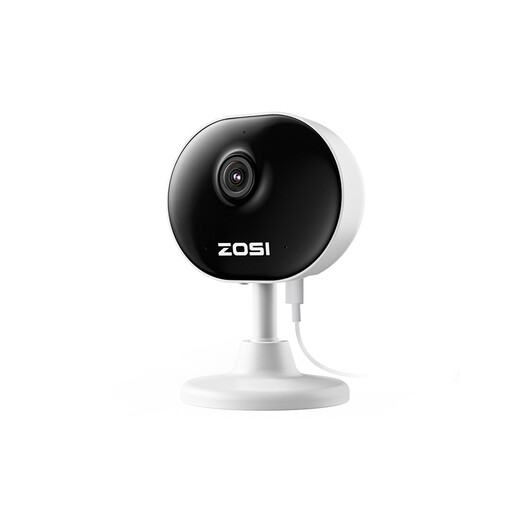
Why It Stands Out: Weighing only 85 grams, this is a very compact and discreet indoor IP camera. Thanks to its magnetic base and included 3M tape, it can be placed almost anywhere without drilling. Despite its small size, it delivers sharp 1080p images.
Advantages:
Who Is This Camera For? A great choice for renters, students, or anyone looking for an inconspicuous and easy-to-install camera. Also very suitable as a pet camera to see what your dog or cat is doing when you're away.

Why It Stands Out: The Tapo C200 is a popular all-rounder from a well-known brand in networking equipment. It offers a solid combination of features most users are looking for: 1080p video, pan/tilt functionality, and a user-friendly app.
Advantages:
Who Is This Camera For? For those looking for a reliable and affordable 360-degree camera for general home security. The simple installation and well-known brand name make it a solid choice for many households.
The cameras above are designed for indoor use. If you are looking for an outdoor model, or a camera with other specific features, it is worth exploring a wider range of products.
? See more waterproof wireless CCTV cameras here.
1. Is a subscription required for an indoor Wi-Fi camera? Not always. Many cameras, like the TP-Link Tapo C200, offer the option to store footage locally on a microSD card. In that case, you don't need a subscription. A subscription is usually required for cloud storage, which has the advantage of keeping your footage safe even if the camera is taken.
2. What about privacy with an indoor IP camera? This is a valid concern. Choose a camera from a reputable brand that releases regular security updates. Always use a strong, unique password for your account. Features like a privacy mode, which physically or digitally stops recording, offer extra peace of mind when you're at home.
3. Can I use an indoor security camera as a baby monitor? Yes, many modern security cameras are very suitable as a baby monitor with a camera and app. They often provide sharper video, two-way audio, and smart notifications (e.g., for sound or motion) on your smartphone. A model like the ZOSI C528D4 with its call function is a great example of this.
