
Vandaag of morgen in huis

Kwaliteit gegarandeerd

Welkomstaanbiedingen ontgrendelen: GRATIS bezorging | Tot 80% korting | Gratis 30 dagen JoyPlus-proefperiode
Download de app
A home security camera provides peace of mind. Whether you want to see who's at the door, keep an eye on your pets while you're away, or secure your property, the right camera makes all the difference. However, the market is vast, and the specifications can be overwhelming.
This guide is designed to help you. We'll highlight several popular choices and explain what to look for, enabling you to make an informed decision that fits your needs without getting bogged down by marketing jargon.
Before making a choice, it's helpful to consider a few key features. These will determine how well a camera integrates into your daily life.
The first question is where you plan to use the camera. An outdoor security camera must be weatherproof and able to withstand rain, wind, and temperature fluctuations. An indoor security camera doesn't require this durability but may offer other convenient indoor features, such as a compact design or a privacy mode.
Most cameras connect to your home network. A Wi-Fi camera is the standard, but its stability depends on your signal strength. For locations without Wi-Fi, such as a shed in the backyard, a boat, or a holiday home, a camera with 4G support is an excellent solution. In terms of power, you can choose between a plug-in model or one with a rechargeable battery, which offers more installation flexibility.
Higher resolution means a sharper image. A 2K security camera provides significantly more detail than a standard HD camera, which can be crucial for identifying faces or license plates. Furthermore, a camera with AI detection is becoming increasingly common. This technology can distinguish between people, animals, and vehicles, reducing false alerts. Another key consideration is whether you want a security camera without a subscription. Many models offer local storage on a microSD card, so you aren't tied to monthly cloud storage fees.
Based on these specifications, we've selected a few models that cater to different needs.
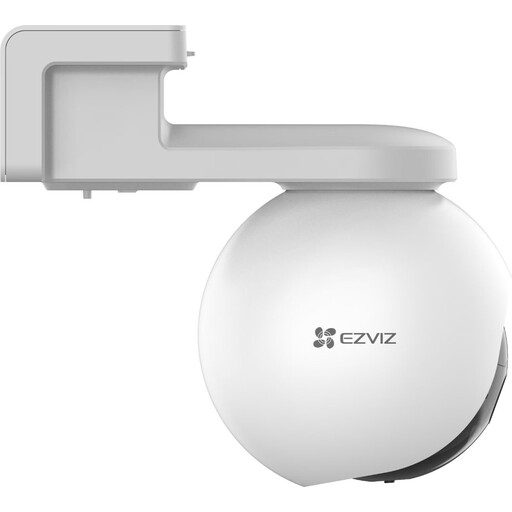
Why It Stands Out: This camera offers complete autonomy. Thanks to its 4G connectivity and a powerful rechargeable battery, it doesn't depend on a Wi-Fi network or a nearby power outlet.
Advantages:
Who Is It For? Ideal for securing locations without a stable power or Wi-Fi connection, such as a driveway, a remote shed, a construction site, or a holiday home.
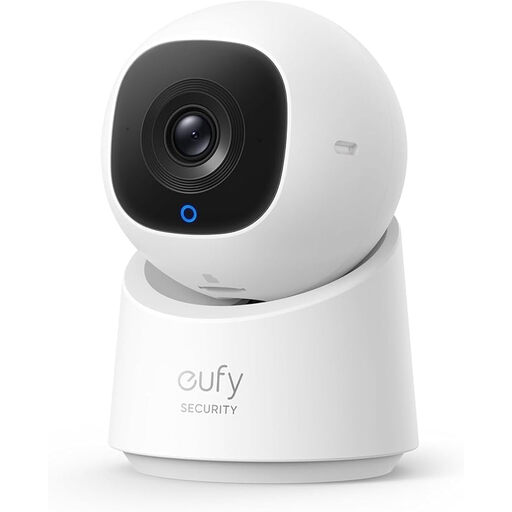
Why It Stands Out: This indoor camera combines a full 360-degree view with smart AI tracking, ensuring there are no blind spots.
Advantages:
Who Is It For? Perfect for those who want to fully monitor a specific area in their home, such as the living room, a child's room, or a pet play area, without any monthly fees.

Why It Stands Out: This camera is specifically designed to film through glass without suffering from reflections or glare, a common issue with standard cameras.
Advantages:
Who Is It For? An excellent solution for renters or apartment dwellers who want to monitor their front yard, driveway, or street without mounting a camera on an exterior wall.
The world of security cameras is vast, with many different models available. Are you specifically looking for a model with a long battery life for outdoor use? There are various options that might better suit your needs.
Explore more rechargeable outdoor security cameras
Do I need a subscription for a security camera? Not always. Many modern cameras, including the models mentioned above, function as a security camera without a subscription. They offer local storage on a microSD card, allowing you to save footage directly on the device and avoid monthly cloud storage fees.
What is the benefit of a camera with AI detection? A camera with AI detection is 'smarter' at recognizing relevant events. It can distinguish between the movement of a person, an animal, or a vehicle. This reduces the number of unnecessary notifications from things like waving leaves or passing traffic, so you only get an alert when it really matters.
How difficult is it to install a Wi-Fi camera? Most contemporary Wi-Fi cameras are designed for easy installation. The process typically involves connecting the camera to your Wi-Fi network via an app on your smartphone. Indoor cameras can often be simply placed on a surface, while outdoor models are usually secured with a few screws. The in-app guide will walk you through the process step-by-step.
