
Vandaag of morgen in huis

Kwaliteit gegarandeerd

Welkomstaanbiedingen ontgrendelen: GRATIS bezorging | Tot 80% korting | Gratis 30 dagen JoyPlus-proefperiode
Download de app
A good gaming controller feels like an extension of yourself. A bad one is a source of frustration that can ruin your gaming experience. If you're looking for a new gamepad, it's easy to get lost in marketing jargon and flashy designs. Before making a purchase, it's important to know what to look for to prevent your controller from needing replacement after just a few months.
As a Product Recommendation Officer at Joybuy, I see which products are popular on a daily basis, but also the issues users encounter. These are the most common pitfalls:
To avoid buyer's remorse, it's helpful to understand a few technical specifications. These are the most important points to check before buying a gaming controller.
This is perhaps the most critical point for avoiding 'stick drift'. Most standard controllers, including the official ones from major brands, use potentiometers. These are mechanical sensors that make physical contact to register movement. Over time, this contact wears down, leading to inaccuracies and drift.
A Hall Effect joystick is the solution. This technology uses magnets and sensors to measure the stick's position without physical contact. Because there is no friction, there is virtually no wear and tear. Controllers with Hall Effect joysticks, such as some models from GameSir, have a significantly longer lifespan and remain accurate.
Always check if the controller is fully compatible with your platform.
A wireless controller offers freedom of movement, which is ideal for couch gaming. The downside is that you have to charge the battery, and there can be minimal delay (latency). For competitive gamers, a wired controller may be preferable as it offers a more stable and faster connection without worrying about a dead battery.
Not every gamer needs the same thing. Below are some popular choices, tailored to a specific type of user.
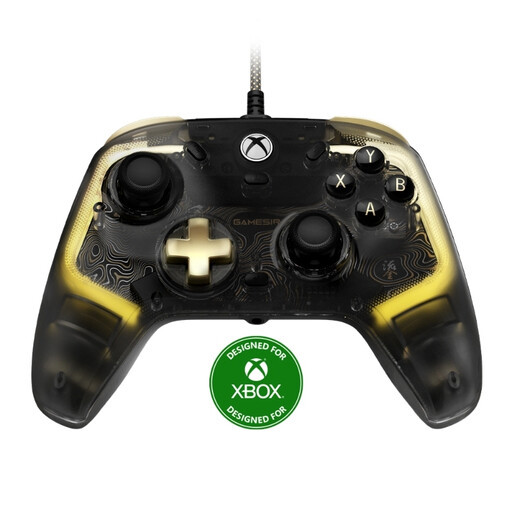
Why This Fits Their Persona: This gamer seeks precision, reliability, and minimal input lag for fast-paced games. The wired connection and advanced components are more important than wireless convenience.
According to the manufacturer GameSir, this controller is equipped with Hall Effect joysticks, which minimises the risk of stick drift and ensures long-lasting, precise control.
Wired USB-C connection for virtually zero latency. Fully compatible with Xbox Series X|S, Xbox One, and Windows 10/11.
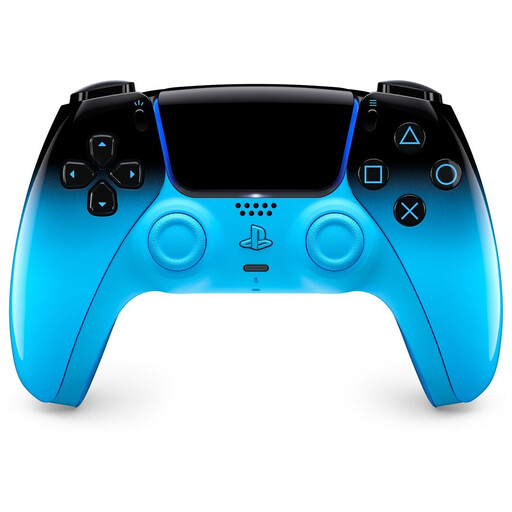
Why This Fits Their Persona: This player wants the most immersive experience on the PS5, with all the unique features the console offers. Appearance is important and must match a modern setup.
As an official Sony product, compatibility is guaranteed. You get access to all features like haptic feedback and adaptive triggers, something often missing from third-party controllers.
Offers a unique, immersive gaming experience thanks to its advanced feedback features. Works wirelessly on PS5 and can also be used on PC (via cable or Bluetooth).
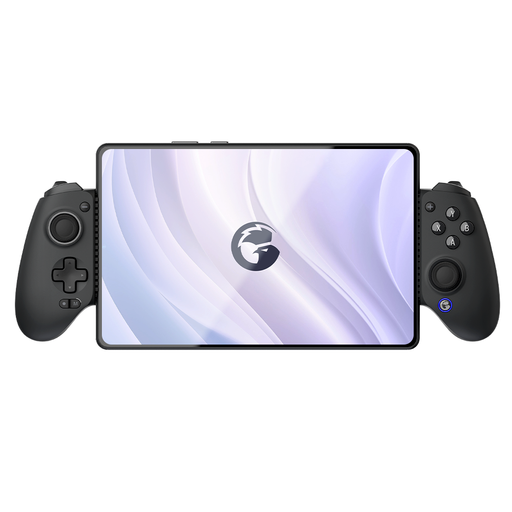
Why This Fits Their Persona: This gamer plays everywhere: on their smartphone on the train, at home on a tablet, or occasionally on a PC or Switch. A flexible, portable solution is essential.
This isn't a standard controller with a clumsy phone clip. It's a purpose-built mobile controller that transforms your phone into an ergonomic handheld, preventing false compatibility issues.
Broad compatibility via Bluetooth for Switch, iOS, Android, tablet, and PC. The design provides a comfortable, console-like experience for mobile gaming.
We have compiled a complete, up-to-date list of products that meet these selection criteria and current regulations.
Stick drift is an issue where your controller's joysticks register movement even when you're not touching them. This is caused by wear and tear on the internal sensors (potentiometers). The most effective way to prevent this is by choosing a controller with Hall Effect joysticks, as they don't use physical contact and therefore don't wear out.
Yes, an official Sony DualSense PS5 controller works on a PC. You can connect it via a USB-C cable or Bluetooth. More and more PC games are supporting its unique features like adaptive triggers, but this is not always guaranteed. For the most stable experience, a wired connection is recommended.
This depends on your preference. A wired controller typically has a slightly faster response time (lower latency), and you never have to worry about a dead battery. This makes it a popular choice for competitive players. A wireless controller offers more freedom of movement and comfort, which is ideal for casual gaming from the couch. The technology in modern wireless controllers is so good that most players won't notice the difference in latency.
