
Vandaag of morgen in huis

Kwaliteit gegarandeerd

Welkomstaanbiedingen ontgrendelen: GRATIS bezorging | Tot 80% korting | Gratis 30 dagen JoyPlus-proefperiode
Download de app
A dead battery at the worst possible moment is frustrating. You're looking for a fast charger, but the market is a maze of technical terms, wattages, and vague promises. Many chargers don't perform as advertised, or worse, they can damage your expensive devices.
Before you make a purchase, it's important to recognise a few common pitfalls that can cost you money and patience.
You don't need to be an engineer to avoid a bad purchase. Pay attention to the following three specifications to find a charger that truly fits your needs.
The wattage (W) determines how quickly a charger can deliver energy. A modern smartphone, like an iPhone charger or Samsung charger, often needs at least 20W to charge at full speed. For a tablet or a compact laptop charger, you're typically looking at 45W to 65W.
Look beyond the wattage to the supported protocol. Power Delivery (PD) is the universal standard for fast charging via USB-C. Almost all modern devices, from Apple and Samsung to Google, use it. For the absolute fastest charging speeds on recent Samsung phones, support for PPS (Programmable Power Supply) is a must-have.
Think about which devices you want to charge simultaneously. A multi-port charger is ideal for your desk or for travel. The main choice is between USB-C and the older USB-A.
A good balance, such as two USB-C ports and one USB-A port, offers flexibility for both new and older devices.
GaN stands for Gallium Nitride, a material that is replacing silicon in modern chargers. A GaN charger has distinct advantages:
Based on objective specifications, we have selected a number of chargers that suit different user profiles.
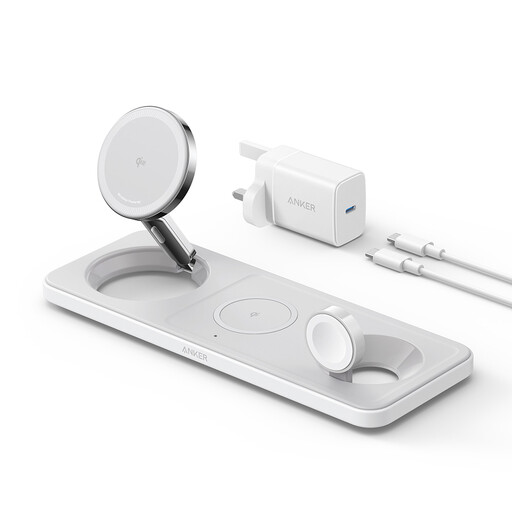
Why This Fits Their Persona: Ideal for anyone who owns an iPhone, Apple Watch, and AirPods. This wireless charger combines everything into one sleek hub for a nightstand or desk, eliminating the need for three separate chargers and cables.
This charging station is specifically designed for the Apple ecosystem. You don't have to worry about incompatible protocols; it delivers the correct power to each device.
Wirelessly charges three devices at once. Supports fast charging for recent Apple Watch models and 15W for AirPods.
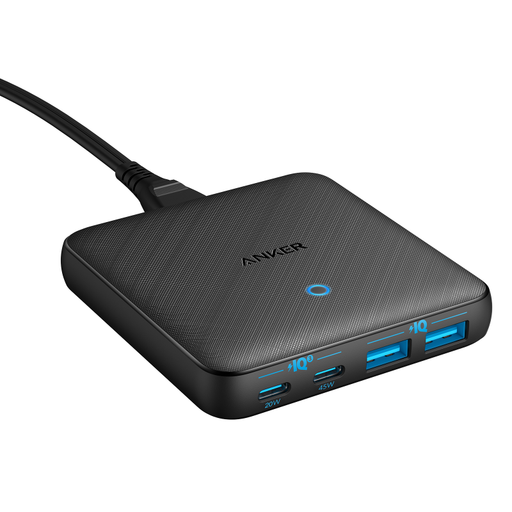
Why This Fits Their Persona: For the professional who needs to charge a laptop, smartphone, tablet, and earbuds simultaneously. This GaN charger replaces a power strip full of adapters with a single, slim charging station on the desk.
This charger clearly specifies the output per port (a 45W USB-C port for a laptop and a 20W USB-C port for a phone). No confusion about a misleading "total output".
Charges four devices at once via two USB-C and two USB-A ports. Its ultra-slim design (0.7 inches thick) takes up minimal space on your desk.
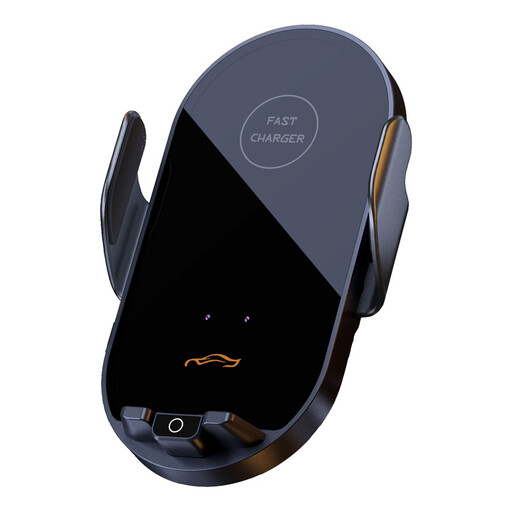
Why This Fits Their Persona: For those who are frequently on the road and use their phone for navigation. This car charger doubles as a phone mount that automatically clamps your phone and charges it wirelessly, ensuring a safe and clutter-free cockpit.
This product combines a mount and charger in one, so you don't have to buy separate components that might not work well together. The infrared sensor ensures ease of use and safety.
Supports 15W wireless fast charging. The automatic clamp with an infrared sensor allows for one-handed operation, which is safer while driving.
We have compiled a complete, up-to-date list of products that fully meet these strict selection criteria and safety regulations.
Power Delivery (PD) is the universal standard for fast charging over USB-C, supported by brands like Apple, Google, and Samsung. Quick Charge (QC) is a technology from Qualcomm, primarily found on Android phones with a Snapdragon processor. Many modern chargers support both protocols, but PD is the more future-proof choice.
No, a certified fast charger will not damage your device. The charger and your device communicate with each other to determine the maximum safe charging speed. Your phone only "asks" for the amount of power it can handle. The danger lies with cheap, uncertified chargers that lack this communication and the associated safety features.
First, check if your laptop supports charging via USB-C. If it does, look at the wattage of the original charger that came with your laptop. This is usually printed on the adapter itself (e.g., 65W or 90W). Choose a USB-C PD charger with an equal or higher wattage to ensure your laptop charges correctly and at full speed. A charger with a lower wattage might charge the laptop slowly or only maintain the battery level, but not charge it during use.
