
Vandaag of morgen in huis

Kwaliteit gegarandeerd

Welkomstaanbiedingen ontgrendelen: GRATIS bezorging | Tot 80% korting | Gratis 30 dagen JoyPlus-proefperiode
Download de app
Long days at the computer can lead to discomfort in your wrist, arm, or shoulders. A standard mouse often forces your hand and wrist into an unnatural position, which can cause strain over time. An ergonomic mouse is designed to support a more natural posture and can help reduce or prevent these issues.
This article serves as a practical guide. We'll highlight the key specifications of various models, so you can make an informed decision that suits your workflow and needs.
The market for ergonomic mice is diverse. To make the right choice, it's helpful to pay attention to a few key features.
The shape is the most defining feature of an ergonomic mouse. The two most common types are the vertical mouse and the traditionally shaped, yet highly contoured, mouse.
The choice between a wireless or wired mouse depends on your personal preference and workspace.
For those who spend a lot of time at the computer, extra features can significantly boost productivity. A professional mouse might include:
Based on specifications and functionality, we've highlighted a few interesting models for you.
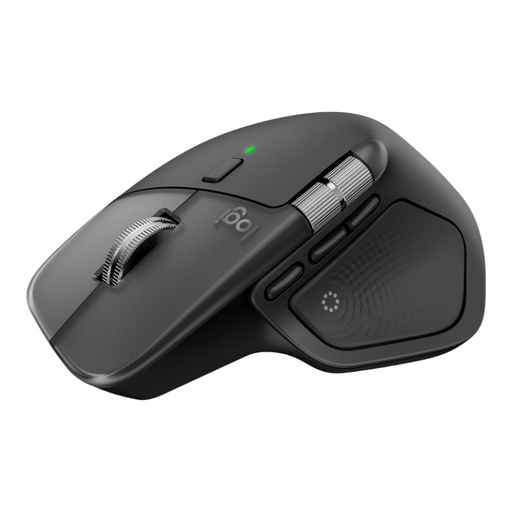
Why This Model Stands Out: The Logitech MX Master 4 is a contoured mouse packed with advanced technology. Its MagSpeed electromagnetic scroll wheel can, according to Logitech, scroll up to 1,000 lines per second and automatically switches between ratchet and free-scroll modes. The mouse has a comfortable, natural shape and is equipped with 8 programmable buttons, including a horizontal thumb wheel. Connectivity is flexible, with both a Logi Bolt USB-C receiver and Bluetooth.
Pros
Who Is This For?: For professionals, creatives, and power users seeking maximum productivity and customisation in a comfortable mouse. This is a quintessential Logitech mouse focused on efficiency.
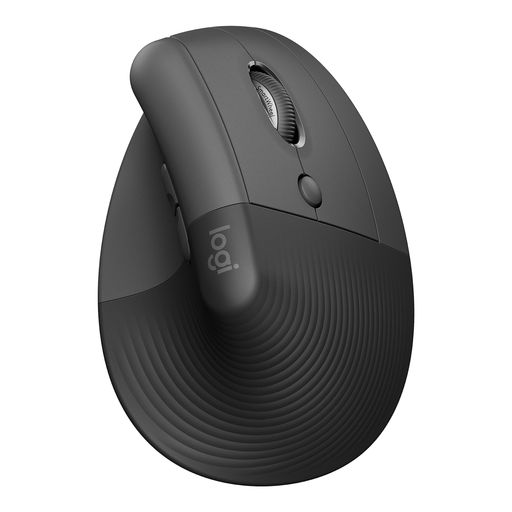
Why This Model Stands Out: The Logitech Lift is a vertical mouse with a unique 57-degree angle. This posture is designed to reduce pressure on the wrist and promote a more natural forearm position. The mouse is specifically designed for small to medium-sized hands and features silent clicks, which is welcome in an office environment. It connects via Bluetooth or the included USB receiver. According to Logitech, its casing is partly made from recycled plastic.
Pros
Who Is This For?: For office workers and home users with small to medium-sized hands who are looking for an effective mouse for RSI or a mouse for wrist pain.
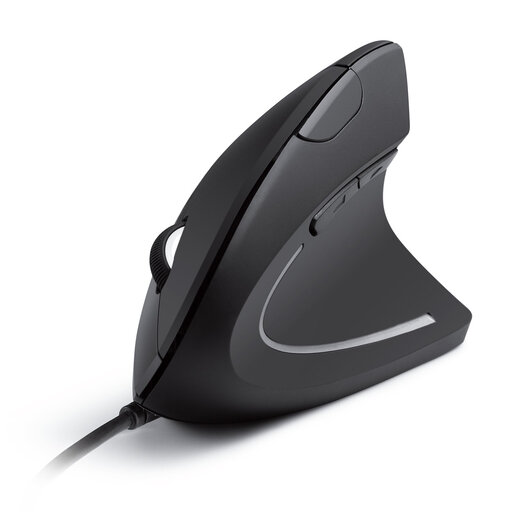
Why This Model Stands Out: The Anker CE100 is a no-nonsense wired vertical mouse. It offers the ergonomic benefits of a 'handshake' position at a very accessible price point. Installation is simple: plug in the USB cable, and you're ready to go. The mouse is equipped with five buttons, including 'previous/next' buttons for easy navigation. The optical sensor has adjustable sensitivity (1000/1600 DPI).
Pros
Who Is This For?: For budget-conscious users or beginners who want to try the benefits of a vertical mouse without making a large investment.
Every hand and workflow is different. If these recommendations don't quite match what you need, many more options are available. A good mouse is a personal choice, and it pays to consider different shapes and features.
Explore our full collection and find the perfect match for your desk.
Discover more in our Ergonomic Keyboard and Mouse category
What is the advantage of a vertical mouse? A vertical mouse places your hand in a 'handshake' position. This reduces the rotation of your forearm, which can lower muscle strain and promote a more neutral posture. This can help prevent or alleviate wrist discomfort.
How do I know what size ergonomic mouse I need? The fit is important. A mouse is too small if your fingers hang over the edge and too large if you have to stretch your hand to reach the buttons. Some manufacturers, like Logitech with its Lift mouse, specify the intended hand size (e.g., small to medium). Pay attention to the product dimensions and compare them to your current mouse to get an idea.
Does a wireless ergonomic mouse work as well as a wired one? Yes, for most office and home users, there is no noticeable difference in performance. Modern wireless mouse technology, such as Bluetooth or a 2.4GHz USB receiver, is very stable and responsive. A wired model eliminates the need for batteries and has virtually zero latency, which is sometimes preferred by gamers or users in environments with a lot of wireless interference.
