
Vandaag of morgen in huis

Kwaliteit gegarandeerd

Welkomstaanbiedingen ontgrendelen: GRATIS bezorging | Tot 80% korting | Gratis 30 dagen JoyPlus-proefperiode
Download de app
Long days at a desk can take their toll. A nagging pain in your wrist, a stiff forearm, or reduced precision during work are common complaints. A good ergonomic mouse isn't a luxury; it's an essential tool for anyone who spends significant time at a computer.
This guide is designed to help you make an informed decision. We'll cover the key factors to consider and highlight several popular models engineered for comfort and efficiency.
With so many options on the market, making the right choice can be challenging. Focus on the following three points to find a model that suits your workflow.
The shape of the mouse dictates the posture of your hand, wrist, and arm. Traditional ergonomic mice are contoured to provide excellent palm support. A vertical mouse takes this a step further by placing your hand in a natural "handshake" position. This can reduce muscle strain in your forearm and is often recommended for those looking to prevent or alleviate discomfort. This type of model is also known as an RSI mouse.
A wireless mouse ensures a clutter-free desk and greater freedom of movement. Most models connect via Bluetooth or a small USB receiver. Do you work on a laptop, a desktop computer, and maybe a tablet too? If so, consider a multi-device mouse. With the press of a button, you can switch seamlessly between different systems, which significantly speeds up your workflow.
For a professional mouse, precision and customisation are crucial. The sensitivity of a mouse is expressed in DPI (Dots Per Inch). A higher DPI means the cursor moves faster across the screen with a small physical movement, which is useful for graphic designers or users with large monitors. Programmable buttons and advanced scroll wheels, such as a wheel with a freewheel mode, offer extra efficiency for power users.
Based on specifications and functionality, we've selected models that excel in various use cases.
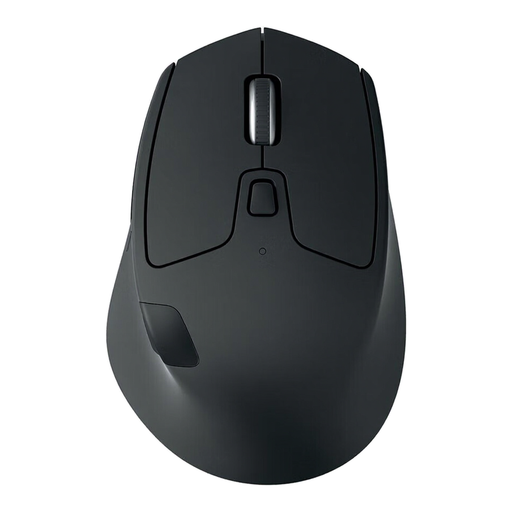
Why It Stands Out The M720 Triathlon is built for versatility and endurance. The "Triathlon" name refers to its ability to switch between three different devices at the touch of a button. This, combined with a long battery life and a durable design, makes it a reliable companion for the modern multitasker.
Pros
Who Is It For? For the professional who constantly switches between a laptop, desktop, and/or tablet and needs an efficient, no-nonsense wireless mouse with a familiar, comfortable shape.
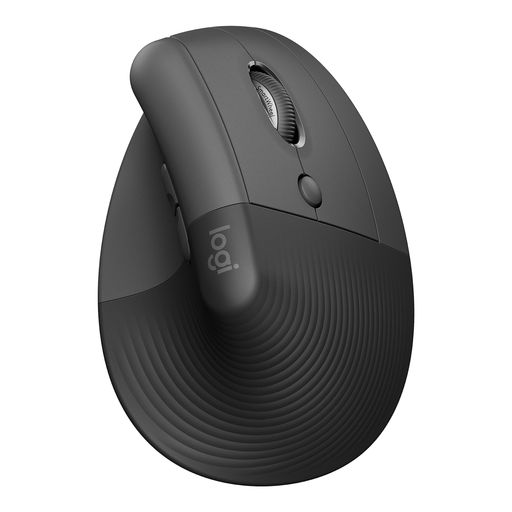
Why It Stands Out The Logitech Lift takes a different approach to ergonomics with its 57-degree vertical angle. This posture is designed to alleviate pressure on the wrist and promote a more natural alignment of the forearm and upper body. This model is specifically designed for people with small to medium-sized hands.
Pros
Who Is It For? For users actively seeking a solution for wrist or arm pain, or those who want to proactively adopt a better posture. An excellent choice as a vertical mouse for people with small to medium-sized hands.

Why It Stands Out The MX Master 4 is a professional mouse packed with advanced technology. Featuring an ultra-precise 8K DPI Darkfield sensor that works even on glass, an electromagnetic MagSpeed scroll wheel, and quiet click technology, this model is engineered for maximum productivity and control.
Pros
Who Is It For? For the demanding professional—such as programmers, designers, and data analysts—who requires the highest standards of precision, customisation, and comfort. This is a Logitech mouse for the ultimate power user.
Every hand and every workflow is unique. If the models above don't quite match your needs, or if you're looking for different options in terms of price or features, there's much more to discover.
Check out our full range of Wireless Bluetooth Mouse for more choices.
A vertical mouse places your hand and wrist in a neutral "handshake" position. This can reduce muscle activity in the forearm compared to a traditional mouse, which forces the forearm to rotate. As a result, users often experience less strain during long work sessions.
This depends on the mouse. Many models, like the Logitech M720 and MX Master 4, have a dedicated button to switch between paired devices (usually up to three). You pair the mouse once with each device via Bluetooth or the USB receiver. After that, you can use the button to switch instantly without re-pairing.
A higher price often translates to better materials, a more advanced sensor (higher DPI), more customisation options (programmable buttons), and extra features like an advanced scroll wheel or multi-device connectivity. For someone who works with a mouse for many hours every day, the investment in superior comfort and increased efficiency can certainly be worthwhile.
