
Vandaag of morgen in huis

Kwaliteit gegarandeerd

Welkomstaanbiedingen ontgrendelen: GRATIS bezorging | Tot 80% korting | Gratis 30 dagen JoyPlus-proefperiode
Download de app
By: Joybuy Product Recommendation OfficerDate: July 28, 2026
Working with two screens boosts productivity, but it often leads to a cluttered desk and poor posture. Standard monitor stands take up significant space and are rarely adjustable to the correct height. The result: an overcrowded work surface and a nagging pain in your neck. A dual monitor mount is a practical solution that clears your desk and promotes an ergonomic working posture.
This article will help you choose the right dual monitor arm. We'll cover the key considerations and highlight several popular models, so you can make an informed decision for your workspace.
Before you make a choice, there are a few specifications you need to check. This ensures the mount is compatible with your screens and desk.
On the back of almost every modern monitor, you'll find four screw holes. The distance between these holes is standardized and known as the VESA size. The most common sizes are 75x75 mm and 100x100 mm. Check the VESA size of your monitors and ensure it matches the specifications of the VESA mount. Additionally, each monitor arm has a maximum weight capacity per screen. Weigh your monitor (without its stand) and verify that this weight is within the mount's limit.
A desk mount for 2 monitors can be attached in several ways:
A good ergonomic monitor mount is also fully adjustable. A height-adjustable monitor arm allows you to position the screens precisely at eye level. The ability to tilt, swivel, and rotate gives you the freedom to adjust the viewing angle and reduce glare.
Dangling cables detract from a tidy workspace. Many monitor mounts feature a built-in cable management system. Hooks, clips, or channels within the arms themselves allow you to neatly conceal power and video cables. This contributes to a professional and organized look.
Based on specifications and functionality, we have compiled a list of popular choices for you.
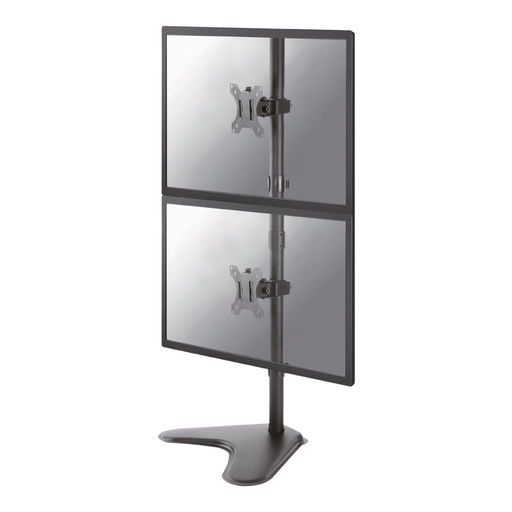
Why this model stands out This monitor stand from Neomounts is designed for a vertical setup, allowing you to stack two screens on top of each other. This is ideal for tasks that require a lot of vertical scrolling, such as programming, writing, or reading long documents. The freestanding base makes installation simple, without the need to clamp or drill into your desk.
Specifications and benefits
Who is this a good choice for? For users who prefer a vertical screen setup and want a solution that doesn't require permanent mounting to the desk. Think programmers, writers, or front-desk staff.
View the Neomounts FPMA-D550DDVBLACK
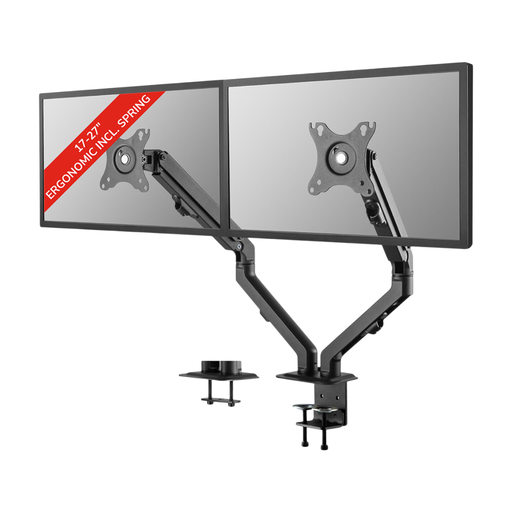
Why this model stands out This dual monitor arm offers a full range of motion. Thanks to the coil spring, you can easily adjust the height (11-42 cm) and depth (0-49.4 cm). This makes it a flexible choice for dynamic workspaces where screens are frequently moved, for example, to show something to a colleague.
Specifications and benefits
Who is this a good choice for? For professionals who desire maximum flexibility and frequently change their screen positions throughout the day. The smooth height and depth adjustment make this a highly practical ergonomic monitor mount.
View the Neomounts FPMA-D650DBLACK
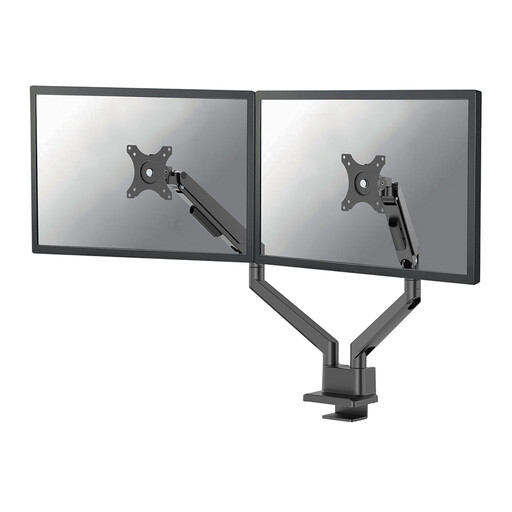
Why this model stands out The DS70-250BL2 is a premium Neomounts monitor mount, equipped with a gas spring. This mechanism provides even smoother, more effortless height adjustment. With a weight capacity of up to 9 kg per screen, this arm is suitable for larger and heavier monitors. Convenient extras like the Quick-release VESA system and a 180° stop mechanism (to prevent the arms from hitting a wall) make this a very complete solution.
Specifications and benefits
Who is this a good choice for? For the demanding user with larger monitors who is looking for optimal ease of use and a durable, high-quality finish. The gas spring makes adjusting heavier screens feel feather-light.
View the Neomounts DS70-250BL2
A dual monitor mount is an excellent upgrade for your workspace. However, if you're looking for a mounting solution in a different style, for example, for your television in the living room, you can take a look at our selection of White TV mount.
1. How do I know if my monitor will fit on a mount? Check two things: the VESA size and the weight. The VESA size (e.g., 100x100 mm) is listed in your monitor's manual or can be measured on the back. The weight of your monitor (without its stand) must be less than the maximum weight capacity of the monitor arm.
2. What is the difference between a gas spring and a coil spring? A gas spring offers smoother and more precise height adjustment, often with a single finger. This is especially nice for heavier screens. A coil spring is a mechanical system that also provides good adjustability and is often found in a lower price range. Both are a significant improvement over an arm without a spring system.
3. Can I install a monitor mount on any desk? Most monitor mounts with a clamp are suitable for desktops with a thickness between 1 and 8.5 cm. Always check the mount's specifications. Be cautious with desks made of glass or other fragile materials; using a clamp is generally not recommended. A freestanding base is a safer option in that case.
