
Vandaag of morgen in huis

Kwaliteit gegarandeerd

Welkomstaanbiedingen ontgrendelen: GRATIS bezorging | Tot 80% korting | Gratis 30 dagen JoyPlus-proefperiode
Download de app
A good game controller is an extension of yourself in the virtual world. But the search for the right one can feel like a daunting level. Between marketing jargon, sky-high prices for 'pro' models, and vague promises about compatibility, it's easy to make a bad purchase. Many gamers fall into the same traps: they pay too much for features they don't use, or end up with a controller that starts acting up after just a few months.
As a Joybuy Product Recommendation Officer, I'm here to help you cut through the noise. We won't focus on the hype, but on the specifications that truly matter. Let's break down the two most common pitfalls for gamers, so you can choose a controller that fits your playstyle and budget.
Before you make a choice, there are a few technical aspects you need to check. These determine the performance, comfort, and lifespan of your gamepad.
How you connect the controller is crucial for responsiveness.
Always check if the controller is officially supported by your platform (PlayStation 5, Xbox, Nintendo Switch, PC). For example, a PS5 controller like the DualSense works on a PC, but advanced features like adaptive triggers are only supported in specific games.
A controller should feel comfortable in your hands, even during long sessions. The layout is a matter of preference: symmetrical joysticks (like on a PlayStation controller) or asymmetrical (like on an Xbox controller).
Even more important are the internal components. To avoid the 'stick drift' pitfall, look for controllers with Hall Effect joysticks. These use magnets instead of physical contact to register movement, which significantly reduces wear and tear.
Additionally, modern controllers like the Sony DualSense offer unique features that enrich the gaming experience:
Based on objective specifications, we have selected a few controllers that suit different types of gamers.
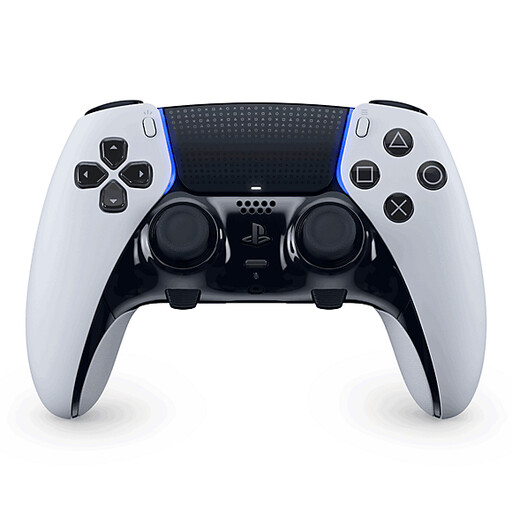
Why This Fits Their Persona: For the serious PS5 and PC gamer who demands complete control and customisation. Ideal for esports athletes or players looking to optimise their performance in competitive games.
The swappable joystick modules are a direct solution to the 'stick drift' pitfall. Instead of buying a whole new controller, you just replace the module.
Fully customisable buttons, triggers, stick sensitivity, and programmable back buttons. Retains all the immersive features of the standard DualSense.
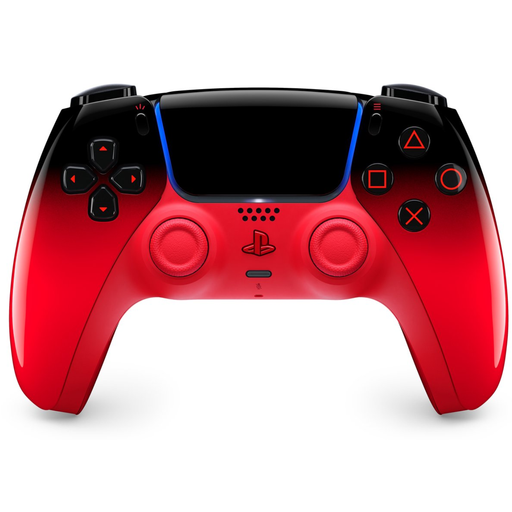
Why This Fits Their Persona: For the gamer who wants to personalise their setup. This controller combines the trusted quality of Sony with a striking and expressive design.
You get the reliability and full functionality of an official PS5 controller. No compromises on quality for a unique look, unlike with unofficial 'custom' controllers.
Features all the signature DualSense functions, such as haptic feedback and adaptive triggers. An official Sony product, ensuring seamless compatibility with PS5 and PC.
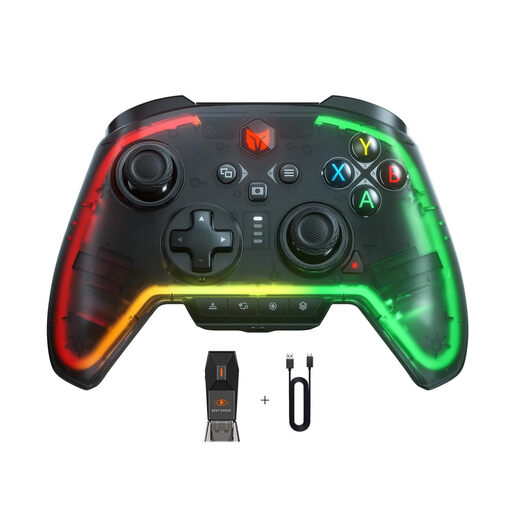
Why This Fits Their Persona: Perfect for the gamer who switches between PC, Nintendo Switch, and even PS4. This gamepad offers a wealth of features for a wide range of systems.
Unlike vague 'universal' controllers, this model clearly specifies its compatibility and offers advanced features like macros and a 6-axis gyro that actually work on the supported platforms.
Broad compatibility (PC/Switch/PS4), customisable buttons, a turbo function, and RGB lighting. A versatile pro controller at an accessible price point.
We have compiled a complete, up-to-date list of products that fully meet these strict selection criteria.
A 'pro controller' typically offers more customisation options than a standard model. This can include programmable buttons (often on the back), swappable joysticks, adjustable 'trigger stops' (to shorten the trigger pull distance), and sometimes more durable materials. This is especially useful for competitive players looking to gain every millisecond of advantage. For most casual gamers, a standard, official controller is perfectly sufficient.
Stick drift is caused by mechanical wear and can sometimes be unavoidable in the long run. However, you can reduce the risk. If possible, choose a controller with Hall Effect joysticks, which don't wear down due to their magnetic design. Additionally, keep your controller clean and free of dust and crumbs. Store it in a safe place where it won't be dropped.
Most modern PC controllers are 'plug-and-play', especially if they use a USB connection. The official Xbox controller is generally considered the standard for Windows and offers the most seamless experience. With other controllers, particularly over Bluetooth, you may need to install drivers, or advanced features like vibration or haptic feedback might not be supported in every game. Always check the product page for specific information on PC compatibility.
