
Vandaag of morgen in huis

Kwaliteit gegarandeerd

Welkomstaanbiedingen ontgrendelen: GRATIS bezorging | Tot 80% korting | Gratis 30 dagen JoyPlus-proefperiode
Download de app
Buying a new computer mouse seems simple—until you get tangled in a web of marketing jargon, sky-high DPI values, and vague promises about ergonomics. Many specifications are designed to impress, not to actually help you. Before you spend money on features you don't need or a model that becomes unusable after three months, let's break down the most common pitfalls and the features that truly matter.
The two biggest deceptions that many buyers fall for are:
To avoid buyer's remorse, it's better to focus on a few concrete specifications that directly impact your daily use.
The choice between a wireless mouse and a wired mouse is no longer a matter of performance. The technology has matured.
The sensor is the heart of your mouse. Almost all modern mice use an optical sensor, which works excellently on most surfaces (except glass). The sensitivity of this sensor is expressed in DPI (Dots Per Inch).
A higher DPI value means the cursor travels a greater distance on the screen with a small movement of your hand. For general office work and browsing, a DPI between 800 and 1600 is more than sufficient. Gamers who need fast reflexes might benefit from an adjustable DPI up to around 6400. Anything above that is rarely practical. So, don't focus on the maximum number, but on the ability to adjust the DPI to your preference.
A mouse can have the best specs in the world, but if it doesn't feel comfortable in your hand, it's useless. A good fit depends on your hand size and grip style (palm, claw, or fingertip). An ergonomic mouse is designed to keep the hand in a more natural position. A vertical mouse is a more extreme example of this, specifically intended to reduce wrist and arm strain (RSI) by forcing a 'handshake' posture. If you spend long days at the computer, this is worth considering.
Based on these practical criteria, we have selected a few models that suit different user profiles.
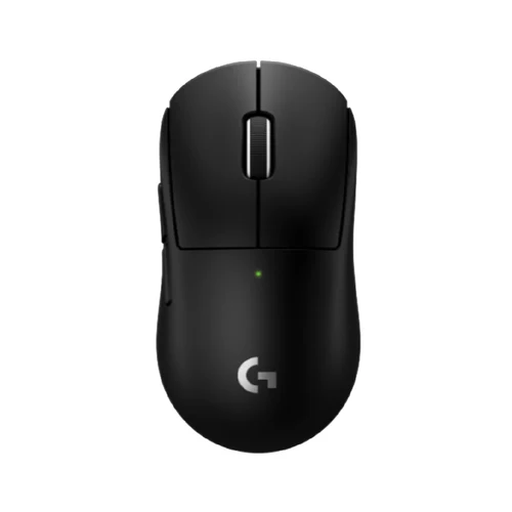
Why This Fits Their Persona: This mouse is designed for esports professionals. Its ultra-light weight of 53 grams reduces fatigue and enables fast, precise movements. The combination of the HERO 2 sensor and the LIGHTSPEED connection provides the responsiveness needed in competitive games.
Instead of boasting an unnecessarily high DPI, this Logitech mouse focuses on a complete package of low weight, a top-tier sensor, and proven wireless performance. The value lies in the balance, not in one exaggerated spec.
Extremely lightweight (53g) for maximum control; HERO 2 sensor for pixel-perfect tracking; reliable LIGHTSPEED wireless connection.
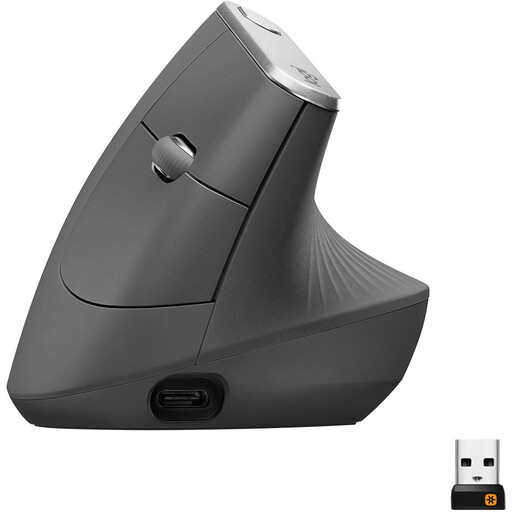
Why This Fits Their Persona: For those who spend long days at a desk, comfort is not a luxury. The vertical 'handshake' posture of this mouse is designed to reduce muscle strain in the forearm and wrist. According to Logitech, this reduces muscle activity by 10%.
This isn't a standard mouse with an 'ergonomic' label slapped on. It's a fundamentally different design that addresses a specific problem. The claim is based on a clear, functional shape rather than vague marketing.
Unique 57-degree vertical angle for better wrist posture; rechargeable with long battery life; connects via Bluetooth or USB receiver.
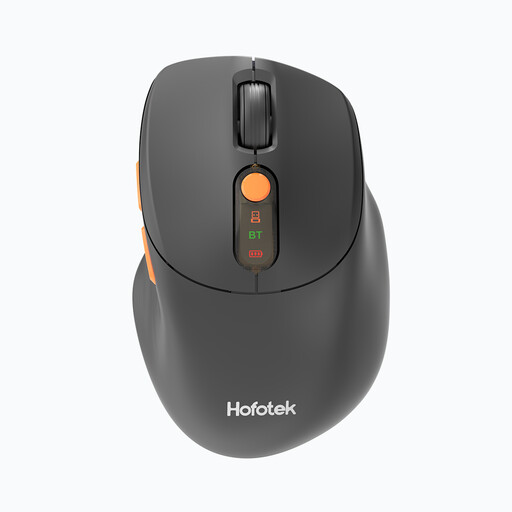
Why This Fits Their Persona: This mouse is practical and versatile. The ability to switch between 2.4GHz and Bluetooth is ideal for those who alternate between a work laptop and a personal computer. The silent clicks make it a considerate silent mouse for an office or a shared home workspace.
This model focuses on practical features rather than specs for show. The DPI is adjustable to a useful level (4000), and the ergonomic shape is comfortable for general use without making extreme claims.
Silent clicks for a quiet environment; dual-mode connectivity (2.4GHz and Bluetooth) for versatility; lightweight and compact.
We have compiled a complete, up-to-date list of products that meet these strict selection criteria and local regulations.
Yes, often it is. A gaming mouse from brands like Razer or Logitech typically has a highly accurate sensor, durable buttons, and a comfortable shape. Features like programmable buttons can even boost productivity by assigning them to tasks like copy and paste. The only downsides might be a flashy design or RGB lighting, but you can usually turn those off.
This varies greatly by model and usage. Mice with a built-in rechargeable battery, like the Logitech MX Vertical, can last up to four months on a full charge. Models that use AA or AAA batteries have a runtime that can range from 200 to over 500 hours, depending on the connection mode (Bluetooth is often more energy-efficient than 2.4GHz). Most modern wireless mice have an automatic sleep mode to conserve power.
Both types use light to detect movement. An optical mouse uses an LED light and is very accurate on most non-glossy surfaces, like a mouse pad. A laser mouse can work on more surfaces, including glass, but can sometimes suffer from unwanted 'acceleration' during fast movements. For most users, including gamers, a modern optical sensor is the most reliable and predictable choice.
