
Vandaag of morgen in huis

Kwaliteit gegarandeerd
Download de app
Categorieën

Purchasing an Apple Watch is a significant decision that requires careful comparison. The right model for you depends on your daily activities, fitness goals, and budget. To avoid choosing a model with features you won't use, or missing one that's essential, it's important to compare the specifications side-by-side. This guide will help you make an informed choice between the new Apple Watch models for 2026.
Before comparing the models, it's helpful to define your own usage profile. The following criteria will guide you.
Based on specifications and intended use, we are highlighting the three main new models: the Apple Watch SE 3, the Apple Watch Series 11, and the Apple Watch Ultra 3.
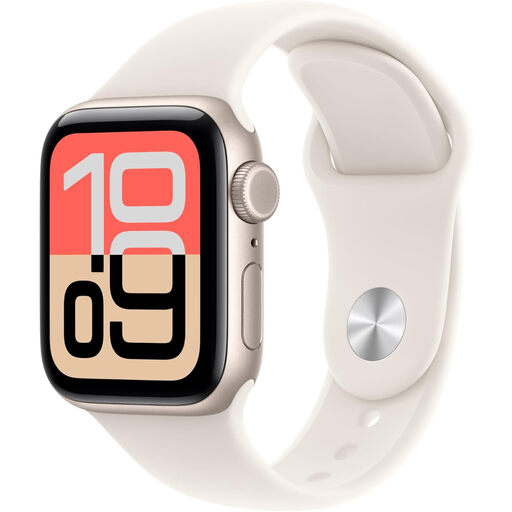
Why This Product The Apple Watch SE 3 is a significant upgrade over its predecessor, now offering features previously reserved for more expensive models. It's a solid choice for those seeking the core Apple smartwatch experience without paying for specialised health sensors.
Pros
Who Is It For? This model is suitable for beginners, budget-conscious consumers, and everyday users who want a reliable Apple smartwatch for notifications, activity tracking, mobile payments, and occasional workouts.
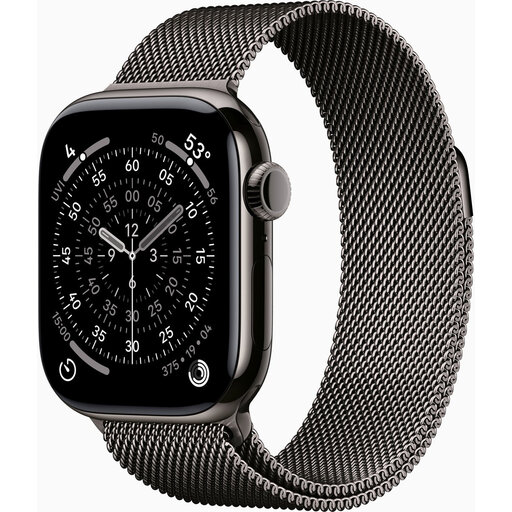
Why This Product The Apple Watch Series 11 is the logical choice for users who want to do more with their health and fitness. The model builds on the solid foundation of its predecessors, adding key new monitoring features along with improved battery life and faster charging capabilities.
Pros
Who Is It For? This model is designed for the health-conscious consumer and the active fitness enthusiast looking for a balance between advanced features for daily wellness and detailed sports tracking. The 5G connectivity makes it ideal for those who like to work out without their iPhone.
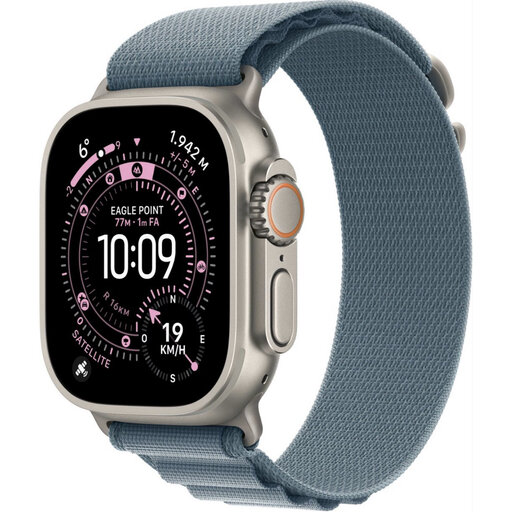
Why This Product The Apple Watch Ultra 3 is purpose-built for extreme conditions and endurance performance. With the longest battery life, a rugged titanium case, and unique features like satellite communication for emergencies, this is the most capable model in the lineup.
Pros
Who Is It For? This model is aimed at serious athletes, adventurers, and outdoor enthusiasts who push the limits. If you need the most robust features, the longest battery life, and maximum reliability in remote areas, the Ultra 3 is the definitive choice.
| Feature | Apple Watch SE 3 | Apple Watch Series 11 | Apple Watch Ultra 3 | | :--- | :--- | :--- | :--- | | Target Audience | Everyday use, beginners | Health & fitness | Extreme sports, adventure | | Battery Life (normal) | Up to 18 hours | Up to 24 hours | Up to 42 hours | | Key New Feature | Always-On display | Hypertension notifications | Satellite communication | | Water Resistance | 50 metres (WR50) | 100 metres (10 ATM) | 100 metres (10 ATM) + dive computer | | Case Material | Aluminium | Aluminium | Titanium | | Connectivity | GPS, GPS + Cellular | GPS, GPS + Cellular | GPS + Cellular (standard) |
An Apple Watch is a personal device. Besides choosing a model and size, you can customise its look with a watch band. The standard bands included are functional, but a different band can completely change your watch's appearance, making it suitable for a business meeting or a night out. For a durable and stylish look, metal smartwatch bands are a popular choice.
1. Do I need an iPhone to use an Apple Watch? Yes, an iPhone is required to set up and manage an Apple Watch. The Apple Watch is designed as an extension of the iPhone and operates within the Apple ecosystem.
2. What is the difference between GPS and GPS + Cellular? An Apple Watch with GPS can determine your location and record routes, but it needs a connection to your iPhone (via Bluetooth or Wi-Fi) for internet-dependent features like calls, receiving messages, or streaming. A model with GPS + Cellular has a built-in eSIM, allowing it to connect to a cellular network independently. This lets you make calls and use data without your iPhone nearby (requires a separate cellular plan).
3. Can I pay in stores with an Apple Watch? Yes, all recent Apple Watch models are equipped with NFC and support Apple Pay. After setting up your payment cards in the Wallet app on your iPhone, you can make contactless payments by holding your watch near a compatible payment terminal.