For watching from bed, an adjustable, portable model is a good fit if the measured projection distance matches your desired image width. If you can’t fully darken the bedroom, pay particular attention to the stated light output. Also check the native resolution, fan noise and how you’ll play programmes. Manufacturer specifications can’t predict exactly how the picture and sound will perform in your room.
Who is a bedroom projector suitable for?
For watching from bed
You want to use the wall or ceiling without a complicated permanent set-up. The space available and your viewing angle will help determine which model to choose; BenQ and Philips describe models with adjustable or rotating stands.
For viewing architectural details
Look at the native image resolution, sharpness and an image size suited to your viewing distance, so you can make out floor plans, façades and subtitles. BenQ, Philips and Epson list Full HD specifications for the models mentioned.
For bedrooms with changing light levels
You may not always be able to fully darken the room, so you’ll need to balance visibility with portability and flexibility in where you place the projector. Epson highlights the importance of the viewing environment when choosing brightness.
What should you look for in a bedroom projector?
| What to consider |
What should you look for? |
Who should pay particular attention? |
| Will it project from your chosen position? |
Measure the distance from the lens to the projection surface and the image width you want. BenQ lists a throw ratio of 1.2 for the GV50; Philips describes a 180° rotating stand for the NeoPix 450 Smart NPX450/INT. |
If I want to watch from bed, I need to be able to position the image without running out of the required distance or clear space. Around 25% of consumers prioritise being able to set up the projector by the bed. |
| Will details and text remain clear? |
Check the native resolution of the exact model and view your preferred image size with representative programmes and subtitles. BenQ lists a native resolution of 1920 × 1080 for the GV50; support for an incoming 4K signal is not the same as native 4K projection resolution. |
When viewing floor plans, façades and subtitles, I want to make out small details, so I check both the native resolution and the image size from my viewing position. Around 25% of consumers prioritise image detail. |
| Will the picture be visible in the available light? |
Take account of how well you can darken the room, the image size and the unit used for the brightness rating. Epson links brightness choice to the viewing environment; ANSI lumens, ISO lumens and other ratings are not directly comparable real-world tests. |
If I can’t always darken the room, I want to know whether the picture will remain clear in the light in my bedroom. Around 20% of consumers prioritise visibility in ambient light. |
| Will it be quiet enough by the bed? |
Check the stated fan noise for each picture mode and, if possible, listen from where you plan to watch. BenQ lists separate normal and eco figures for the GV50; Philips mentions stereo speakers and a 3.5mm socket for the NeoPix 450 Smart. |
When I watch programmes with quiet dialogue in the evening, I want to hear them clearly without the projector disturbing my peace. Around 15% of consumers prioritise quiet listening. |
| How will you play programmes? |
Check whether your preferred streaming service is available and which connections or playback devices the exact version offers. BenQ lists Google TV and HDMI for the GV50; Epson lists HDMI for the CO-FH01. |
I want to be able to start watching without discovering afterwards that I need a separate source device. Around 15% of consumers prioritise easy playback. |
Common buying mistakes
-
Reading ‘supports 4K’ as ‘projects in 4K’
BenQ lists support for an incoming signal of up to 4K UHD for the GV50, but its native projection resolution is 1920 × 1080.
When comparing projectors for architectural details, check the native resolution of the exact model, not just the signals it can process.
-
Assuming an adjustable stand means every image size will fit
The direction you can adjust the image and the required projection distance are two different things. BenQ lists a fixed throw ratio of 1.2 for the GV50.
Measure the distance and available projection surface before choosing a model.
You may need to reposition the projector or use a smaller image if the available distance isn’t suitable.
-
Comparing lumen ratings in different units directly
Manufacturers use ratings such as ANSI lumens, ISO lumens, and white and colour light output. Epson highlights the importance of the viewing environment when choosing brightness.
Note the unit, the image size you want and how much you can darken the room. Don’t treat different ratings as a single comparative real-world test.
-
Assuming a bundle version is identical to the standard model
The XGIMI MoGo 4 Match Night EU Edition is a bundle version; its contents and specification may differ from those of the separately listed MoGo 4.
Check the model name, regional version and included items in the exact offer.
Brands to consider
BenQ
The GV50 is a specific model for flexible wall and ceiling projection by the bed.
- BenQ lists an adjustable base, native 1080p resolution, a throw ratio of 1.2 and 500 ANSI lumens for the GV50.
- Measure the available distance; the specifications don’t prove how visible the picture will be in your room. Don’t confuse the GV50 with the separately named GV50P without checking.
Philips
The NeoPix 450 Smart NPX450/INT is an option if you’re looking for a rotating stand and a streaming device.
- Philips lists a stand that rotates through 180°, Full HD 1080p and stereo speakers for this model.
- Check what’s included and assess the picture and sound in the room where you plan to use it.
Epson
The CO-FH01 is a conventional Full HD option for a space where the stated light output matters.
- Epson lists Full HD 1080p, 3000 lumens of white and colour light output, and HDMI for the CO-FH01.
- Light output alone won’t tell you whether the projector will fit by your bed or how audible it will be in your bedroom.
XGIMI
The MoGo 4 is a portable model for anyone who wants to move the projector between viewing spots.
- XGIMI lists a 360° adjustable stand, native 1080p display, 450 ISO lumens and a built-in battery offering up to 2.5 hours of playback for the MoGo 4.
- That maximum battery life is a manufacturer’s figure. Check the plug, version and bundle contents when viewing an offer.
Samsung
The Freestyle+ SP-LFF3HLAXXXE is an option if automatic correction for changing projection positions is important to you.
- Samsung describes automatic keystone correction and wall adaptation for this specific model.
- These manufacturer claims don’t prove that a coloured or uneven wall will give the same result as a suitable, flat projection surface.
Projectors for bedroom use
This Joybuy selection focuses on projectors for bedroom use, with options for flexible positioning and built-in playback.
 Image unavailable
XGIMI Vibe One Match Night EU Edition with projection screen and stand
Ideal if you’re looking for a portable projector with built-in playback and an included projection screen.
Native resolution 1920 × 1080; 250 ISO lumens. Google TV, HDMI and a built-in battery are listed. Video playback on battery lasts up to 1.2 hours in eco mode; playback time decreases with a brighter picture.
View at Joybuy
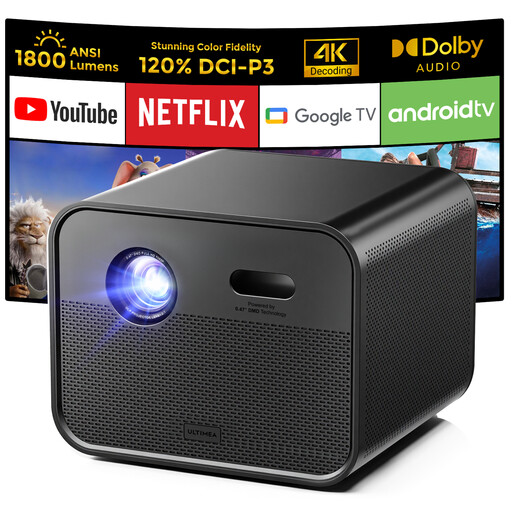 Image unavailable
Ultimea Poseidon E100 Full HD projector
An option if you want to combine built-in playback with a Full HD projector.
Native resolution 1080p; 1800 ANSI lumens. The product information lists Google TV, autofocus, 6D keystone correction and HDMI.
View at Joybuy
 Image unavailable
Yaber L2 Full HD projector
Ideal if you want flexible positioning and to play programmes using built-in Google TV.
Native 1080p; 520 ISO lumens. The product information lists a 360° gimbal, Google TV and two 5 W speakers.
View at Joybuy
 Image unavailable
XGODY Gimbal N6 Pro
An option if you’re looking for a rotating set-up and built-in streaming apps.
Native 1080p; 700 ANSI lumens. The product information lists WhaleOS 3.0, autofocus and automatic keystone correction.
View at Joybuy
 Image unavailable
Android 13 Smart Projector, 1080P HD
Ideal if you want a rotating stand and built-in streaming apps.
The title lists 1080P HD, Android 13, Wi-Fi 6, Bluetooth 5.0 and a 360° rotating stand. Check whether your preferred streaming service is available on the exact version.
View at Joybuy
Frequently asked questions
How can you tell if the projector will fit on your bedside table?
Measure from the intended lens position to the wall and decide how wide you want the image to be. BenQ lists a fixed throw ratio of 1.2 for the GV50: at an image width of 1.5 metres, this ratio calls for a projection distance of around 1.8 metres (1.5 × 1.2). This calculation doesn’t automatically apply to other models or a ceiling set-up.
Do you need to darken the bedroom?
That depends on the light when you’re watching and the image size you choose. Epson links brightness choice to the viewing environment, so consider your preferred image size and how well you can actually darken the room rather than relying on a lumen figure alone.
How can you make use and maintenance practical?
Before setting it up, check the user manual for the exact model and make sure the power supply and connections are accessible. Assess fan noise from your final viewing position; BenQ publishes separate normal and eco figures for the GV50.
What happens if the projector develops a fault after you buy it?
In the Netherlands, you’re entitled to a product that works properly, and the seller is your point of contact if it doesn’t. According to the Dutch government, the legal guarantee has no fixed time limit; what you can expect depends, among other things, on the product, its price and the information provided. An additional guarantee is most relevant if it gives you extra rights.
What does a CE mark on a projector mean?
A CE mark applies when the relevant EU rules require the product to carry one. According to EU information, CE is not a quality award or an independent comparison of picture performance; check the documentation for the exact version.


