
Player with a dedicated console
You already have a PS5, Xbox or Switch 2 and want to avoid buying an extra controller that won’t work with your system and game edition.


Choose a controller that works with your console or PC and the specific edition of your basketball game; a controller made for another platform isn’t automatically a suitable replacement. Next, work out how many separate controllers you need, then choose between wireless play and a cable route that works in your bedroom. Remember to consider the power supply, any firmware updates and the features your game actually supports.
You already have a PS5, Xbox or Switch 2 and want to avoid buying an extra controller that won’t work with your system and game edition.
You want to play against each other on the same screen and need to know whether each player needs their own compatible controller.
You play in a bedroom and are weighing up a cable route against wireless play, which still requires a power source for the controller.
Choose this option if: you play on PS5 and need a separate, PS5-compatible controller. The Dutch PlayStation Store listing for NBA 2K27 states that it supports 1–4 players, as well as DualSense haptic feedback and trigger effects.
Bear in mind: check which edition of the game you have. The PS5 Assist Controller feature lets two controllers act as one, but doesn’t add a second player.
Choose this option if: you play on a supported Xbox console or Windows PC. Microsoft lists Bluetooth connectivity and use with Xbox and Windows devices.
Bear in mind: check whether your PC game recognises multiple controllers separately. The standard Xbox Wireless Controller uses AA batteries or a separate compatible charging solution.
Choose this option if: you play on Switch 2. Nintendo lists the Switch 2 Pro Controller and Joy-Con 2 as additional controllers for playing together.
Bear in mind: for NBA 2K26 on Switch 2, Nintendo specifies one compatible controller per multiplayer participant. The wired PowerA option has a cable, while the manufacturer says the 8BitDo Ultimate 2 Bluetooth needs a firmware update for Switch 2 compatibility.
| Consideration | What should you check? | Which consumers? |
|---|---|---|
| Compatibility | Check that the full controller model works with your console or PC and the edition of your basketball game. A Switch Pro Controller and a Switch 2 Pro Controller are different products. | Anyone looking for a controller for their existing system and the right game edition should prioritise compatibility; this applies to around 36% of consumers. |
| One controller per player | Check the local player count for your game edition and count how many compatible controllers you already have. On PS5, the Assist Controller feature doesn’t replace a separate second player. | Anyone who wants a friend to play using their own controls should focus on separate controllers; around 29% of consumers put this need first. |
| Wired or wireless | Consider where the players will sit and whether a cable can safely run from the system to their seats. For wireless play, also check the power supply and pairing process. | Anyone with limited space looking for a connection that suits their seating arrangement should focus on the available playing space; around 21% of consumers put this first. |
| Power and features | Check the power and charging options, as well as which extra features your game supports. Also check whether the necessary accessories are included. | Anyone wanting to minimise ongoing upkeep and choose only relevant features should focus on power and features; around 14% of consumers prioritise these. |
On PS5, the Assist Controller feature combines two controllers so they work as one. This doesn’t automatically give a second participant their own player in the game.
Check that your game edition recognises two separate players, and use a separate compatible controller for the second player.
The name Switch Pro Controller doesn’t prove that it’s a Switch 2 Pro Controller, or that the features and compatibility are the same.
Check the full product name and the compatibility details listed by the manufacturer and the game for your system.
A wired controller needs a practical cable route to your seat. A wireless controller keeps that cable out of the way, but still needs a suitable power solution.
First decide where the players and system will be. Then check the cable and connection for a wired model, or the power supply and pairing process for a wireless one.
Worth considering if you’re looking for a PS5 controller for a PS5 game edition.
An option for buyers with a supported Xbox console or Windows PC.
A good fit for a Switch 2 set-up with several local players.
The Advantage Wired Controller is a wired option for Switch 2 players who want assignable buttons.
The Ultimate 2 Bluetooth is an option if you’re considering a controller for Switch and Windows and don’t mind a little set-up.
This selection includes wired and wireless controllers for PS5, Xbox or Windows, and Nintendo Switch 2. Before buying, check that the model works with your game edition and that the cable, power supply or any firmware update suits your set-up.
 Image unavailable
A wired option for a Switch 2 set-up where a cable can run to your seat.
The product information lists a USB connection; the USB cable isn’t included.
 Image unavailable
A wired option if you use a supported Xbox console or Windows PC and have a suitable cable route to your seat.
The product name lists Xbox Series X/S, Xbox One and Windows 10/11. The product information lists Hall effect joysticks and triggers, plus two programmable buttons.
 Image unavailable
A wireless option for a supported Xbox console or Windows PC. Also check whether your game recognises multiple controllers separately.
The product information lists a hybrid D-pad and remappable buttons. The standard Xbox Wireless Controller needs AA batteries or a separate compatible charging solution.
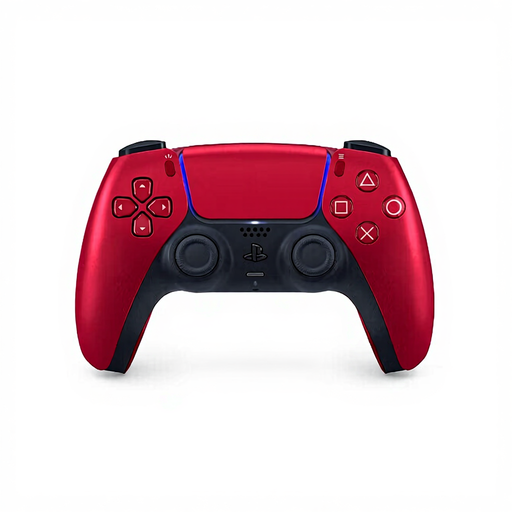 Image unavailable
A PS5 controller for anyone who needs separate, compatible controls for a local player.
The product information lists haptic feedback, adaptive triggers, a built-in battery and Bluetooth or USB-C connectivity. The Dutch PlayStation Store listing for NBA 2K27 mentions DualSense effects for that game edition.
 Image unavailable
A Switch 2 controller for a separate local player; check the requirements for your basketball game edition.
The product information lists Bluetooth, a rechargeable battery, HD rumble and motion controls. For NBA 2K26 on Switch 2, Nintendo specifies one compatible controller per multiplayer participant.
No. PlayStation describes the Assist Controller feature as letting two controllers work as if they were one. For two separate players, use separate compatible controllers and check the local player count for your game edition.
For the multiplayer mode in NBA 2K26 on Switch 2, Nintendo says each player needs a compatible controller. Check the game information separately for a different basketball game or edition.
It depends on the game and system, so check how many local players the chosen edition supports and how it recognises controllers. For the Switch 2 version of NBA 2K26 mentioned here, Nintendo specifies one compatible controller per participant; the PS5 Assist Controller feature counts two controllers as one set of controls.
Follow the pairing and set-up instructions for the full model you buy. PlayStation requires you to connect a DualSense to PS5 using a USB cable the first time you pair it. For Switch 2 compatibility with the 8BitDo Ultimate 2 Bluetooth, the manufacturer says you need to update the firmware first.
The Dutch PlayStation Store listing for NBA 2K27 states that it supports 1–4 players and requires PS Plus for online play. That online requirement doesn’t prove that PS Plus is needed for the local players listed; check the requirements for the specific game mode.