
Players who need an extra controller
You want to play with friends on the same system and need to check which controller and how many local players your game supports. The Dutch PlayStation Store lists NBA 2K27 on PS5 for 1–4 players.


First, choose a controller that works with your console or PC, then check whether the basketball game supports local play with the number of players you want. Daylight coming through tall windows doesn’t, in itself, affect which controller you need. Samsung describes reflections from windows as a screen visibility issue, so also consider the screen position and seating.
You want to play with friends on the same system and need to check which controller and how many local players your game supports. The Dutch PlayStation Store lists NBA 2K27 on PS5 for 1–4 players.
You already have a PS5, Xbox or Switch 2 and want to make sure a controller works with your platform. Sony, Microsoft and Nintendo describe controllers for specific systems; a wireless connection doesn’t automatically mean every model works with every console.
You play locally on Windows and want to match the available connection and controls to your PC and game. Microsoft describes the Xbox Wireless Controller as compatible with Windows PCs; 8BitDo lists 2.4 GHz or USB connectivity for the Ultimate 2C Wireless on Windows.
First, check that your platform and game are supported. Then work out how many controllers you need before comparing controls, power and cables.
| What to consider | What should you check? | Who is this important for? |
|---|---|---|
| Platform and game | Check the exact controller version, console or Windows version, and game. | If I don’t want to buy a controller that won’t work with my system, I check the full model name. Around 33% of consumers put platform compatibility first. |
| Playing together locally | Check the player information for the right game version and platform. | If we want to play together on one system, I check how many players can join in at once and how many controllers we’ll need. Around 27% of consumers give the number of local players top priority. |
| Buttons and controls | Compare the button layout and check whether any customisation you want works on your platform. | When I often play with others, I want a layout that feels comfortable for the way I play. Around 20% of consumers prioritise controls and customisation. |
| Power and connection | Check the power type, the connection needed, and whether a cable can safely reach your seat. | If I don’t want power or connection hassles during a match, I compare wireless play with the practical limitations of a cable. Around 13% of consumers give these factors top priority. |
| Visibility in daylight | Check the screen from where you’ll be playing, at the time of day you plan to play. | If light from a window makes the game difficult to see, I look at reflections and the screen setup first, rather than choosing a different controller model. Around 7% of consumers prioritise visibility in daylight. |
Different versions within a product range can have different platform compatibility and connection options. For example, the 8BitDo Ultimate 2C Wireless and Ultimate 2C Bluetooth have different listed platforms and connections.
Compare the full model name and platform specifications with your console or PC. Don’t choose based only on ‘wireless’ or the product range.
A controller that doesn’t work with your system won’t solve the need for an extra player.
The player information applies to a specific game version, and a connected controller must also work with your setup. On Switch 2, Nintendo says the number of controllers that can be synchronised depends on the controller type and the features in use.
Check the player information for your platform and test the controllers together before the match starts.
Reflections from windows affect screen visibility, not a gamepad’s connection or buttons. Changing controllers won’t change those reflections.
First, check the screen position and seating in daylight. Samsung describes reflections from windows as a screen issue.
The Dutch government explains that there is no fixed statutory warranty period for all products in the Netherlands, and that you can contact the seller if there’s a problem with a product.
Check your statutory rights before considering additional cover, and find out what the cover adds.
Additional cover may be unnecessary if it adds nothing to the protection you already have.
The DualSense is worth considering as an extra controller for a PS5 setup with a supported local basketball game.
The Xbox Wireless Controller is an option for supported Xbox consoles and Windows PCs.
The Switch 2 Pro Controller is designed for Nintendo Switch 2 owners looking for a traditional gamepad.
The Ultimate 2C Wireless is worth considering for Windows players looking for extra mappable buttons.
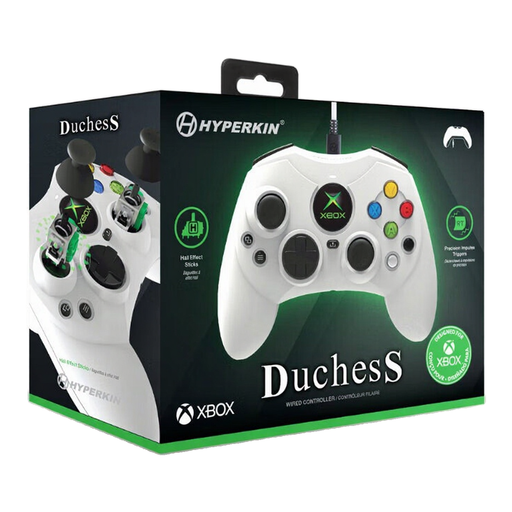
The standard white Wired Controller is a wired option for a compatible Xbox setup.
These product options suit a range of PS5, Xbox, PC and Switch 2 setups. Check that each version works with your platform and basketball game.
 No image available
An option for an extra player in a PS5 setup; the Dutch PlayStation Store lists NBA 2K27 on PS5 for 1–4 players.
The product name lists PS5, PC, Mac and Mobile; check support for your game and platform.
 No image available
The product name lists Switch and PC as platforms. Check compatibility with your specific game and platform before choosing this version.
 No image available
A wired option if you can safely connect your seat to your Xbox or PC. The product name lists Xbox Series X|S, Xbox One and Windows 11/10.
Bear in mind the cable between the system and your playing position.
 No image available
A wireless controller option for an Xbox setup. Microsoft also lists Windows PC support for the Xbox Wireless Controller; check that your game and the version you choose are compatible with your system.
 No image available
The product name lists PC, Nintendo Switch/Switch 2, Steam and Android as platforms. Check which connections and features work with your system and game.
The product name mentions haptic triggers, adjustable joystick resistance and six programmable buttons.
You can compare models, but the right choice depends on the console or PC and the game version. Nintendo says the Switch 2 Pro Controller works only with Switch 2.
Start by checking how many players will be playing at once, then check the player information for your platform. The Dutch PlayStation Store lists NBA 2K27 on PS5 for 1–4 players; this doesn’t confirm the same number for every other version.
Follow the manufacturer’s pairing instructions and test the controller in the game. Nintendo describes wirelessly synchronising the Switch 2 Pro Controller or connecting it to the charging grip while the system is docked in it. PlayStation explains how to pair a DualSense with a PS5 using a USB cable and the PS button.
Don’t assume that local multiplayer has the same requirements as online play. The PlayStation Store listing for NBA 2K27 mentions online play and PS Plus separately from 1–4 players, and says that Play Now is available offline. Check the requirements for the game and mode you choose.
According to the Dutch government, the seller must provide a solution if there’s a problem with a product; there is no fixed statutory warranty period for all products in the Netherlands. A manufacturer’s warranty is an addition to, not a replacement for, your statutory rights.