What should you look for in an extra controller?
First check your console or PC and your game’s local play mode. Then consider the connection, how many people are playing and how the controller is powered.
| What to consider |
What to look for |
Who should pay particular attention? |
| System and game |
Check the exact controller model and whether your basketball game supports local play with extra controllers. |
If I’m buying a second controller, I want to be sure it works with my system and in the game’s local play mode. Around 36% of consumers say compatibility is their main reason for buying. |
| Cables and connection |
Check whether the model connects to your device using the wireless connection you want or USB. If you’re using a PC, check in advance that it recognises both controllers. |
In a small room, I want to position players without a cable crossing the walkway. Around 29% of consumers prioritise a cable-free set-up. |
| Controls for each player |
Check how many players the game supports locally and whether it supports one Joy-Con or a full controller per player. |
If two people want to play, I want to know whether each person can use their own suitable controller. Around 14% of consumers focus mainly on the number of individual player positions. |
| Power |
Check whether the controller uses a rechargeable battery or AA batteries, and what’s included with the version you choose. |
When playing a match at home, I don’t want to stop halfway through to charge the controller or look for batteries. Around 14% of consumers focus mainly on power and running costs. |
| Extra features |
Check whether the game supports extra buttons, haptics or trigger effects. These features won’t necessarily work in every game. |
Once I’ve sorted out the basic controls, I can see whether extra buttons or feedback would add anything to my game. Around 7% of consumers put additional features first. |
Controller options on Joybuy
This selection includes controllers for Xbox and Windows set-ups, PS5 and Nintendo Switch or Switch 2 set-ups, as well as a controller whose product name says it supports multiple platforms. Before buying, check that the exact version is compatible with your system and game.
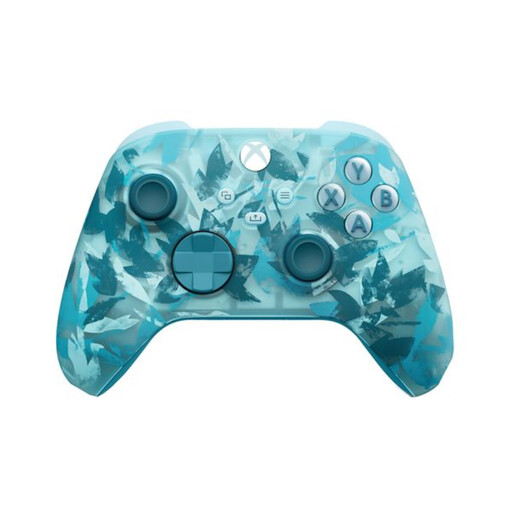 No image available
Xbox Wireless Controller for Xbox Series/PC - Ice Breaker Special Edition
An option for an Xbox or Windows set-up; the product name mentions Xbox Series and PC.
View on Joybuy
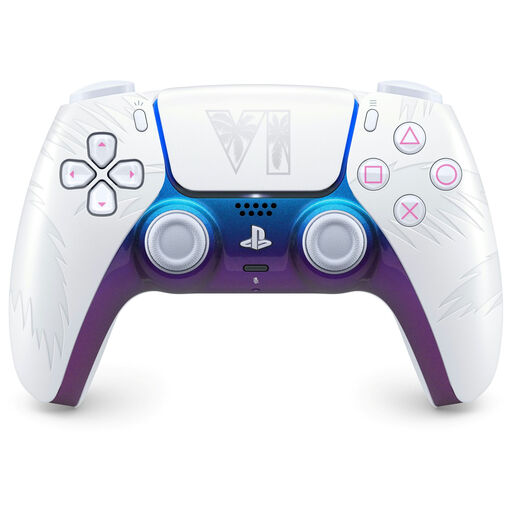 No image available
PlayStation DualSense Wireless Controller - Grand Theft Auto VI White Limited Edition
An option for a PS5 set-up; the product name also mentions PC, Mac and mobile devices.
According to the product information, the haptic feedback and adaptive triggers mentioned are only available in compatible games.
View on Joybuy
 No image available
GameSir Cyclone 2 Multiplatform Controller (Black-Bundle Edition)
Worth considering for a PC or Switch set-up; the product name also mentions iOS and Android. Check that your game and device support this version.
View on Joybuy
 No image available
Nintendo Switch Pro Controller - Black
An option for an original Nintendo Switch set-up; also check that your basketball game supports local multiplayer with this controller.
View on Joybuy
 No image available
Nintendo Switch 2 Official Pro Controller - Black
An option for Nintendo Switch 2; according to Nintendo, this Pro Controller is designed exclusively for that system.
View on Joybuy
Frequently asked questions
Do you need an online subscription to play NBA 2K26 locally on PS5?
The Dutch PlayStation Store lists one to four players for NBA 2K26 and lists PS Plus separately as a requirement for online play. Check how many players your chosen local play mode supports in the game.
Can each player hold one Joy-Con on Switch?
Not in every game. Nintendo says a Joy-Con held horizontally can be used as a separate controller if the software supports that play style. So check the controls for your basketball game.
How do you get a second DualSense ready to use?
According to Sony, first connect the second DualSense to your PS5 while it’s switched on using a USB cable, then press the PS button. Once the controller has charged sufficiently, you can unplug it. You can use up to four controllers at the same time on PS5.
What can you do if a controller you bought online is faulty?
According to the Dutch government, if a product is faulty you may be entitled to a free repair, replacement or refund. There is no fixed statutory guarantee period for all products in the Netherlands; the assessment depends on factors including the product and the circumstances.
What is the cooling-off period for online purchases in the Netherlands?
The Dutch government states that sellers must tell you about the cooling-off period when you buy online. It is usually 14 days. Check the information provided with your order, and remember that the cooling-off period is separate from your statutory rights if a product is faulty.


