Who is this relevant to?

Housemates sharing one console

They’re mainly looking for an extra controller that works with their console and local basketball game mode. Nintendo Netherlands says that, for NBA 2K26 on Switch 2, every player in multiplayer mode needs a compatible controller.

Players in a small living room

They want to play together from the sofa or table, while making sure there’s room to move and the cable can be routed safely. A wired controller needs a suitable spot for the device and cable.

Housemates who play on PC

They need to check that the controller, connection method and game they’ve chosen work with their Windows PC. Extra features are only useful if the game supports them.

What should you consider when choosing?

What to consider What should you check? Who is this important for?
Platform and model variant Compare the exact controller model and connection method with your console or PC. The manufacturer lists different connections and platforms for the 8BitDo Ultimate 2C Wireless and the Ultimate 2C Bluetooth. When I buy an extra controller, I want to be sure it works with the device we use for our basketball game. Around 33% of consumers prioritise platform compatibility.
Number of players Count the controllers you can use and check the local game mode. Nintendo Netherlands says that, for NBA 2K26 on Switch 2, every player in multiplayer mode needs a compatible controller. I want everyone at home to be able to play at the same time, so I check which controllers the game mode accepts for players. Around 27% of consumers prioritise having enough controllers for the game.
Wired or wireless Measure the distance between the players, device and connection point. For the PowerA wired Switch model mentioned, the manufacturer specifies a 3 m cable and use with the Switch in its dock. In a small living room, I want us to be able to sit together without a cable getting in the way. Around 20% of consumers focus mainly on the layout and connections in their gaming space.
Power Check how the controller is powered and what’s included with the exact model. The Xbox Wireless Controller uses AA batteries; according to the manufacturer, the PowerA wired model mentioned doesn’t need batteries. When housemates share controllers, I want to know in advance who’s responsible for batteries or charging. Around 13% of consumers consider power and running costs their main concern.
Extra features Check whether the game supports the features you want. PlayStation says that DualSense haptics on PC require game support and a USB connection. Once the basic set-up is sorted, I want to know whether extra buttons or feedback will actually be useful in our game. Around 7% of consumers prioritise controls and extra features.

Avoiding common buying mistakes

  • Assuming similar model names mean it’s the same controller

    According to 8BitDo, the Ultimate 2C Wireless and Ultimate 2C Bluetooth have different listed platforms and connections. Choosing based on the product range alone could mean ending up with a model that doesn’t work with your device.

    Compare the full model name and listed connection with the console or PC you use to play.

  • Choosing a Switch 2 controller for the original Switch

    Nintendo says that the Switch 2 Pro Controller doesn’t work with the original Switch. According to Nintendo, an original Switch Pro Controller can be paired wirelessly with Switch 2.

    Before you buy, check which Switch generation you have.

    If you choose the wrong generation, you may still need to buy a compatible controller.

  • Choosing a wired controller without checking your room layout

    According to the manufacturer, the PowerA model tested has a detachable 3 m cable and only works when the Switch is in its dock.

    Check that the dock, USB connection, seating and cable route all work together.

  • Confusing the manufacturer’s warranty with your statutory rights

    ACM ConsuWijzer distinguishes between the statutory guarantee and any retailer or manufacturer’s warranty. If a product is faulty, the retailer is responsible for providing an appropriate solution.

    Keep your proof of purchase and report any fault to the retailer. What you can expect will depend on what a reasonable person would expect from the product under normal use.

Brands to compare

PlayStation

The DualSense range is designed for PS5 and can also connect to compatible PCs via USB-C or Bluetooth.

  • PlayStation lists haptic feedback as a feature when supported by the game.
  • On PC, PlayStation says haptic feedback requires both game support and a USB connection. Don’t assume a particular basketball game supports it.

Xbox

The Xbox Wireless Controller is an option for Xbox consoles and Windows PCs, provided the game and mode you’ve chosen support it.

  • Microsoft lists Xbox Wireless for Xbox consoles and Bluetooth for devices including Windows PCs.
  • The controller uses AA batteries. Also check that its connection method is suitable for the device you plan to use.

Nintendo

Choosing the right generation is essential when buying a Pro Controller for Switch or Switch 2.

  • According to Nintendo, an original Switch Pro Controller can be paired wirelessly with Switch 2.
  • Nintendo says the Switch 2 Pro Controller doesn’t work with the original Switch. The Switch 2 model includes assignable GL/GR buttons, among other features.

8BitDo

The Ultimate 2C Wireless and Ultimate 2C Bluetooth are different models for platforms including PC and Switch.

  • For the Ultimate 2C Wireless, 8BitDo lists Windows via 2.4 GHz or USB, and Android via Bluetooth.
  • The separate Ultimate 2C Bluetooth is designed for Switch. For Switch 2, 8BitDo specifies a required software version. Check the full model name.

PowerA

The Enhanced Wired model tested is designed for a fixed Switch gaming set-up.

  • PowerA lists a detachable 3 m cable for this model, which doesn’t need batteries.
  • According to PowerA, this model only works when the Switch is in its dock and doesn’t support features including motion controls.

Controllers at Joybuy

This Joybuy selection includes wired and wireless controllers for Nintendo Switch and Switch 2, PS5 and Xbox. Start with the console you use to run your basketball game, then check the connection and where you’ll play.
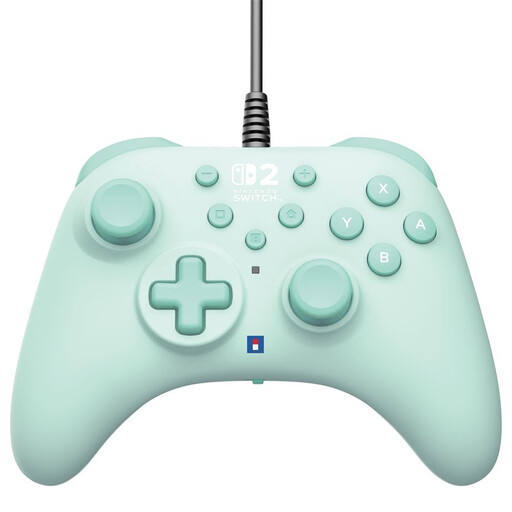
Hori Horipad Turbo wired controller for Switch and Switch 2, green

Hori Horipad Turbo wired controller for Switch and Switch 2, green

A wired option for a Switch gaming set-up where the cable can reach your seats.

The product information lists a 3 m USB-A cable and programmable buttons.

View at Joybuy

PlayStation DualSense Wireless Controller Grand Theft Auto VI White Limited Edition for PS5, PC, Mac and mobile

PlayStation DualSense Wireless Controller Grand Theft Auto VI White Limited Edition

A wireless DualSense model for a PS5 set-up. Check that your chosen basketball game supports local multiplayer with this controller.

The product information lists haptic feedback, adaptive triggers, a built-in microphone and a rechargeable battery. According to PlayStation, haptic feedback on PC requires game support and a USB connection.

View at Joybuy
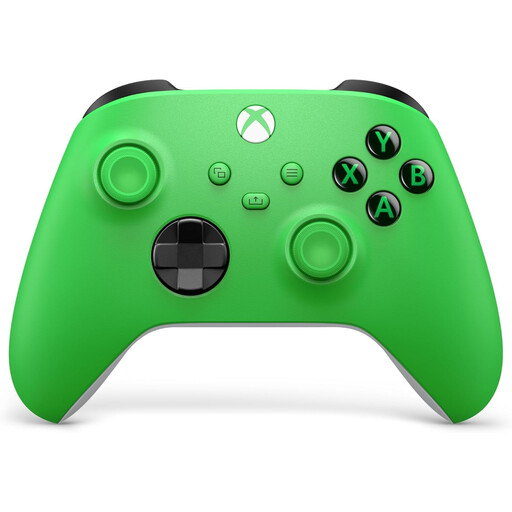
Xbox Wireless Controller Velocity Green for Xbox Series X/S and Xbox One

Xbox Wireless Controller Velocity Green for Xbox Series X/S and Xbox One

An option for an Xbox set-up. Microsoft also lists Windows as a supported platform for the Xbox Wireless Controller.

The product information lists a hybrid D-pad and USB-C. Microsoft specifies AA batteries for power and Xbox Wireless for Xbox consoles. Check the connection method for the device you plan to use.

View at Joybuy

Nintendo Switch Pro Controller, black

Nintendo Switch Pro Controller, black

An extra wireless controller for Switch. Nintendo says an original Switch Pro Controller can also be paired wirelessly with Switch 2.

The product information lists motion controls and HD Rumble.

View at Joybuy

Nintendo Switch 2 Pro Controller, black

Nintendo Switch 2 Pro Controller, black

An extra wireless controller for Switch 2. Nintendo says this controller doesn’t work with the original Switch.

The product information lists HD Rumble, motion controls, a rechargeable battery and a USB charging cable.

View at Joybuy

Frequently asked questions

Can two separate Joy-Cons automatically be used by two players in a basketball game?

Not necessarily. Nintendo says that, in NBA 2K26’s multiplayer mode on Switch 2, each player needs a compatible controller. Check which controller set-up your own game and mode accept as one player’s controller.

Can a Switch 2 Pro Controller also be used with the original Switch?

No. Nintendo says the Switch 2 Pro Controller doesn’t work with the original Switch. According to Nintendo, an original Switch Pro Controller can be paired wirelessly with Switch 2.

What should you connect or charge before a night of local gaming?

Pair each controller with the right system and check the power supply and cable route. The Xbox Wireless Controller uses AA batteries; the PowerA wired Switch model tested doesn’t need batteries, but it does require the Switch to be in its dock.

Do you need an online subscription for a local basketball game?

Not just to use your chosen controller. Nintendo says Play Now in NBA 2K26 on Switch 2 is available offline; other modes and features may need an internet connection and possibly an account. Check the requirements for your own game and mode.

What are your rights in the Netherlands if an online controller purchase isn’t right for you or breaks too soon?

According to ACM ConsuWijzer, online product purchases generally come with a statutory 14-day cooling-off period starting from delivery. Your statutory guarantee is separate from any manufacturer’s warranty. If a product breaks sooner than you could reasonably expect under normal use, the retailer must provide an appropriate remedy free of charge, according to ACM ConsuWijzer.
