What should you look for when choosing?
Start with your console or PC and your game’s compatibility. Then compare how easy the controls are to recognise in the dark, and decide whether a cable or wireless power works better for your gaming set-up.
| What to consider |
What should you check? |
Who should prioritise this? |
| Compatibility |
Check the exact controller model, your system’s generation and whether your basketball game supports it. |
If my main concern is making sure the controller works with my console or PC, compatibility comes first. Around 33% of consumers make compatibility their top priority. |
| Controls in the dark |
Check where the lighting is positioned and whether you can identify the buttons and triggers on the exact version. |
When I play in a dark room, I want to find the buttons I need without relying on lighting effects alone. Around 27% of consumers put easy-to-recognise controls first. |
| Cable and power |
For a wired controller, check the cable length and route. For a wireless controller, check which power source and accessories are included with that version. |
If I like to sit some distance from my console or don’t want to think about power while gaming, I weigh up wired and wireless options carefully. Freedom of movement and power are the main concerns for around 20% of consumers. |
| Comfort and customisation |
Compare the button layout you know, your preferred button mapping and the version; try the controller for yourself if possible to assess how comfortable it feels. |
For longer sessions, I focus on controls that feel comfortable in my hands and suit my preferences. Around 20% of consumers put comfort and customisation ahead of other considerations. |
Controller options at Joybuy
This selection includes controllers for Xbox and Windows systems, PS5 and PC, or Switch. Check whether your system and basketball game are supported for each model; a version with RGB lighting doesn’t guarantee that the button labels light up.
 No image available
Xbox Wireless Controller Robot White
A wireless Xbox controller to consider if you play on Xbox or a supported Windows PC. Check compatibility with your exact system and game.
The product information lists AA batteries for wireless use. Check which power source and accessories are included with this version.
View at Joybuy
 No image available
PlayStation DualSense Wireless Controller V3, Remix Green Edition
A wireless DualSense version to consider for PS5. Check compatibility too if you want to use it with another device or a specific game.
The product information describes a rechargeable controller. Bear charging in mind, and check the connection type and what’s included with this version.
View at Joybuy
 No image available
GameSir Cyclone 2 Black-Bundle Edition
A multi-platform option to consider if you play on a system that supports this version. Check that it works with your basketball game and platform.
The product name lists PC, Switch, iOS and Android, TMR sticks, RGB lighting and a charging station. The stated compatibility doesn’t in itself mean that every game will support it.
View at Joybuy
 No image available
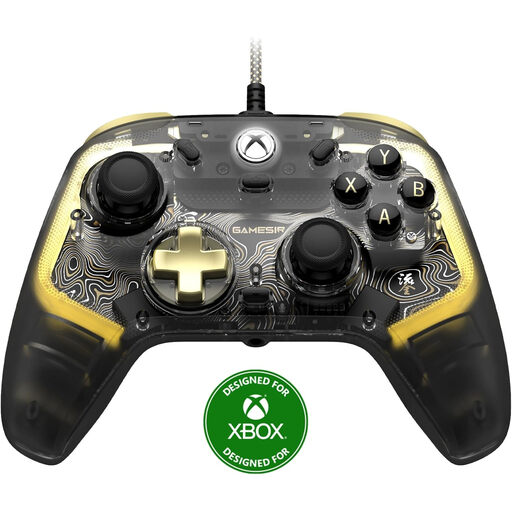
GameSir Kaleid Flux Smoke Transparent RGB Wired
A wired Xbox controller to compare if a cable suits your gaming set-up and you’re looking for a model with RGB lighting.
The product name lists Xbox Series X/S, Xbox One and Windows 10/11. Check whether the lighting makes the controls easy to use in a dark room.
View at Joybuy
 No image available
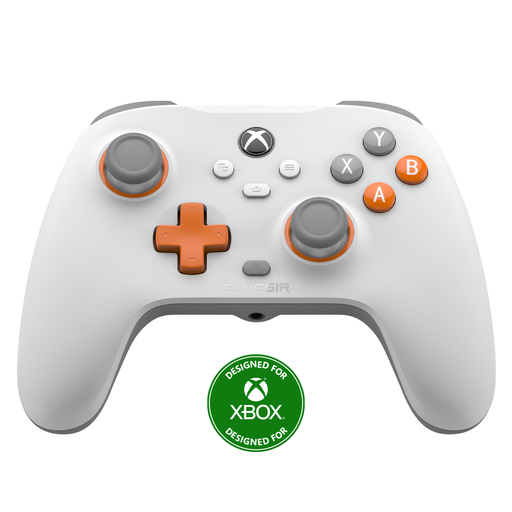
GameSir T7 Wired Xbox Controller White
A wired version to consider if you play on one of the listed Xbox or Windows systems and a cable works for your gaming set-up.
The product name lists Xbox Series X|S, Xbox One, Windows 10/11 and Steam. The product information lists a detachable 3 m USB-C cable and Hall effect joysticks and triggers. Check compatibility with your preferred game and system.
View at Joybuy
Frequently asked questions
Will a controller for one console also work with another?
Don’t assume it will. Nintendo says the Switch 2 Pro Controller is for Switch 2 only and doesn’t work with the original Switch. For any other model, check the listed compatible systems and then whether your game supports it.
Will DualSense vibrations and adaptive triggers work with a basketball game on PC?
Not automatically. Sony says the game must support these features and that haptic feedback on PC requires a USB connection. Check support for the specific game.
How can I avoid interruptions during a long gaming session?
Check the battery level or charge the battery beforehand. With a wired controller, make sure the cable runs safely and comfortably to your console or PC. PowerA lists a 10 ft cable for the Lumectra model reviewed.
Can I return a controller bought online, and what if it breaks too soon?
For a standard online consumer purchase in the Netherlands, ACM ConsuWijzer says you’ll generally have a statutory 14-day cooling-off period after delivery; check which exceptions apply. Your statutory guarantee is separate from any manufacturer’s warranty. If a product is faulty despite normal use, the seller is responsible for providing an appropriate solution.
What should I look for when it comes to product safety?
The Dutch government states that electronic products must carry a CE marking when required by the applicable EU rules. Check the product information and marking on the exact controller; a retailer’s online description alone doesn’t prove compliance.


