
Couch players short on space
Want to play basketball together without swinging their arms around. Start by choosing a game with the local mode you want, then check which controllers work with it.


First, choose a basketball game with the local mode you want to play, then check the platform, player count and controller support. Nintendo Netherlands describes a local 3-point challenge in Nintendo Switch Sports, while the 2-on-2 matches on the Dutch game page are listed as an online option. If it isn’t safe to move around in your narrow living room, a game with button controls is a better fit; a different controller won’t automatically make a motion-controlled game suitable.
Want to play basketball together without swinging their arms around. Start by choosing a game with the local mode you want, then check which controllers work with it.
Are looking for a basketball challenge with Joy-Con, but also need another way to play if there isn’t enough clear space.
Want to know in advance whether everyone can play at the same time, and whether they’ll need an extra controller, a pair of Joy-Con or a different game.
First, check that the game has the right local mode. Then choose the controls and number of controllers that suit your space and group.
| What to consider | What should you check? | Who does this matter most to? |
|---|---|---|
| The right local mode | Check whether the specific game and edition let you play the match you want locally on one system; a local challenge isn’t automatically a full match. | If I want to play with others on one screen, I need to know for sure that the chosen basketball mode works locally. Around 31% of consumers prioritise local play modes. |
| Space and controls | Check whether everyone can move around safely and whether the game requires motion controls; if not, choose a game with button controls. | In a narrow living room, I don’t want to bump into people or objects. Around 25% of consumers prioritise safe playing space and the control method. |
| Platform and game compatibility | Compare the platforms supported by the specific controller model with those supported by the game; also check whether motion controls are required. | If I want to use my existing console or PC, both the controller and the game I want need to work with it. Around 25% of consumers check this first. |
| Number of players and controllers | Check the maximum number of players in the local mode you’ve chosen, then count how many individual controllers you’ll need. | If everyone wants to play at the same time, I want to know in advance how many controllers the game requires. Around 19% of consumers prioritise the number of players and controllers. |
Nintendo Netherlands describes a local 3-point challenge in Nintendo Switch Sports; the 2-on-2 matches on the same Dutch game page are online. So the mode you want may not be the one you expect.
Choose the game and the specific local mode first, and only then buy extra controllers.
If the mode you choose doesn’t offer the type of match you want, you may need a different game.
Nintendo states that Switch Pro Controllers aren’t compatible with Nintendo Switch Sports. A wired Switch controller without motion controls won’t replace Joy-Con in games that only work with Joy-Con.
Check compatibility with the specific game, not just the console.
When players move around, they could bump into each other or objects. Nintendo recommends taking your surroundings into account and wearing the Joy-Con wrist straps when playing wirelessly.
Make sure there’s enough clear space around each player, or choose a basketball game with button controls.
Joy-Con are designed for motion controls in Nintendo Switch Sports and can be used individually in supported games.
A DualSense could be a good extra controller for an existing PS5 and a basketball game with the local mode you want.
The Xbox Wireless Controller is designed for supported Xbox consoles and Windows PCs.
The Ultimate 2C Wireless is an option for Windows or Android; the Ultimate 2C Bluetooth is a different model designed for Switch.
A wired Switch controller could suit supported games with button controls.
These controller options are suited to button controls on PS5, Xbox, PC or Switch, with a pair of Joy-Con also included for supported Switch games. For each game, check the local mode, controller support and any motion control requirements.
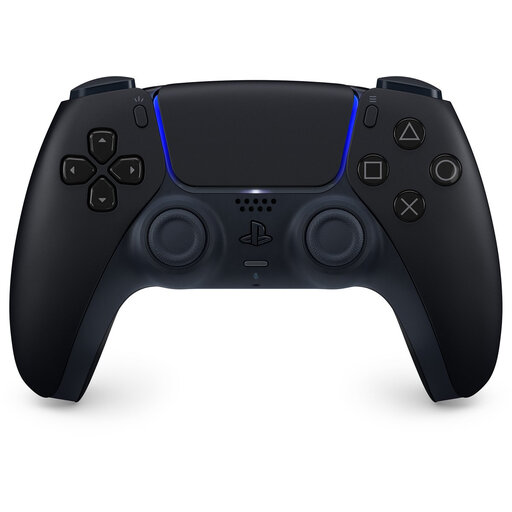 Image unavailable
An option for button controls if you already use a PS5; check that your chosen basketball game and local mode support multiple players on one system.
The product description lists haptic feedback, adaptive triggers and sticks. Sony lists these features, but that doesn’t confirm that a specific basketball game uses them.
 Image unavailable
Suited to an Xbox or Windows PC setup with button controls; check whether the game supports multiple controllers in the local mode you want.
Xbox lists support for Xbox consoles and Windows PCs. The product description mentions Bluetooth, USB-C, a hybrid D-pad and customisable button mapping.
 Image unavailable
A pair of Joy-Con for supported Switch games. In games that allow individual use, each Joy-Con can be used by one player. Nintendo says Desktop Basketball supports up to four players, with one Joy-Con per player.
The product description lists button and motion controls, as well as two wrist straps. For motion-controlled play, Nintendo recommends leaving enough clear space and wearing the wrist straps.
 Image unavailable
An option if you’re looking for a controller for PC or Nintendo Switch; check support for the specific game and local mode before choosing.
The product name lists six programmable buttons and adjustable joysticks. The product description states that it’s compatible with PC and Nintendo Switch.
 Image unavailable
An option for PC or Switch if the game supports the controller; also check which local mode suits the way you want to play.
The product description lists compatibility with PC and Switch, wired, Bluetooth and dongle connections, and a bundle with a charging dock. It also mentions TMR sticks, triggers, micro-switch buttons and a D-pad.
No. Nintendo states that the Switch Pro Controller and Switch 2 Pro Controller aren’t compatible with Nintendo Switch Sports. Which Joy-Con setup works depends on the sport you choose.
Check that there’s enough clear space around each player. For Nintendo Switch Sports, Nintendo recommends taking your surroundings into account and wearing wrist straps; the Dutch instructions say to attach the Joy-Con wrist straps whenever you play wirelessly.
Nintendo says a Nintendo Switch Online membership is needed to play Nintendo Switch Sports online, but not for the local challenge described. For another game, check which features are available locally and which require an online connection.
According to ACM ConsuWijzer, online product purchases generally come with a 14-day cooling-off period after delivery, although there are exceptions. This is separate from your statutory guarantee: if a product doesn’t do what you could reasonably expect during normal use, contact the seller.