
Console player looking for compatibility
You want to find out first whether the controller works with your PlayStation, Xbox or Switch 2 and your game. Sony, Xbox and Nintendo explain the platform and usage requirements for their controllers.


First, choose a controller that works with your console or PC and your basketball game. Then decide how to connect your headset: a 3,5mm jack on the controller doesn’t automatically mean audio will work with every wireless PC connection. Extra buttons are only useful if you want to set them up and use them.
You want to find out first whether the controller works with your PlayStation, Xbox or Switch 2 and your game. Sony, Xbox and Nintendo explain the platform and usage requirements for their controllers.
You want to hear game audio or chat through a headset and find out whether it should be connected to the controller or directly to your PC. Sony and Microsoft explain how the connection on PC can depend on the connection mode.
You want to set up extra buttons or profiles and decide whether those controls suit your playing style. GameSir and 8BitDo explain the extra button and customisation options available on specific models.
First check support for your platform and game, then how headset audio is routed, and finally the extra controls and your choice of cable or power supply.
| What to consider | What should you check? | Who is this important for? |
|---|---|---|
| Platform and game | Check support for your exact console or PC and basketball game. For example, according to 8BitDo, the 8BitDo Ultimate 3-mode Controller for Xbox uses different connection modes on Xbox and Windows PC. | I want to find out first whether the controller works with my gaming device and whether my game supports it. Around 31% of consumers put platform and game compatibility first. |
| Headset audio | Check where to connect your headset and how the controller needs to be connected to your PC or console. Sony requires a wired controller connection for the DualSense headset jack to work on PC; for the Xbox chat headset on PC described by Microsoft, Bluetooth is not a supported connection method. | I want to know whether my headset will play audio through the connection I want, including when I’m gaming on PC. Around 31% of consumers make headset functionality their top priority. |
| Buttons and settings | Check the button layout and whether the exact model has extra buttons, and whether your game supports the button mapping you want. GameSir says the G7 SE has two configurable rear buttons. | I want to use the buttons in a way that suits my game, without choosing settings I don’t need. Around 23% of consumers put customisable controls first. |
| Cable and power | Check that a cable will reach your gaming area and what power source or adapter you’ll need. The GameSir G7 SE is wired; Microsoft specifies AA batteries for the Xbox wireless controller described. | I want to take into account how far I sit from the screen and the cable or power options while playing. Around 15% of consumers prioritise these practical considerations. |
On PC, headset functionality can depend on how the controller is connected. Sony requires a wired controller connection for the DualSense headset function on PC and Mac. For the Xbox chat headset on PC, Microsoft describes a connection method other than Bluetooth.
Before buying, check that it works with your exact controller, headset and PC connection mode.
For the Ultimate 3-mode Controller for Xbox, 8BitDo specifies a wired USB connection on Xbox and a 2.4GHz connection on Windows PC. The mode therefore varies by platform.
Compare the connection mode for each device you want to use, rather than looking only at the number of modes in the model name.
According to the Dutch government, if a product is faulty, the retailer is your point of contact. An extra paid-for warranty is only worthwhile if its terms offer something beyond your existing rights.
Before buying, read what cover the extra warranty provides and what you can already expect under your statutory rights.
A good option if you play on PS5 or want to use a DualSense with compatible games on Windows PC.
A good option for Xbox and Windows PC, with models that have a jack for a compatible wired headset.
The wired G7 SE is an option for Xbox or Windows PC if you want headset controls and configurable rear buttons.
A good option if you want to switch between using the Ultimate 3-mode Controller for Xbox on Xbox and Windows PC.
The Switch 2 Pro Controller is a platform-specific option for basketball games on Nintendo Switch 2.
This selection includes controllers for Xbox, Windows PC and compatible mobile devices or Nintendo Switch systems. Check each model to make sure it supports your specific game and the headset connection you want.
 No image available
A good fit if you’re looking for a wired controller for Xbox or Windows PC and want to connect a headset to the controller.
The product information lists Xbox Series X/S, Xbox One and Windows 10/11, a 3.5mm jack, two programmable rear buttons and a detachable USB connection. The controller is wired.
 No image available
A good fit if you’re looking for a controller with programmable buttons for the listed PC, Switch or Android devices; check separately how to connect your headset.
The product name lists six programmable buttons, haptic feedback triggers and adjustable joystick damping. The listed platforms are PC, Nintendo Switch, Switch 2, Steam and Android.
 No image available
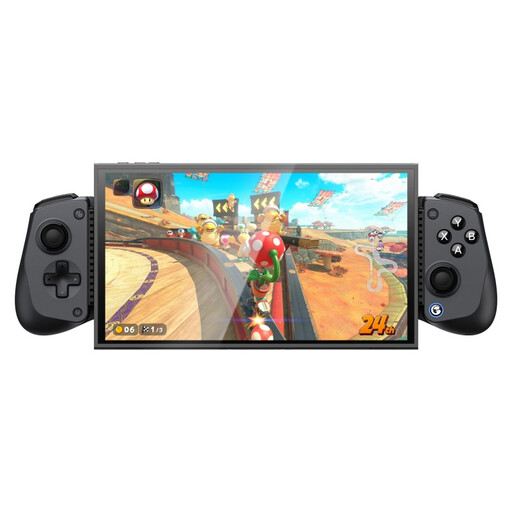
A good fit if you’re looking for a controller for the listed Switch, PC or mobile platforms; check separately whether the headset audio you want works through this controller.
The product name lists Switch 2, Android, iOS and PC. The product information lists Bluetooth and a suitable device length of 105–213 mm for mobile use.
 No image available
A good fit if you want one model for wired use on Xbox and wireless use on PC or mobile; check the connection and platform support for your headset.
The product name lists Xbox Series X|S, Xbox One, PC, Android and Steam. According to the product information, the connection is wired on Xbox and wireless on PC and mobile.
No. Sony requires a wired connection between the controller and the device for the DualSense headset jack to work on PC and Mac. Also check that your game supports the controller.
For the Xbox chat headset described by Microsoft, the controller must be connected via USB or an Xbox Wireless Adapter for Windows. The headset isn’t supported if the controller is connected to the PC using Bluetooth.
GameSir explains how to adjust the volume and game/chat balance using the M button and directional pad, as well as the separate steps for assigning the two rear buttons. If you have audio problems, first check that the plug is fully inserted.
Nintendo doesn’t guarantee that it will work with every audio device. According to Nintendo, the controller has a 4-pole 3.5mm CTIA jack, so check that your headset plug is compatible and that your game supports the controller.
No. 8BitDo describes a wired USB connection for Xbox and a 2.4GHz connection for Windows PC. Check the connection mode for each platform you want to use.