What should you look for?
Start by checking compatibility with your console or PC and your game. Then check the local mode, connection and power options. Finally, compare the controls and what’s included in the box.
| What to consider |
What should you check? |
Who is this most important for? |
| Compatibility |
Check the exact console model, the controller’s full model name and the supported connection. |
If I’m looking for an extra controller for the console or PC I already own, I want to be sure the combination will work. Around 31% of consumers put compatibility first. |
| Local game mode |
Check the edition, local mode and player count; online player numbers don’t tell you this automatically. |
If an extra controller is for a match on one screen, I want to know whether my edition of the game supports local multiplayer. Around 25% of consumers say a working local match is their top priority. |
| Cable and power |
Compare wireless use, battery type or batteries, included cables and the cable route to the sofa. |
If I’m playing from the sofa, I want room to move without batteries running out unexpectedly or an awkward cable route. Around 19% of consumers prioritise freedom of movement, cables and power. |
| Controls and grip |
Compare the button layout and grip; check separately whether the game supports any extra features. |
If I play often, I want controls that feel familiar and suit my preferences. Around 13% of consumers prioritise grip and controls. |
| Accessories and aftercare |
Check what’s included in the box and who to contact if something goes wrong. |
If I want to factor in extra accessories or help with a fault, I want to know what comes with this model and what rights I have in relation to the seller. Around 12% of consumers prioritise accessories and aftercare. |
Controller options at Joybuy
This selection at Joybuy includes controllers for Xbox and Windows, PS5 and Switch 2, as well as a PC and Switch controller. Check the local mode for each game and the exact version of each controller.
 No image available
Xbox Wireless Controller for Xbox Series/PC - Ice Breaker Special Edition
Ideal if you play on Xbox Series X|S, Xbox One or Windows 10/11 and want to play wirelessly from the sofa.
Supports Xbox Wireless and Bluetooth, and uses two included AA batteries.
View at Joybuy
 No image available
PlayStation DualSense Wireless Controller - Grand Theft Auto VI White Limited Edition
An option for an extra local player on PS5; check that your edition of the game supports the local mode you want.
The product description lists a built-in rechargeable battery and Bluetooth. No cable is included.
View at Joybuy
 No image available
GameSir Cyclone 2 (White-Bundle Edition)
Ideal if you’re looking for a controller for PC or Switch and want to choose between different connection options.
The product description lists wired, Bluetooth and wireless dongle connections, as well as TMR sticks and programmable rear buttons.
View at Joybuy
 No image available
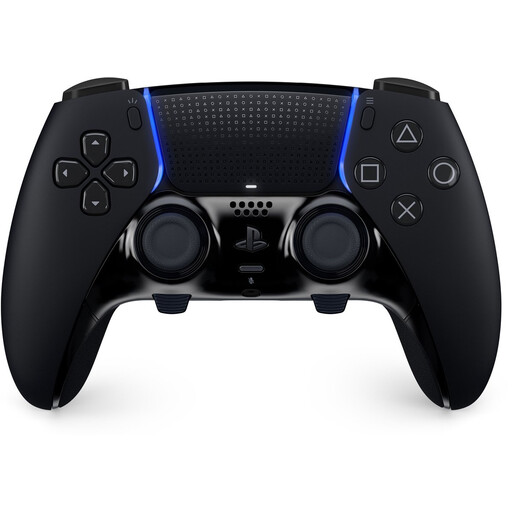
Sony PS5 DualSense Edge Controller Black
A PS5 controller for anyone who values customisable controls; check that the game supports the features you want.
The product description lists adjustable stick sensitivity and rear buttons. Replacement joystick modules are sold separately.
View at Joybuy
 No image available
Nintendo Switch 2 Official Pro Controller - Black
Ideal if you’re looking for a controller specifically labelled as a Switch 2 Pro Controller.
The product description lists Bluetooth and HD Rumble. Also check whether your game version supports local matches.
View at Joybuy
Frequently asked questions
Do I need an online subscription for two players on one screen?
Not necessarily: local and online play are different modes. The Dutch PS5 listing for NBA 2K27 states that it supports 1–4 players and requires PS Plus for online play. Check the mode and edition you want to use.
What should I check when connecting two controllers to a PC?
First, check that the game supports local multiplayer and your type of controller. Xbox Support says performance may be reduced when more than one controller is connected via PC Bluetooth; if necessary, check for another supported connection.
Can an older Nintendo Switch Pro Controller work with Switch 2?
Yes, Nintendo confirms that it can connect wirelessly to Switch 2. The HOME button on this older controller can’t wake Switch 2 from sleep mode; you can charge it using a USB cable connected to the Switch 2 dock.
Will a different controller make the TV picture easier to see in bright daylight?
No, reflections are down to the screen and its position, not your choice of controller. For distracting light, LG recommends, among other things, positioning the TV so it faces away from a window.
Who should I contact if a controller develops a fault too soon under normal use?
Contact the seller: according to ACM ConsuWijzer, they’re responsible if the product doesn’t meet what you could reasonably expect. The Netherlands doesn’t have a fixed general two-year period for this. Online purchases often also come with a cooling-off period of up to 14 days after delivery, with some exceptions.


