A compact camera may be all you need for overview shots of whole baskets. If you also want to fill the frame with small details of the weave, a mirrorless camera gives you more flexibility to choose a different lens later. Whichever camera you choose, check that the lens suits your shooting distance, and pay attention to the lighting, white balance and stability of your set-up.
Who is this buying guide for?
Online shop owner with a basket collection
You want to photograph baskets from similar angles, against a consistent background and with their weave colours faithfully represented. Canon Netherlands explains how a tripod can help keep the framing and background consistent.
Photographer capturing weave details
You want to fill the frame with small joins and material textures as well as photographing the whole basket. The lens and distance from the basket both affect whether you can achieve the crop you want. The Consumers’ Association emphasises that both the lens and sensor affect your photos.
Photographer working in different locations
You want to photograph baskets in different places and weigh portability against lens choice and a consistent lighting set-up.
What should you look for when choosing?
Compact camera with a fixed lens
Best for mainly overview shots and anyone who wants one camera that’s easy to carry.
The trade-off you can’t change the lens if the close-up you want is beyond its range. So test it with your basket and shooting distance.
Mirrorless camera with a standard zoom lens
Best for repeatable overview shots and anyone who wants the option to choose a lens for smaller details later.
The trade-off check that the supplied lens is suitable; you may need a different lens for the close-up you want.
| What to consider |
What to look for when buying |
Who should prioritise this? |
| Sharp, detailed shots of the weave |
Test the exact camera and lens combination with your largest basket and the smallest detail you want to capture, at the distance available. Canon gives the RF-S 18–45 mm a magnification of 0.25× in manual focus mode. |
If you want to fill the frame with small joins and material textures, you’ll need to know whether the lens can handle that at your working distance. Around 36% of consumers prioritise capturing weave details. |
| White background and natural basket colour |
Take a test shot and check the background, basket edge and weave under the lighting you plan to use. Canon Netherlands recommends checking the white balance and adjusting the exposure if necessary. |
If you want white to look truly white without losing the basket’s lighter areas, pay attention to exposure and colour reproduction. Around 29% of consumers prioritise preserving white and natural colours. |
| Consistent photos of multiple baskets |
Check that you can position the camera securely and keep the framing and lighting consistent. Canon Netherlands describes using a tripod for consistent framing and backgrounds. |
When taking a series of product photos, you’ll want the baskets photographed from similar angles and in similar lighting. Around 21% of consumers prioritise a repeatable photo series. |
| Portability and the size of the complete set-up |
Compare the camera with the lens you need, and factor in any tripod and lighting. The Consumers’ Association also advises paying attention to the lens. |
If you photograph in different locations, you’ll want to carry the complete set-up without losing sight of your lens needs. Around 14% of consumers prioritise a small, portable set-up. |
Common purchasing mistakes
-
Comparing megapixel counts alone
A higher megapixel count on its own won’t tell you whether a small weave detail will fill the frame at your shooting distance. The Consumers’ Association also highlights the role of the lens and image sensor.
Test the complete camera and lens combination with a basket and a detail at the distance you plan to shoot from.
-
Assuming a white background will look right automatically
In a bright scene, the metering may make the photo darker. The colour of the light can also affect the white background and the basket.
Take test shots and check the exposure and white balance. Keep the lighting as consistent as possible between products so you can compare the same settings.
You may also need to allow time and budget for lighting and post-processing to get a workable set-up.
-
Comparing a camera body with a complete compact camera
A mirrorless camera deal may include a body and a specific lens, while a compact camera already has its lens built in. Compare what’s included in each set, not just the camera body.
Check which items are included and whether you’ll need another lens, a tripod or a memory card for overview and detail shots.
An extra lens or accessories also mean more items to carry and set up.
Brands to compare
Canon
The EOS R50 kit with RF-S 18–45 mm has an interchangeable lens, while the PowerShot G7 X Mark III is a compact camera with a fixed lens.
- Canon lists a 24,2 MP APS-C sensor and an adjustable screen for the EOS R50.
- The RF-S 18–45 mm has its own limits for focusing distance and magnification. The G7 X Mark III’s fixed lens cannot be replaced.
Fujifilm
The X-S20 is a mirrorless camera for anyone who wants to edit RAW files and take photos outside a fixed set-up too.
- Fujifilm specifies 26,1 million effective pixels, RAW shooting and 5-axis sensor-shift stabilisation.
- The stated 7,0-stop compensation is based on Fujifilm’s test conditions and doesn’t tell you whether a specific lens is suitable for your weave details.
Sony
The ZV-E10 II is an APS-C mirrorless camera with an interchangeable E-mount lens, for anyone who wants to shoot video as well as basket photos.
- Sony lists approximately 26,0 MP for stills and offers, among other options, a kit with an E PZ 16–50 mm lens.
- The camera model and kit specifications don’t prove that the supplied lens will fill the frame with every small weave detail at your working distance.
Nikon
The Z50II has a viewfinder and an adjustable screen, which may be useful if ease of operation is a priority while you’re taking photos.
- Nikon describes an electronic viewfinder, a tilting touchscreen and adjustable picture profiles.
- Picture profiles are no substitute for controlled white balance when the basket’s natural colour matters. Assess the supplied lens separately too.
Cameras on Joybuy
Cameras on Joybuy that may suit this type of photography, from compact models to a mirrorless camera with a standard zoom lens. Check that each model’s lens and features suit your baskets, shooting distance and desired level of detail.
 Image unavailable
KINSI Mini Vlog Camera 4K, 64 MP
The product information lists still photography and a 330° rotating lens; check that it can capture the framing you want with your basket.
The title lists a 1.72-inch touchscreen and a mini tripod.
View on Joybuy
 Image unavailable
KOMERY G7 5K, 80 MP, 18× zoom
The title and product description list a portable point-and-shoot camera for still photography; test whether its fixed lens can capture the framing you want.
The product title lists 5K, 80 MP and 18× zoom.
View on Joybuy
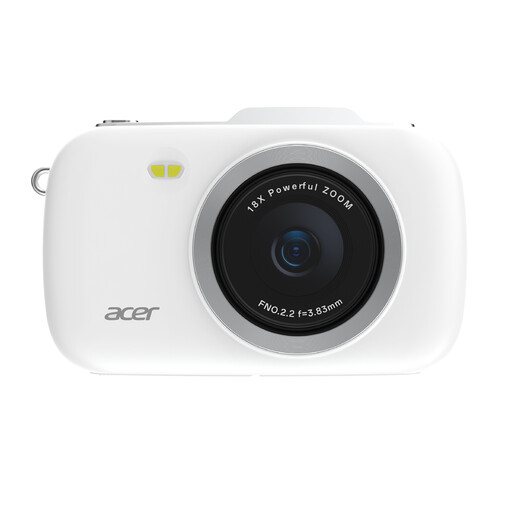 Image unavailable
KOMERY G7-A 4K, 80 MP, 18× zoom
The product description lists still photography with a portable point-and-shoot camera; assess the lens with the basket and framing you want to capture.
The product title lists 4K, 80 MP and 18× zoom.
View on Joybuy
 Image unavailable
Sony ZV-E10 with E PZ 16–50 mm zoom lens
This mirrorless camera with zoom lens is an option for overview shots with different framing; check whether the lens can fill the frame with the smallest detail you want to capture from your chosen distance.
The product information lists a 24,2 MP APS-C sensor and an adjustable touchscreen. A memory card and adapter/charger are not included, according to the description.
View on Joybuy
 Image unavailable
Sony ZV-1 compact camera
This compact camera is an option if you want a fixed lens; test whether its range suits both the whole basket and the detail you want to capture.
The product information lists 24–70 mm, RAW/JPEG shooting and a tilting screen.
View on Joybuy
Frequently asked questions
Do I need a macro lens to photograph a whole woven basket?
No, not just for an overview shot. If you want small joins to fill the frame, test the magnification and shooting distance of the exact lens. Canon lists a maximum magnification of 0.25× for the RF-S 18–45 mm in manual focus mode.
Why does a white background sometimes look grey?
In a very bright scene, the automatic metering may underexpose the photo. Check a test shot and, if necessary, use exposure compensation or manual exposure without losing the basket’s lighter areas.
How can I keep the colours consistent across a series of basket photos?
Keep the lighting and set-up as consistent as possible, and check the white balance under the lighting you’re using. RAW shooting can make it easier to adjust the white balance during post-processing, if your chosen camera supports it.
What should I check besides the camera body?
Check exactly what’s included in the set: a camera body and a lens are not the same package. Also factor in any other lens, tripod or memory card you may need.
What rights do I have when buying a camera online in the Netherlands?
If you buy online from a business as a consumer, the Dutch government says you’ll often have a 14-day cooling-off period, although exceptions may apply. You’re entitled to a product that works as it should, but there is no fixed statutory warranty period in the Netherlands. If a product doesn’t meet the requirements, contact the seller. These consumer rights don’t necessarily apply to business purchases.


