
Vandaag of morgen in huis

Kwaliteit gegarandeerd

Welkomstaanbiedingen ontgrendelen: GRATIS bezorging | Tot 80% korting | Gratis 30 dagen JoyPlus-proefperiode
Download de app
A backpack seems simple to choose, until you’re carrying a laptop, books, lunch and a charger every day. A bag may look spacious in photos, but have too few compartments in practice. Terms such as “waterproof”, “ergonomic” and “travel-friendly” don’t always tell you exactly what you need to know, either.
As a Joybuy Product Recommendation Officer, I focus on information you can check: dimensions, capacity, laptop compatibility, material, comfort and layout. That way, you can compare a laptop backpack, travel backpack or work backpack on practical features, rather than appearance alone.
A laptop backpack for a 15.6-inch laptop won’t automatically fit every device of that size. Screen diagonal is only one measurement. Your laptop’s actual width, height and depth can vary. So check the dimensions of the laptop compartment and compare them with your laptop, including any protective case.
A backpack with a laptop compartment should also offer sufficient protection with a padded wall and a fastening that stops the device from shifting around easily. Don’t treat a laptop compartment as a guarantee against damage: put your laptop in carefully and avoid overloading the bag.
A water-resistant backpack can help keep out light rain, but that doesn’t mean it’s safe from prolonged rain, puddles or submersion. Check the material, the finish of the zips and the construction around the seams. A roll-top fastening can shield the opening better, but always check the product information before carrying electronic devices without extra protection.
For cyclists and commuters, a rain cover or a separate waterproof laptop sleeve is often a sensible addition.
A long list of pockets sounds handy, but small compartments can reduce the space in the main section. Don’t just look at the number of compartments. Check the capacity in litres, the dimensions and the shape of the main compartment too.
A spacious backpack is most useful when its layout suits what you carry. For school, books and a pencil case are important; for work, you’ll also need space for documents, a laptop and accessories. A travel backpack should have room for clothes, a washbag or snacks too.
For a 15.6-inch laptop backpack, a stated compatibility of up to 15.6 inches is a good starting point, but it doesn’t guarantee a perfect fit. Check:
According to the product information, the Lenovo ThinkPad Professional 2nd Generation is suitable for laptops up to 15 inches, while its external dimensions are 30 × 18,5 × 43,5 cm. The specifications also list a laptop compartment, zipped pockets and a handle.
Capacity is usually given in litres. For everyday use, around 15 to 25 litres may be enough. If you also carry clothes, lunch or sports kit, you’ll often need more space. An expandable backpack offers extra flexibility, but check that it’s still comfortable to carry when fully expanded.
According to the product details, the HP Travel 25L 15.6-Inch Blue Laptop Backpack has a capacity of 25 litres, expandable to 30 litres. The bag weighs around 860 grams and has shoulder and chest straps. Pack heavy items close to your back, and don’t carry sharp or heavy objects without protection.
Look for adjustable, padded shoulder straps, a padded back panel and a handle. A chest strap can help keep the bag stable while cycling or walking. A luggage strap is useful if you want to attach a travel backpack to a trolley.
A USB port is mainly a pass-through for a cable. You’ll still need a power bank; the port won’t charge a device on its own. Also check that the cable and power bank can be stored safely and that the port is protected from moisture.
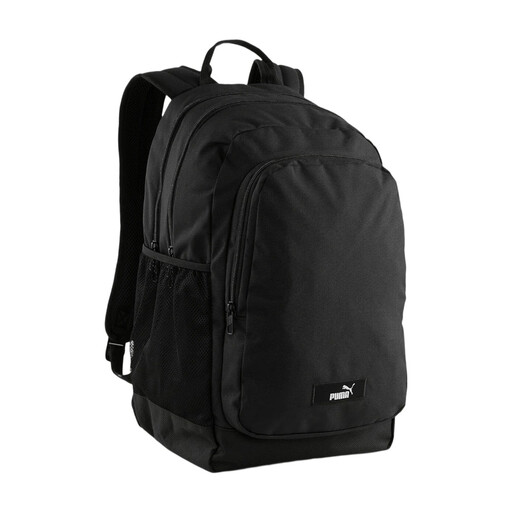
Why it suits this profile: This backpack is designed for school, everyday use and short commutes. It has a capacity of around 24 litres and measures 45 × 30 × 18 cm.
The two main compartments and several pockets make the layout clear from the outset. Do check that your laptop is within the stated maximum device size of 18,7 inches.
Padded shoulder straps and back panels; two mesh side pockets; according to the product description, at least 70% of the main material is made from recycled materials.

Why it suits this profile: This work backpack is ideal for commuters and travellers who want to carry a laptop, clothes and accessories in one bag.
Its capacity is clearly stated as 25 litres, expandable to 30 litres. So you don’t have to rely on a vague claim about “large capacity”.
Suitable for laptops up to 15,6 inches; expandable capacity; chest straps, lockable zips and a hidden RFID-blocking pocket, according to the product description.
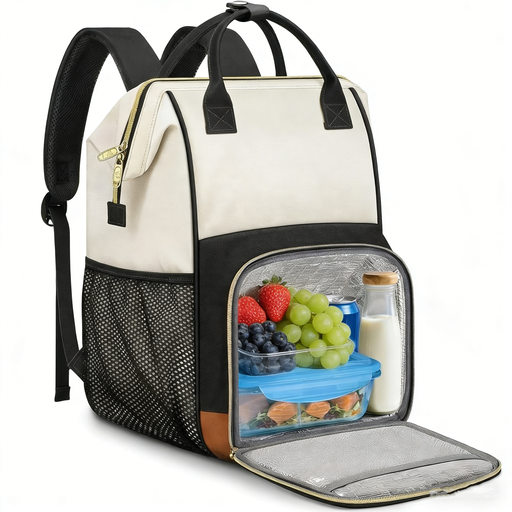
Why it suits this profile: A practical choice for anyone carrying a laptop, documents and lunch to work, school or a long day out.
The dimensions, weight of around 1,14 kg and laptop compartment for devices up to 15,6 inches are all listed. The lunch compartments are also removable, so you can use the space differently.
Water-resistant material according to the product description; removable insulated lunch bag; A4 organiser compartment, luggage strap and USB port.
We’ve put together a complete, up-to-date list of products that meet these strict selection criteria and the applicable European safety regulations.
Not always. The screen size doesn’t tell you the laptop’s exact width and depth. Compare your device’s dimensions with those of the laptop compartment, and allow for a protective case.
For work or school, 15 to 25 litres is often enough. If you carry clothes, lunch or sports kit, 25 to 35 litres may be more practical. An expandable backpack gives you extra space when you need it, but don’t carry more than feels comfortable.
A USB port connects an external cable to your power bank. The power bank itself should be kept in a separate compartment and kept dry. Check the cable regularly for damage, and don’t use damaged accessories. The USB port is not a replacement for a protected power supply.
