
Vandaag of morgen in huis

Kwaliteit gegarandeerd

Welkomstaanbiedingen ontgrendelen: GRATIS bezorging | Tot 80% korting | Gratis 30 dagen JoyPlus-proefperiode
Download de app
A baby monitor with camera can give you peace of mind while your child is sleeping, but not every model is right for every home. A Wi-Fi baby monitor with an app is useful if you also want to check in while you are away from home. A baby monitor without Wi-Fi is simpler to use and remains independent of your internet connection. The differences are not limited to picture quality; range, storage, alerts and everyday use also matter.
A high resolution sounds appealing, but also check the night vision, viewing angle and positioning options. A camera with 1080p can deliver clear images during the day, while its night-time picture may be limited. Pay attention to the stated infrared range and ask yourself whether you mainly want to see a cot, an entire room or several rooms.
A baby camera with night vision can automatically switch to infrared. Some models also offer colour night vision. According to information provided by the brands concerned, these modes are intended to make details visible in low light; the actual experience depends on distance, how dark the room is and the camera’s position.
A smart baby monitor with cloud storage, sleep features or advanced alerts may require a subscription. Before buying, check:
Some cameras support local recording of up to 256 GB, while cloud storage must be paid for separately. That is not a problem if you only want to watch live footage, but it is important if you want to review recordings.
Manufacturers often state the range in an open space. Walls, floors, metal structures and other wireless devices can limit the connection. A baby monitor without Wi-Fi usually uses a direct connection between the camera and parent unit. A Wi-Fi baby monitor uses your router and can therefore be accessed remotely, but it depends on network coverage and good security.
Choose a baby monitor with app when you want to check how things are going while you are out, for example during work or a visit to family. Use a strong, unique password and install updates for the app and camera. Also check which data is stored and whether multiple users can be given access.
A baby monitor without Wi-Fi is suitable when you mainly want to keep an eye on things within your own home. The VAVA VA-IH006 PRO uses a direct 2,4GHz connection between the camera and parent unit and, according to the product information, does not require an account, app or cloud service.
A fixed camera is sufficient if the cot always stays in the same place. For a playroom or pets, a model with pan-and-tilt functionality may be more practical. Dual-lens cameras sometimes combine a fixed view with a rotating view. Check whether the camera only offers digital zoom or can also physically rotate.
Also look out for:
Features such as automatic tracking and cry detection are useful tools, but they are not a substitute for supervision by an adult. Claims about recognition or fewer false alerts come from product information or the brand’s own research and should not be treated as guaranteed results.
A baby monitor with two-way communication allows you to speak from another room. A baby monitor with temperature sensor displays the temperature as a guideline. Do not use this type of measurement as a medical instrument, and do not rely on the sensor as the sole basis for decisions about the sleeping environment.
For families with several children or rooms, support for multiple cameras can be useful. If you also want to use the camera as a baby monitor for babies and pets, wide viewing angles, motion detection and night vision are often more useful than sleep analysis.
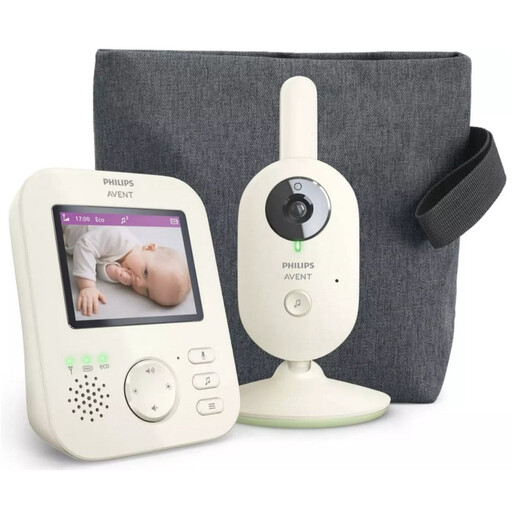
Why it suits this profile: A straightforward parent unit with a screen is practical for anyone who does not want to use an app or cloud account. The product information states a range of up to 50 metres indoors and up to 300 metres outdoors in an open space.
The direct connection and parent unit mean that a smartphone app is not required. Do check the actual range in your home.
2.8-inch colour screen, infrared night vision, zoom, ECO mode and two-way communication.
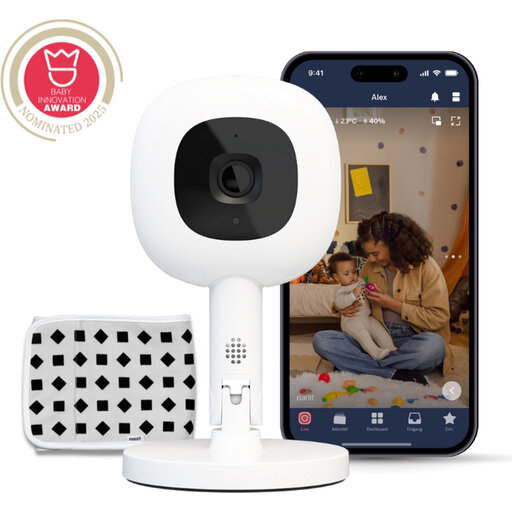
Why it suits this profile: Ideal for parents who want to check in remotely via an app and value a camera that can be positioned flexibly. According to the product description, the camera offers 1080p video, night vision and two-way communication.
The product information clearly states that certain sleep features require a Nanit Insights subscription. Check the ongoing costs in advance.
1080p video, Flex Stand, temperature and humidity monitoring and, according to the manufacturer, 256-bit AES encryption.
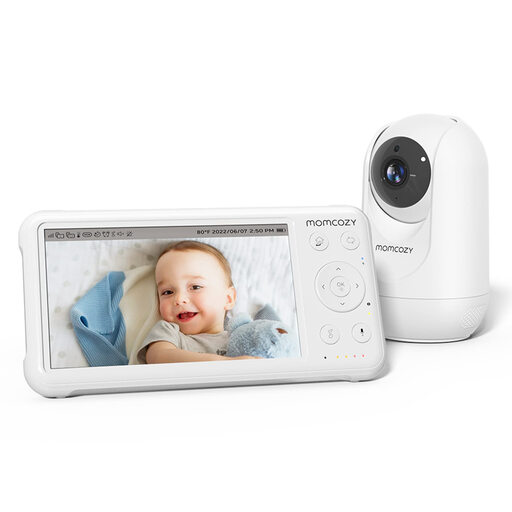
Why it suits this profile: Suitable for households that want to monitor several rooms or children. According to the product details, up to four cameras can be paired.
The parent unit works without needing your phone for every check. Note: the stated range applies to an open space.
5-inch 1080p screen, PTZ control, temperature sensor, night vision, two-way communication and a stated range of up to 960 ft in an open space.
We have put together a complete, up-to-date list of products that fully meet these strict selection criteria and the applicable European safety regulations.
Keep the camera out of your child’s reach and keep cables away from the cot. Mount the device securely and follow the distance recommendations in the manual. Do not point a camera at private areas, and let household members or visitors know when recording is taking place. When using it as an indoor security camera for a baby, pet or older person, the same considerations around consent and privacy apply.
Yes. A model with its own parent unit, such as a direct 2,4GHz baby monitor, can work without a Wi-Fi router. In that case, you generally cannot check in via an app while you are away from home. Do check the stated range and take walls and floors into account.
The lifespan depends on the power supply, cables, battery use, software support and everyday use. A camera that records continuously may be used more intensively than a model that only activates when it detects sound. Check whether components such as adapters and parent units are available separately.
In addition to the purchase price, you may incur costs for a microSD card, cloud storage or a subscription for extra app features. A baby monitor without Wi-Fi generally has no cloud costs. So do not compare only the product price; also consider storage, subscriptions and electricity consumption over the longer term.
