
Vandaag of morgen in huis

Kwaliteit gegarandeerd

Welkomstaanbiedingen ontgrendelen: GRATIS bezorging | Tot 80% korting | Gratis 30 dagen JoyPlus-proefperiode
Download de app
A baby monitor with camera gives you a quick view of your baby, but not every model will suit your home or the way you plan to use it. A Wi-Fi baby monitor works differently from a system with a separate parent unit. Terms such as “smart”, “360 degrees” and “night vision” also do not always tell you exactly what you will get in practice.
The most important choice usually comes down to three questions:
Manufacturers sometimes state a range of several hundred metres. According to the product description, this generally refers to an open space. In a Dutch home, concrete walls, floors and other wireless devices can reduce the range.
A system with a direct connection between the camera and parent unit can therefore be more practical for use at home. A Wi-Fi baby monitor offers greater flexibility, but depends on your router, internet connection and app.
A baby monitor with night vision can display infrared images, but the result depends on the distance, light levels and resolution. Infrared night vision often produces a black-and-white image. Colour night vision can show more detail, but usually uses additional lighting to do so.
You should therefore check:
Motion detection, crying alerts and automatic tracking sound useful, but check exactly what is being detected. An alert may respond to movement, sound or a person. That is not the same as guaranteed crying detection.
Also pay attention to storage. Some models use local storage on an SD card, while others offer a cloud subscription. For the Nanit Pro model, for example, certain sleep functions and analyses require a Nanit Insights subscription. According to Nanit's product description, the connection is secured with 256-bit AES encryption; this is the brand's own claim and not a general guarantee for every home environment.
A baby monitor with app is useful if you also want to check in while you are away from home. Check whether the camera supports only 2.4GHz Wi-Fi or 5GHz as well. In many homes, 2.4GHz offers a greater range, while 5GHz generally provides faster transfer speeds over shorter distances.
A model without Wi-Fi limits access from outside the home, but does reduce the number of online dependencies. According to the product description, the VAVA VA-IH006 PRO uses a direct 2.4GHz connection between the camera and parent unit. No app, account or cloud service is required.
A fixed camera may be sufficient if the cot always stays in the same place. For a playroom, pet or elderly person in a larger room, a camera that can pan and tilt may be more practical. Look out for the difference between:
A dual-lens camera can combine a fixed overview with a movable lens. This is useful for a living room, nursery or as an indoor security camera.
A baby monitor with two-way audio allows you to speak or listen remotely. Check whether the speaker is clear enough and whether the function only works via the app. A baby monitor with temperature sensor provides an indication of the temperature near the camera. According to YOTON's product information, the temperature sensor is intended for reference only and is not a medical device.
Always position the camera out of your child's reach. Keep power cables away from the cot and place the parent unit on a stable surface. A baby monitor is a useful aid, but it does not replace supervision by an adult.
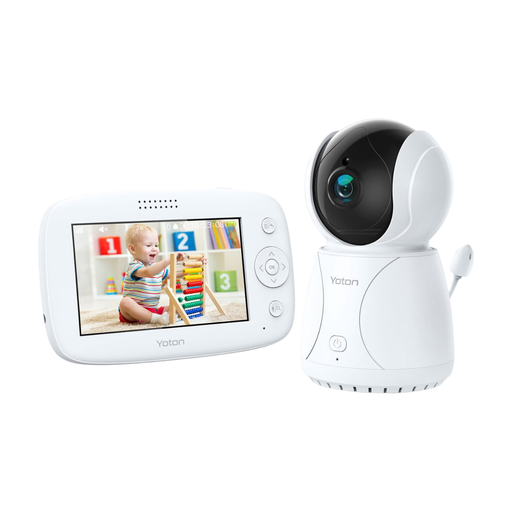
Why it suits this profile: The separate 4.3-inch LCD monitor is easy to use and, according to the product information, does not require an app or cloud account to view the footage.
You are less dependent on Wi-Fi and a smartphone. The temperature reading is only an indication and should not be used as a medical measurement.
4.3-inch screen, rotation function, two-way audio, temperature sensor and night vision according to the product description.
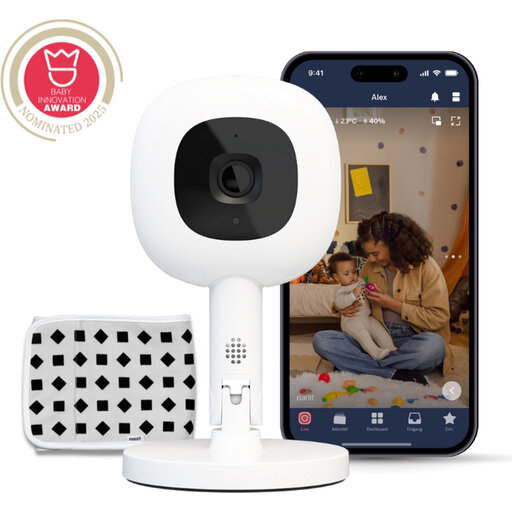
Why it suits this profile: This is a smart baby camera for users who value app control, alerts and additional features.
The product information clearly states the conditions: an Insights subscription is required for certain sleep functions and analyses. Check this before buying.
1080p image, app for iOS and Android, two-way audio, temperature and humidity monitoring, and Flex Stand according to Nanit.
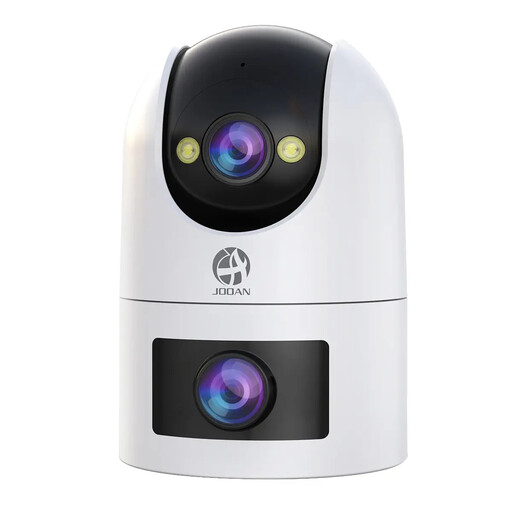
Why it suits this profile: This camera is suitable for anyone who wants to use one device as a baby camera, pet camera, indoor security camera or camera for monitoring elderly people.
The camera supports local recording to a microSD card of up to 256GB. According to the product information, cloud storage is paid for, allowing you to factor in the recurring costs in advance.
Dual lens, 2.4GHz and 5GHz Wi-Fi, two-way audio, motion and sound detection, automatic tracking and IP66 rating according to the product description.
We have put together a complete, up-to-date list of products that fully meet these strict selection criteria and the applicable European safety regulations.
It depends on the model. Some cameras continue to work within your home network, but access from outside the home may be unavailable without the internet. A system with a separate parent unit is less dependent on Wi-Fi. Always check the connection method in the product specifications.
The lifespan depends on continuous use, heat, charging cycles and the quality of the power adapter. A camera that records 24 hours a day is used more intensively than a model that only activates when it detects sound. Keep the firmware and app up to date, and replace damaged cables immediately.
Not always. Some models offer local storage on an SD card without a subscription. Cloud storage, advanced alerts or sleep analyses may incur a charge. Before buying, check which features are free and which require a trial period or subscription.
