
Vandaag of morgen in huis

Kwaliteit gegarandeerd

Welkomstaanbiedingen ontgrendelen: GRATIS bezorging | Tot 80% korting | Gratis 30 dagen JoyPlus-proefperiode
Download de app
A baby monitor with camera can be useful when you work during the day, are in another room in the evening or want to check on your child during a nap. However, a long list of features does not always reflect how practical a product is for everyday use. For example, a camera may have a high resolution but be inconvenient if the app is unstable or the mains cable is within reach of the cot.
Pay particular attention to these common pitfalls:
With a baby monitor featuring night vision, resolution is not the only important factor. Also consider how the image is displayed in a dark room. Infrared night vision usually produces a black-and-white image; some cameras also offer colour or smart night vision modes.
A resolution of 1080p is generally sufficient for viewing a cot or play area. 2K or 3MP can show extra detail, for example if you want to monitor a larger room. Digital zoom enlarges the image but does not add genuine detail. So check whether the camera can also physically pan or tilt.
A smart baby monitor with an app provides remote access. This is convenient when you are away from home, but you should check:
A baby monitor with its own parent unit often works straight away indoors. Philips Avent models, for example, use a separate wireless connection and state a range of up to 50 metres indoors and up to 300 metres outdoors. The actual distance depends on the property. A dual-mode model, such as a system with both a screen and Wi-Fi app, offers greater flexibility but also has more settings.
Two-way communication lets you talk back from another room. Check whether this works via the parent unit, the app or both. With a camera featuring motion detection, it is important to know whether alerts can be set for people, sound, crying or specific zones.
A baby monitor with temperature measurement displays the temperature near the camera. Treat this value as a guide: positioning, draughts and heat sources can affect the reading. It is not a medical measuring method. Also consider storage. Some models support a microSD card of up to 256 GB; cloud storage may involve subscription fees.
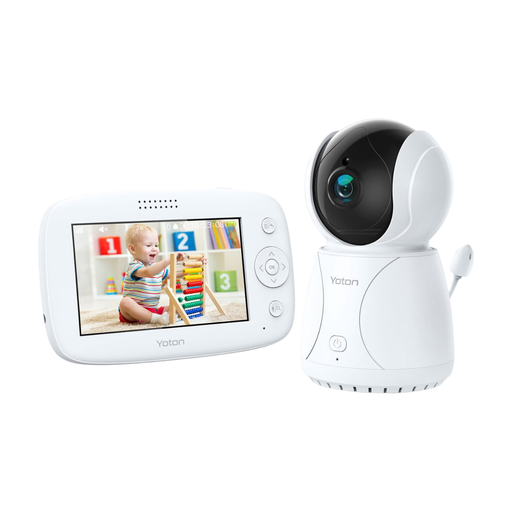
Why it suits this profile: The 4.3-inch parent unit displays the image without you having to open an app first. The camera has a rotation function, night vision, two-way communication and a temperature sensor.
The key functions are available directly via the monitor. This makes you less dependent on Wi-Fi, an account or cloud storage.
4.3-inch LCD screen, temperature measurement, rotation function and night vision according to the product information.
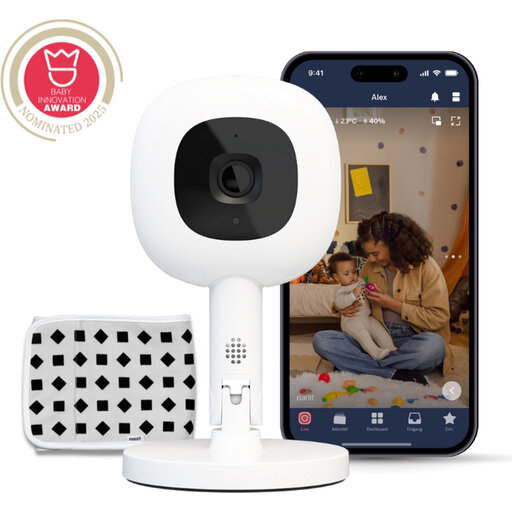
Why it suits this profile: This Wi-Fi baby monitor offers 1080p video, app control, night vision, two-way communication, temperature and humidity measurement, plus a Flex Stand for flexible positioning.
The product information states that the connection uses 256-bit AES encryption. However, bear in mind that certain alerts or features may require a Nanit Insights subscription.
1080p video, Flex Stand, night vision and app support for iOS and Android.
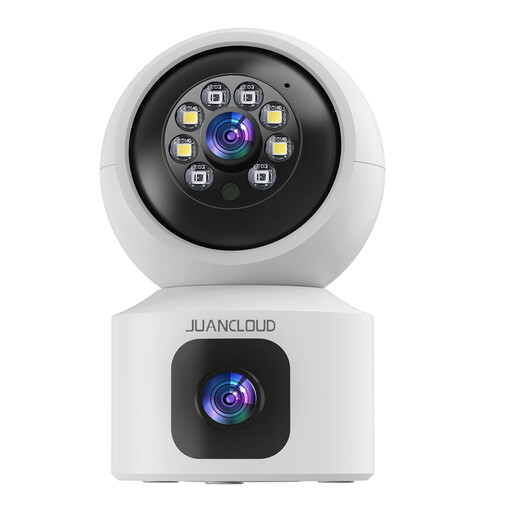
Why it suits this profile: The dual-lens camera is designed for monitoring an entire room, children, pets or family members. The camera supports 2.4GHz and 5GHz Wi-Fi, motion alerts and local or cloud storage.
Two lenses can provide a fixed view and a moving view at the same time. However, check in advance where you want to position the camera and whether you need to adjust the alert settings.
3MP 2K video, 8x digital zoom, two-way communication and dual-band Wi-Fi according to the product description.
We have compiled a complete, up-to-date list of products that fully meet these strict selection criteria and the applicable European safety regulations.
Position the camera securely and out of your child’s reach. Keep power cables away from a cot, bed or play area to prevent entanglement. A camera is a useful aid and does not replace supervision by an adult.
For a Wi-Fi baby monitor, a strong, unique Wi-Fi password is important. Change the default password where possible and install firmware and app updates. Do not point a baby camera or indoor security camera at bathrooms, other people’s bedrooms or neighbours’ homes without permission. Privacy rules may apply when other people are recorded.
For pets, a pet camera with motion detection may be sufficient. A 360-degree camera can be more practical for a larger room. For outdoor models, check the stated IP rating; an indoor camera is not automatically suitable for damp conditions or rain.
Yes. A baby monitor without Wi-Fi usually uses a direct wireless connection between the camera and parent unit. You do not need an app or internet connection for live viewing indoors. The range may be lower inside a property than the distance shown on the packaging because of walls and floors.
The lifespan depends on the power supply, battery, cables, software support and everyday use. A camera that runs continuously from the mains does not have a battery for the camera unit, but the parent unit may still wear out. Before buying, check whether replacement cables, adapters and firmware are available.
In addition to the purchase price, you may incur costs for cloud storage or extra app features. Local storage via a suitable microSD card often avoids an ongoing subscription, but requires you to manage the card and recorded footage yourself. Always check the terms and conditions of the relevant app and storage service.
