
Vandaag of morgen in huis

Kwaliteit gegarandeerd

Welkomstaanbiedingen ontgrendelen: GRATIS bezorging | Tot 80% korting | Gratis 30 dagen JoyPlus-proefperiode
Download de app
A baby monitor with a camera might seem straightforward to choose, but product pages often focus on features that aren’t useful in every situation. For example, a high resolution won’t help much if the night-time picture is unclear. And a long range in an open space doesn’t necessarily tell you how well it will work in a home with concrete walls.
As Joybuy Product Recommendation Officer, I’ve picked out the key specifications for you. This will help you compare a video baby monitor, a baby monitor with a camera and an indoor security camera based on practical features rather than individual marketing claims.
Manufacturers sometimes state a range of hundreds of metres. This is usually measured in an open space. Indoors, walls, floors, metal and other wireless devices can limit the connection. So check whether the range is specified separately for indoor and outdoor use.
A model with its own parent unit works differently from a WiFi baby monitor. A monitor with its own parent unit doesn’t need your home network, while a WiFi model may allow you to control it remotely using an app. However, you’ll need a stable router, app and account.
A camera may give you a sharp picture during the day, but perform differently at night. Check the type of night vision:
With a baby monitor with night vision, a steady, clear picture is often more useful than a high pixel count alone.
Motion detection, cry detection and person detection can send alerts to your phone. According to the brands’ own product information, some models are designed to distinguish between the movements of people, babies and pets. Treat these features as a helpful aid, not as a guarantee that every movement or sound will be detected.
You should also never use a camera as a substitute for supervision. Place it out of your child’s reach and keep any cables away from the cot.
Choose a baby monitor with two-way communication if you want to talk back from another room. Also check whether the parent unit has its own screen. This is handy for checking on your baby at night without having to unlock your phone each time.
A WiFi model may suit you if you want to check in through an app when you’re away from home or give several family members access. If so, check:
A fixed camera is a good fit for a cot that stays in the same place. A baby monitor with pan-and-tilt function is more flexible in a playroom or living room. Check the horizontal and vertical viewing angles, and whether you control the camera using the parent unit or an app.
A wide-angle lens shows more of the room, while digital zoom simply enlarges part of the image. Digital zoom doesn’t automatically add more detail.
A baby monitor with a temperature sensor can show the room temperature as a guide. It isn’t a medical measuring device and shouldn’t replace your own assessment of the sleep environment.
Also consider the power supply:
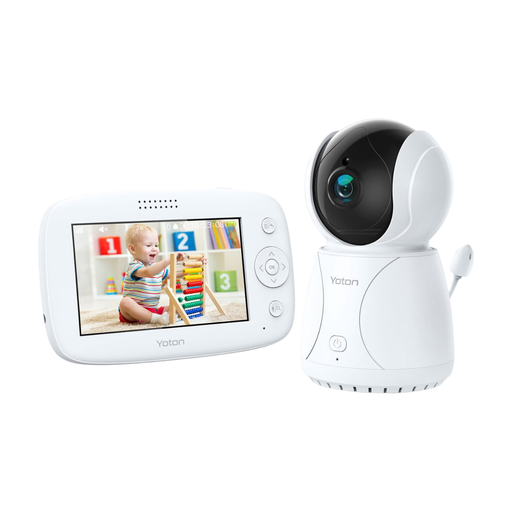
Why it suits this profile: The 4.3-inch parent unit combines a screen, night vision, rotation and two-way audio, so you don’t need a phone app for basic operation.
The product description lists a built-in temperature sensor and rotation function, so you don’t have to focus on resolution alone. The temperature reading is for guidance only.
4.3-inch LCD screen, night vision, two-way audio and camera with rotation function.
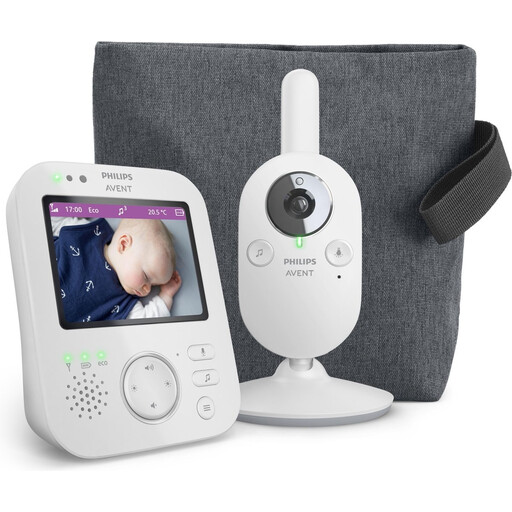
Why it suits this profile: This model is a good fit for parents who value a dedicated monitor, a private connection and straightforward controls.
The stated connection works with a paired parent unit, so you don’t need home WiFi or cloud storage to watch the live feed.
3.5-inch colour screen, 2x digital zoom, VOX mode, ECO mode and a stated range of up to 50 metres indoors and 300 metres outdoors.
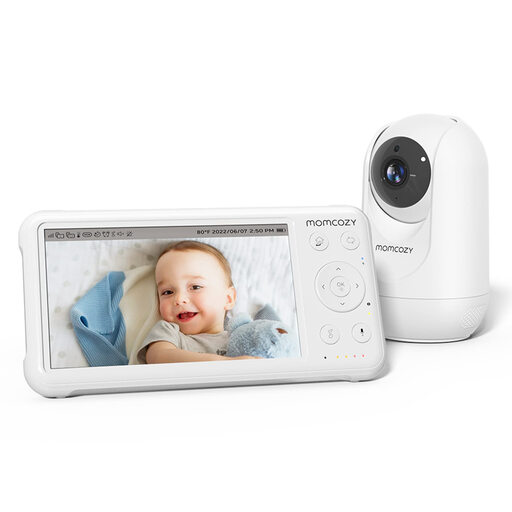
Why it suits this profile: This system is designed for long-term use in a nursery and, according to the product information, can be expanded with up to four cameras.
The camera comes with a parent unit, so you don’t have to rely solely on WiFi. The stated range of up to 960 ft applies to open spaces; performance indoors may differ.
1080p camera, 5-inch screen, pan-tilt-zoom, night vision, two-way audio and temperature sensor.
We’ve put together a complete, up-to-date list of products that meet these strict selection criteria and the current European safety regulations.
Yes. Models with their own parent unit often connect the camera directly to the monitor. You won’t need a home network or app. A WiFi baby monitor is most useful if you want to check in remotely using your smartphone.
Always follow the instructions for your chosen model. Position the camera securely, out of your child’s reach, with the cable kept away from the cot. Some models specify a minimum distance, for example 1.5 metres. Follow this distance if the manufacturer recommends it.
The camera itself uses electricity, and a WiFi model uses your home network. Cloud storage may require a paid subscription after a trial period. If you want to avoid ongoing costs, look for local storage on a memory card or a baby monitor with its own parent unit.
