
Vandaag of morgen in huis

Kwaliteit gegarandeerd

Welkomstaanbiedingen ontgrendelen: GRATIS bezorging | Tot 80% korting | Gratis 30 dagen JoyPlus-proefperiode
Download de app
A baby monitor with camera can help you keep an eye on your baby from another room, during the day or at night. However, not every model is right for every home. A compact baby camera for use at home, for example, works differently from a video baby monitor for travel or a Wi-Fi camera that you view on a smartphone.
When comparing models, look beyond picture resolution and the number of features. The key differences often come down to the connection, where you can place the camera, how it’s powered and how the manufacturer has measured its range.
A quoted range of, for example, 300 metres is usually measured with no walls, floors or other obstacles in the way. In a typical home, concrete walls, metal structures and other wireless devices can reduce the range. Check whether the indoor range is listed separately.
A wireless baby monitor with a parent unit often uses a direct connection between the camera and monitor. A Wi-Fi baby monitor works through your router and may let you check in remotely, but it relies on a stable internet connection and a well-secured network.
A baby monitor with night vision usually uses infrared or another light-sensitive feature. In a dark room, the picture may switch to black and white and show fewer details than during the day. Check the stated night-vision distance and viewing angle, as well as whether there’s a zoom function.
Position the camera so the sleeping area remains clearly visible. Digital zoom enlarges the picture, but doesn’t add any extra detail.
Motion detection, cry detection and person detection can be useful, but curtains, pets or changes in lighting can trigger alerts. Use these features as an aid, not as a substitute for supervision. Also check whether the camera supports microSD card storage and whether cloud storage comes with extra costs.
A baby monitor with parent unit is handy if you want to check in without using a smartphone. Models without Wi-Fi don’t require an account or cloud connection, and can offer a more private home set-up. A Wi-Fi baby monitor is a better choice if you’d also like to check in when you’re out, but you’ll need to pay extra attention to passwords, app access and updates.
When choosing a video baby monitor, check:
A resolution of 1080p or 2K doesn’t tell you everything about picture quality. The lens, lighting and viewing angle matter too. A camera that can pan and tilt can cover more of the room. Also check whether you can mount the camera securely.
Night vision is especially useful when the room has little light. Check whether the infrared light is visible and whether the night-vision distance suits the space between the camera and the cot.
With a baby monitor with two-way audio, you can talk to your baby from another room. Some models also offer lullabies or a night light. A baby monitor with temperature sensor can display the room temperature, but this reading is for information only. Don’t use the sensor as a medical measuring device, and always follow the instructions for use.
Keep these safety points in mind when positioning the camera:
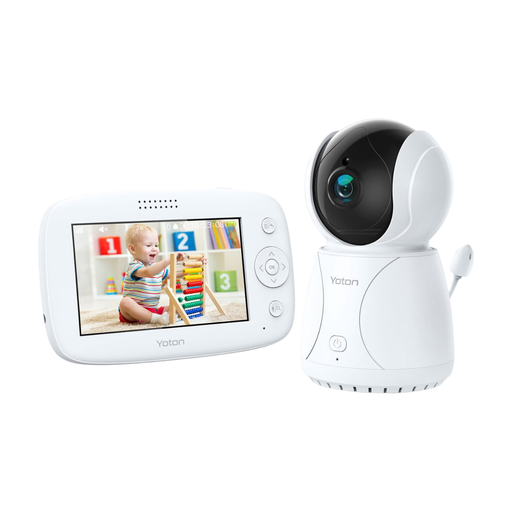
Why it suits this profile: The 4.3-inch parent unit combines a camera feed with a temperature display, pan and tilt, two-way audio and night vision, without the need for a smartphone.
The product specifications clearly list the parent unit’s features and explain that the temperature sensor is for reference only, not a medical device.
4.3-inch LCD screen, camera with pan and tilt, two-way audio and night vision.
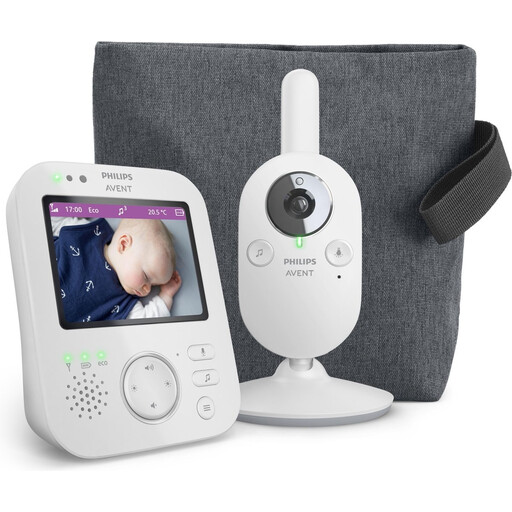
Why it suits this profile: This model focuses on a private connection with a parent unit, a colour screen, zoom, VOX mode and ECO mode.
The stated range is split into up to 50 metres indoors and 300 metres outdoors. This helps put claims based on open spaces into perspective.
3.5-inch screen, 2x digital zoom, VOX mode and ECO mode.
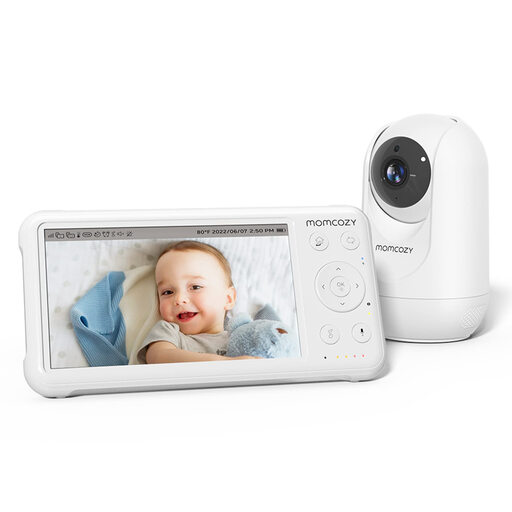
Why it suits this profile: The combination of a 5-inch 1080p screen, a battery in the parent unit, temperature readings, PTZ controls and support for up to four cameras makes it suitable for long-term use.
The product specifications distinguish between the stated range in open spaces and typical use. The camera needs mains power; only the parent unit has a built-in battery.
1080p display, 5000mAh battery in the parent unit, PTZ and expandable to four cameras.
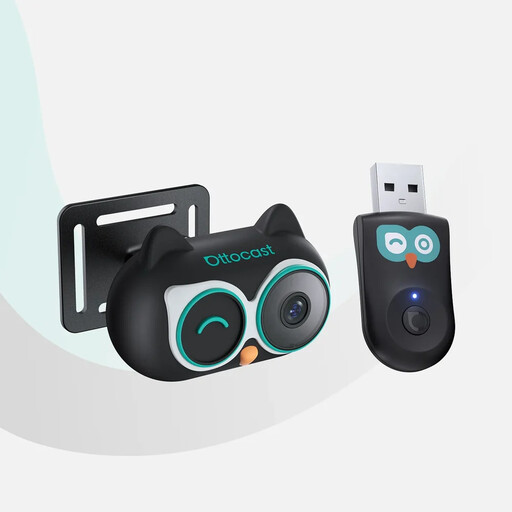
Why it suits this profile: This travel baby monitor is designed for use in the car. It displays the camera feed on the car’s screen when the required wired CarPlay connection and a touchscreen are available.
The compatibility requirements are clear: it works with vehicles that have factory-fitted wired CarPlay; Android Auto isn’t supported. Check this before you buy.
1080p night mode, 150-degree viewing angle, 360-degree adjustable camera and 3-metre power cable.
We’ve put together a complete, up-to-date list of products that meet these strict selection criteria and current European safety requirements.
It depends on the model. Some cameras connect directly to a parent unit and don’t need Wi-Fi. A Wi-Fi baby monitor usually uses your router for app access and remote control. Check the manual to see which features continue to work locally if the internet connection drops.
Its lifespan depends on daily use, battery condition, cables and software support. If the model has a battery, its run time may decrease over time. Check regularly that the parent unit still charges properly, and replace any damaged adapters or cables. Keep the camera and parent unit away from moisture and excessive heat.
On top of the purchase price, you may need to pay for a memory card, replacement accessories or cloud storage. A microSD card may not be included with a model that supports local storage. If you choose a Wi-Fi camera with cloud storage, check whether the storage service becomes a paid subscription after a trial period. A parent unit without a cloud connection usually requires fewer ongoing services.
