
Vandaag of morgen in huis

Kwaliteit gegarandeerd

Welkomstaanbiedingen ontgrendelen: GRATIS bezorging | Tot 80% korting | Gratis 30 dagen JoyPlus-proefperiode
Download de app
A baby monitor with camera gives you a better view of your baby during naps and at night. However, not every model is right for every home. A large screen, high resolution or long range stated on the box doesn’t always reflect how the monitor will perform in a typical bedroom or home.
Pay particular attention to the connection, night vision, camera placement and how alerts work. Read on to find out what to look for and which models suit different needs.
Manufacturers sometimes quote a range of several hundred metres. This is usually measured in an open space with no walls, floors or other wireless devices. At home, concrete walls, multiple floors and metal structures can limit the range.
So don’t just look at the maximum range: check the connection technology too. A baby monitor without Wi-Fi that uses its own parent unit works differently from a Wi-Fi baby monitor that relies on your router and an app.
A camera may show a sharp image during the day but be less useful in a dark nursery. Check whether it has infrared night vision, and how far the night vision is said to reach in the product description. Also look out for reflections from white walls or bedding, as these can affect the image.
A baby monitor with night vision is especially practical when you want to check on your baby briefly at night without turning on the light.
A baby monitor with motion detection can pick up movement in the picture, but curtains, pets or changing light can also trigger alerts. Some models offer person detection or adjustable detection zones. These can reduce the number of alerts, but always check which features are actually listed in the product specifications.
A baby monitor is also an aid and does not replace supervision by a parent or carer.
A digital baby monitor with its own parent unit, such as a model with an LCD screen, can be handy if you don’t want to use an account, app or cloud storage. A direct connection generally only works within the range of the camera and parent unit.
A Wi-Fi baby monitor often lets you view the camera remotely on your smartphone. You’ll need a stable router connection and an app, and should take care with passwords and privacy. Check whether cloud storage costs extra and whether local storage, such as a memory card, is an option.
A baby monitor with an LCD screen is a good choice if you want a separate screen on your bedside table. Look for:
A larger screen isn’t automatically more practical if it makes the parent unit heavier or means it needs charging more often.
A baby monitor with a talk-back function can be useful if you want to speak calmly to your baby from another room. Check that the microphone and speaker are clear enough, and that you can activate the function with a single button.
A baby monitor with a temperature sensor gives you an indication of the temperature near the camera. Use this as a practical guide, not as a medical measurement. Place the camera securely and keep cables out of your child’s reach. The camera should not be in or right next to the cot.
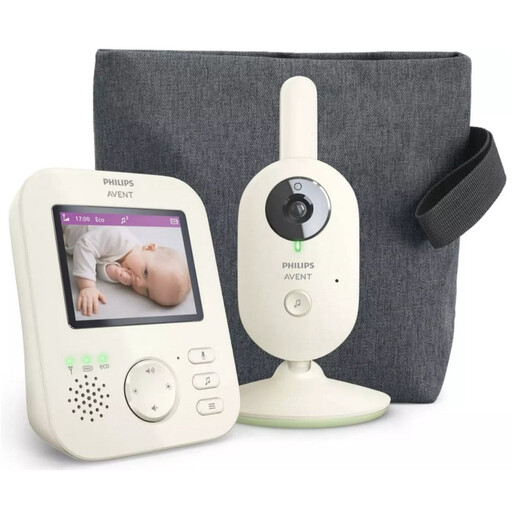
Why it suits this profile: This model has its own parent unit with a 2.8-inch LCD screen. According to the product specifications, there’s no need for a smartphone app, keeping things simple to use.
The product specifications state that it has a direct wireless connection, infrared night vision, VOX mode and a quoted range of up to 50 metres indoors and 300 metres outdoors. Treat these distances as a guide.
LCD screen, two-way communication, zoom, ECO mode, and two lullabies plus background sounds, according to the product information.
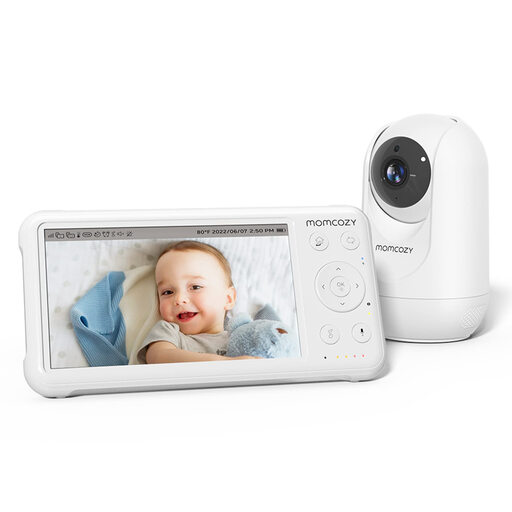
Why it suits this profile: The combination of a 5-inch 1080p screen, pan-tilt-zoom and several monitoring features makes this a good fit for parents who want plenty of settings to choose from.
The product information lists a temperature sensor, night vision and a parent unit. This means you don’t have to rely solely on a smartphone app.
1080p camera, 5-inch screen, talk-back function, built-in lullabies, temperature display and support for up to four cameras, according to the product specifications.
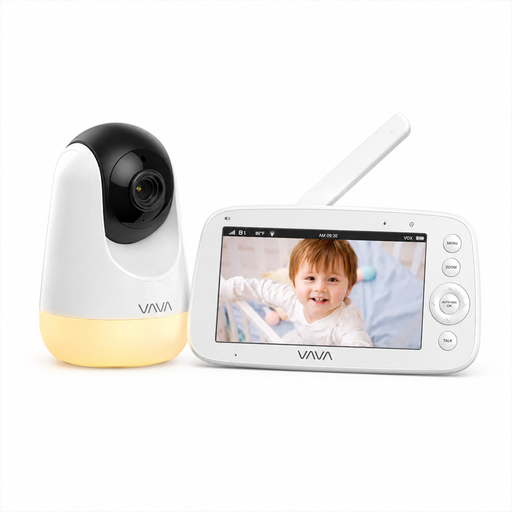
Why it suits this profile: A practical choice for households that would rather not use Wi-Fi, an account or a cloud service, but still want a large parent display.
According to the product description, this model uses a direct 2.4GHz connection without an app or cloud service. Its 300-metre range is measured in an open space; walls can reduce it.
5-inch 720p screen, infrared night vision, talk-back function, temperature information, night light and a parent unit with a quoted battery life of up to 24 hours in audio mode.
We’ve put together a full, up-to-date list of products that meet these strict selection criteria and the applicable European safety regulations.
No. A model with its own parent unit can work through a direct wireless connection. Wi-Fi is usually needed to view the camera remotely on a smartphone.
Its lifespan depends on how it’s used, the battery, cables and maintenance. A parent unit with a replaceable battery or a well-maintained power supply may remain useful for longer. Follow the manufacturer’s charging and storage instructions, and don’t use a damaged adapter.
With a model that doesn’t use a cloud service, you’ll usually only pay for electricity. A Wi-Fi model may also involve charges for cloud storage or extra app features. Check before buying, as a free trial doesn’t always remain free.
