
Vandaag of morgen in huis

Kwaliteit gegarandeerd

Welkomstaanbiedingen ontgrendelen: GRATIS bezorging | Tot 80% korting | Gratis 30 dagen JoyPlus-proefperiode
Download de app
A baby monitor with a camera lets you keep an eye on your child without repeatedly going into the bedroom. However, not every model will suit your home, bedtime routine or travel plans. A large screen, for example, says little about the connection, while the long range stated on the packaging is usually measured in ideal conditions.
As Joybuy Product Recommendation Officer, I look beyond product information to focus on practical details. That way, you can compare video baby monitors not just on price, but also on ease of use, privacy and the features you really need.
Manufacturers often state the range in an open space. In a typical UK home, concrete floors, walls, metal doors and other wireless devices can affect the signal. An indoor baby monitor with a parent unit and a direct connection may perform differently from the distance suggested on the box.
So check:
A baby monitor with night vision usually uses infrared. This generally means a black-and-white picture in the dark. Some Wi-Fi cameras also offer colour or smart night modes, but performance depends on the surroundings and settings.
Check whether the camera:
A Wi-Fi baby monitor with an app can be useful if you want to check in while you’re out. But there are other things to consider: a stable internet connection, account management, software support and storage options. Cloud storage may come with charges after a trial period, so always check the product’s current terms.
A baby monitor without Wi-Fi avoids some of these dependencies. A direct connection between the camera and parent unit is especially practical for use at home, without an app or cloud account.
A resolution of 720p may be enough for a clear overview. A 1080p screen generally shows more detail, which can be useful if the camera is further away from the cot. Also consider the size of the parent unit. A 4.3- or 5-inch screen is easier to read than a small display, but may use more battery power.
Don’t focus on megapixels alone. Good positioning, a suitable viewing angle and a stable connection are just as important.
Check whether the stated battery life applies to video use or audio mode only. For example, the VAVA VA-IH006 PRO is listed as offering up to 24 hours in audio-only mode, while the product information gives a maximum screen-on time of 10 hours. The camera itself runs on mains power.
A larger battery, such as the built-in 5000mAh battery in the Momcozy BM01, can be useful for the parent unit. Actual battery life depends on brightness, volume, VOX settings and distance.
A baby monitor with two-way communication lets you talk to your child from another room. A temperature display can help you keep an eye on the room, but a temperature sensor is only an indicator, not a medical measuring device.
Other useful features include:
Always position the camera out of your child’s reach. Keep cables away from the cot and follow the fitting instructions. A monitor is a useful aid, but it doesn’t replace adult supervision.
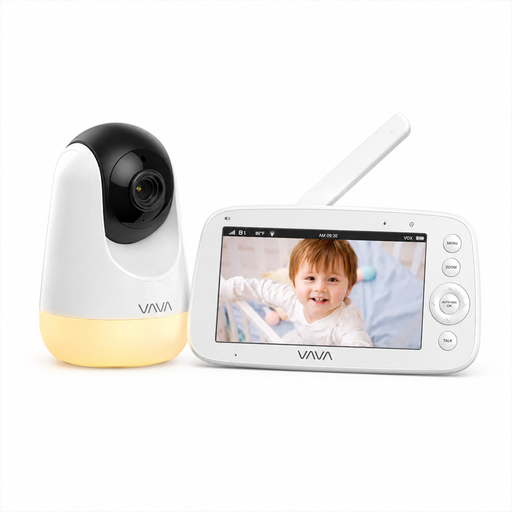
Why it suits this profile: This baby monitor without Wi-Fi uses a direct 2.4GHz connection and comes with a separate 5-inch parent unit. It’s a straightforward choice for parents who don’t want to use an app or cloud account.
The product description states that no app, account or cloud service is needed. The stated range of 300 metres applies in an open space, so the layout of your home will still affect performance indoors.
720p screen, infrared night vision, two-way communication, temperature display, five lullabies and up to 24 hours in audio mode, according to the product information.
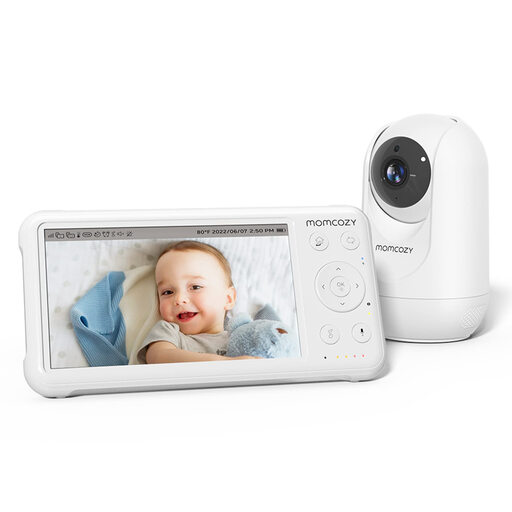
Why it suits this profile: Parents looking for a large picture, remote control and extra features get a complete set with a camera and parent unit.
The stated 960ft range applies in an open space and shouldn’t be taken as a fixed distance in every home. The camera uses a parent unit, so you don’t need Wi-Fi for basic monitoring.
1080p picture on a 5-inch screen, PTZ control, night vision, temperature monitoring, two-way audio, lullabies and a built-in 5000mAh battery in the parent unit.
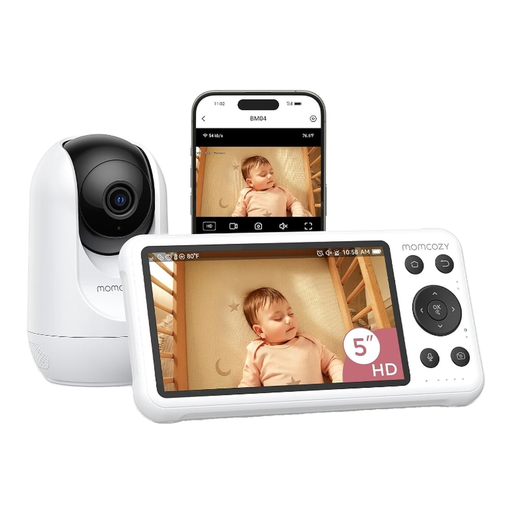
Why it suits this profile: This model is a good fit for parents who want to monitor their baby on a smartphone while out, as well as use a parent unit and receive alerts.
According to the product description, the dual-mode setup offers both a 5-inch monitor and app control. Use a strong Wi-Fi password and check which local storage and notification settings are available.
1080p camera, motion and crying detection, night vision, two-way audio, local recording and access via a mobile app.
We’ve put together a full, up-to-date list of products that meet these strict selection criteria and current European safety regulations.
A baby monitor without Wi-Fi usually sends the picture directly to the parent unit and doesn’t need an app or cloud account. This can reduce the number of digital access points. However, check the pairing process, range and security information for the specific model. For a Wi-Fi baby monitor, it’s important to use a strong password, keep the software up to date and choose your storage settings carefully.
Place the camera securely or fit it to the wall according to the instructions, out of your child’s reach. Keep cords away from the cot and don’t position the camera where it could fall. For example, the Momcozy BM01 recommends placing it 1.5 to 4.5 metres from the cot. Always follow the instructions for your model.
A model with a parent unit mainly uses electricity to power the camera and charge the monitor. A Wi-Fi baby monitor may also incur cloud storage costs after any trial period. A memory card may allow local storage, but check the supported capacity and card type first. According to the product information, the KAWA 64GB microSD card is designed for use with devices including baby monitors and video surveillance cameras, but you’ll still need to check that it’s compatible with your specific device.
