
Vandaag of morgen in huis

Kwaliteit gegarandeerd

Welkomstaanbiedingen ontgrendelen: GRATIS bezorging | Tot 80% korting | Gratis 30 dagen JoyPlus-proefperiode
Download de app
A baby monitor with camera can help you keep an eye on your baby during the day and at night. However, not every model is equally suitable in practice. A high resolution, for example, means little if the night-time image is disappointing, and a Wi-Fi baby camera is not automatically more convenient than a model with a parent unit.
So pay particular attention to the connection, night vision, positioning and how footage is stored. That way, you can avoid paying for features you’re unlikely to use.
Manufacturers often quote the range under ideal conditions. The stated distance in an open space may be shorter in a home due to concrete walls, floors and other wireless devices. So check whether the indoor range is listed separately.
A baby monitor with parent unit that communicates directly with the camera works differently from a baby monitor with app. With a Wi-Fi baby camera, you depend on your router and internet connection. A model without Wi-Fi may be more practical if you don’t want to use an account, cloud connection or app.
Infrared night vision usually displays a black-and-white image. Some models also offer colour or smart night vision modes. These can be useful when you want to make out details in a dark room, but lighting conditions and settings still make a difference.
Also consider the viewing angle. A fixed camera may be enough for a cot, while a pan-and-tilt camera may be better for a larger room or if you want to keep an eye on a toddler, pet or older person too.
An alert for movement or sound can be useful, but alerts aren’t always relevant. Curtains, shadows or pets, for example, can trigger motion alerts. According to the product descriptions, some models use person or pet recognition to filter alerts. This is a product feature, not a guarantee that every alert will be assessed correctly.
A baby monitor is still just a tool. Position the camera safely and remember that you remain responsible for supervision.
Choose a baby monitor without Wi-Fi if you mainly want to monitor locally and don’t need an app. According to the product information, the VAVA VA-IH006 PRO uses a direct 2.4GHz connection to the parent unit. No app, account or cloud service is needed.
A Wi-Fi baby camera is more convenient if you want to check in when you’re out or give access to multiple users. If so, check:
A resolution of 1080p or higher can give you a clearer image than a lower resolution, but the lens, lighting and compression also play a part. For a small nursery, 720p may be perfectly practical. For monitoring a larger room, pets or multiple areas, a higher resolution can provide more detail.
A baby camera with night vision should also be suitable for the distance from the cot. Check the stated range of the infrared lights and whether the camera switches automatically between day and night modes.
With a baby monitor with two-way communication, you can talk back through the built-in microphone and speaker. This is useful for letting your baby hear your voice or speaking to someone in another room. Check the sound quality and how you activate the feature.
Some models also support crying detection, motion detection, temperature alerts or a screen that activates when it detects sound. Treat these features as additional signals, not as a medical or safety assessment.
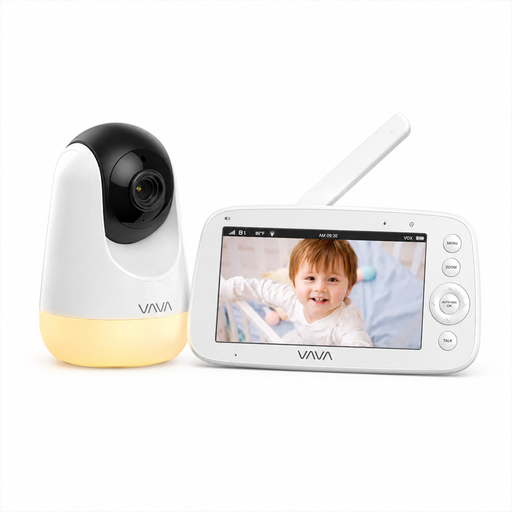
Why it suits this buyer: This model works without Wi-Fi, an app or an account, and comes with a separate parent unit featuring a 5-inch screen. That makes it straightforward to set up for everyday use at home.
You don’t depend on a Wi-Fi signal or paid cloud storage. The stated range of 300 metres applies in open spaces; indoors, it may be shorter.
720p screen, infrared night vision, two-way communication, temperature information and a parent unit offering up to 24 hours of audio use, according to the product description.
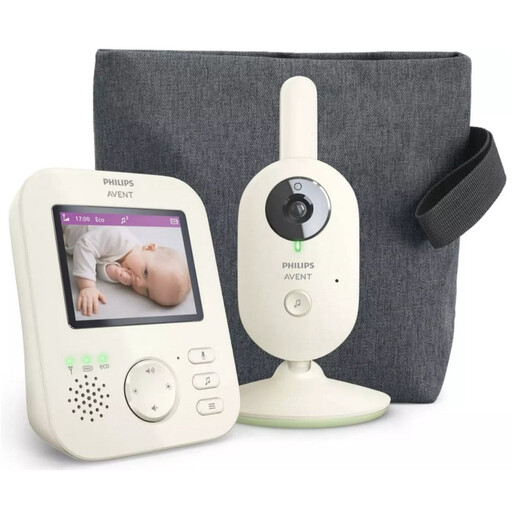
Why it suits this buyer: If you’re looking for a traditional video baby monitor with its own screen, this is a straightforward system that doesn’t focus on app features.
The product information states that it has a private connection, with a range of up to 50 metres indoors and up to 300 metres outdoors. The actual distances will still depend on your home.
2.8-inch colour screen, zoom, VOX mode, infrared night vision, two-way communication and ECO mode.
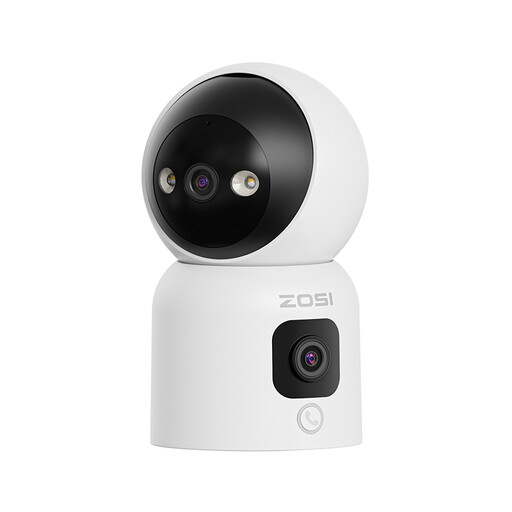
Why it suits this buyer: This camera is designed for a range of uses: monitoring a baby, pet or older person, as well as an indoor space. Its dual lens can be useful if you want to combine different viewing angles.
You’re not limited to a single fixed viewing angle: according to the product description, the upper lens pans horizontally and vertically. Check in advance that the app is compatible with your phone.
Two 2MP lenses, three night vision modes, two-way audio, support for 2.4GHz and 5GHz Wi-Fi, and microSD storage up to 256GB, according to the product information.
We’ve put together a complete, up-to-date list of products that meet these strict selection criteria and current European safety regulations.
Place the camera out of your child’s reach and keep cables away from the cot. If you’re mounting it on a wall, follow the manufacturer’s instructions on distance and fittings. Don’t place a camera on an unstable shelf where it could fall.
Use privacy zones if available, and don’t point an indoor security camera at areas where household members or visitors would expect privacy. Privacy rules may apply if you record other people. Protect a Wi-Fi baby camera with a unique password and only share access with people who need it.
A model without Wi-Fi can be practical for local monitoring, as it doesn’t depend on your router or internet connection. However, the indoor range depends on walls and other sources of interference. Check the practical guidance in the manual and don’t place the camera too far from the parent unit.
Lifespan varies by model and how it’s used. A camera powered from the mains doesn’t have a built-in monitor battery that needs regular replacement, although the battery in a parent unit may wear out over time. Keep the camera, cables and adapter dry, and only use recommended accessories.
It depends on the storage method. Local storage on a microSD card may involve a one-off purchase. Some models include cloud storage for a limited time, after which it becomes a paid service. Before buying, check the app’s terms, the trial period and the cost of extra storage.
