
Vandaag of morgen in huis

Kwaliteit gegarandeerd

Welkomstaanbiedingen ontgrendelen: GRATIS bezorging | Tot 80% korting | Gratis 30 dagen JoyPlus-proefperiode
Download de app
A baby monitor might seem simple at first glance: place the camera, open the app and check in. In reality, models differ significantly in connectivity, night vision, storage and range. You’ll notice this most when the Wi-Fi drops out, the nursery is dark, or you want to review footage later.
This buying guide will help you choose the right baby monitor for a nursery, pet, elderly relative or general home security. The recommendations are based on verifiable product specifications, not just marketing claims.
A 2K or 1080p resolution can deliver a sharp image, but the result also depends on the sensor, image compression, lighting and viewing angle. So alongside resolution, check the night vision range, frame rate and whether the camera can pan and tilt.
A camera with night vision typically uses infrared light. Some models switch automatically between black-and-white, colour and a smart night mode. According to the product specification for the ZOSI C528D4, this model supports three night vision modes. That doesn’t mean every mode will produce the same image in every room; the distance to the subject and the amount of ambient light still matter.
With a Wi-Fi baby monitor, only the data connection is wireless. The camera usually still needs a mains socket. Pay attention to the length of the power cable and place it out of a child’s reach. A model with a parent unit, like some baby monitors, can work differently from an indoor camera that is viewed exclusively through an app.
If you don’t want to use an internet connection in the nursery, you can opt for a baby monitor without Wi-Fi. In this case, the camera and parent unit communicate directly with each other. You won’t need an app, cloud account or home network, but you usually won’t have remote control from outside the house either.
Many cameras offer local storage via a microSD or TF card. Other models combine this with cloud storage. Check whether a free trial automatically converts to a paid subscription and how much storage space is included. For the JOOAN C17C, the product specification mentions an SD card up to 256 GB and cloud storage that is not free.
Also think about privacy. Use a strong password, install firmware updates and activate privacy zones if available. Don’t point an indoor security camera at areas where people expect privacy, and inform housemates or visitors when recording is taking place.
A Wi-Fi baby monitor often works on 2.4 GHz, 5 GHz or both frequencies. 2.4 GHz generally offers better range through walls, while 5 GHz can be suitable for higher data speeds over shorter distances. Check whether the camera supports only Wi-Fi or also offers a wired connection and AP hotspot mode.
A camera with a parent unit provides a more direct experience: you don’t have to open your smartphone every time. According to the product information, the VAVA VA-IH006 PRO uses a direct 2.4 GHz connection and has a specified range of up to 300 metres in open space. Indoors, the range can be significantly lower due to walls and floors.
For a nursery, a fixed camera is sometimes sufficient. In a living room with a moving child or pet, a PTZ camera is more practical. PTZ stands for pan, tilt and zoom: horizontal rotation, vertical tilting and digital zoom.
Pay attention to the actual angles. According to the product specification, the TP-Link Tapo C230 has a pan range of 0–340° and a tilt range of 0–69°. The JOOAN C17C states 355° horizontally and 90° vertically. A wider viewing angle prevents blind spots, but automatic tracking can also trigger unwanted notifications too often.
Motion detection can send notifications to your phone when movement is detected. Some models distinguish between people, pets or other movements. According to the product description for the Tapo C230, the model supports person and pet detection, among other features. Check whether you can set detection zones, for example to exclude a window or busy hallway.
A camera with two-way communication has a microphone and speaker. This lets you listen and speak back. It’s handy for reassuring a child or talking to a pet, but it doesn’t replace supervision by an adult.
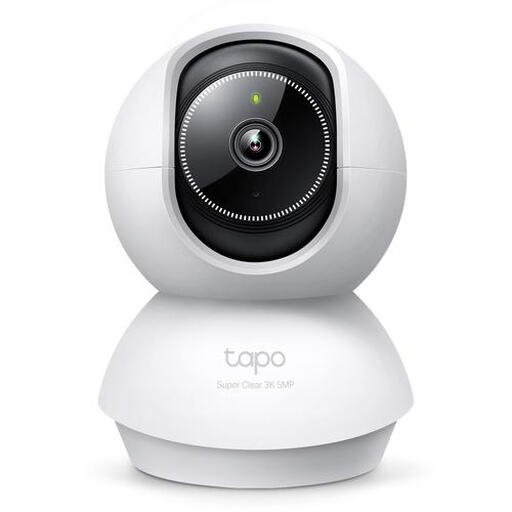
Why it fits the profile: A practical indoor camera for anyone looking for clear specifications and features without a separate parent station. Suitable for baby, pet or living room monitoring.
The product specification states 5 MP, 2880 × 1620 pixels, IR night vision up to 12 metres and microSD storage up to 512 GB. Do check beforehand whether you need a card.
Pan range of 340°, tilt angle up to 69°, two-way communication and support for person and pet detection according to the product information.
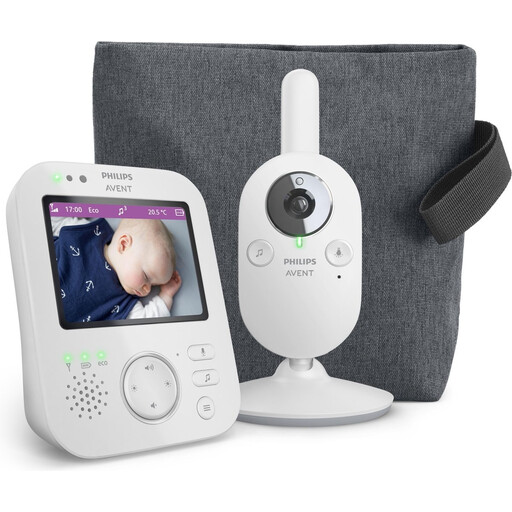
Why it fits the profile: A more traditional baby monitor with camera and its own screen for parents who don’t want to rely on a smartphone app.
The product specification mentions a private connection, VOX mode and its own colour screen. This means you don’t automatically need a cloud account or subscription.
3.5-inch colour screen, 2x digital zoom, night vision and a specified range of up to 50 metres indoors and 300 metres outdoors.
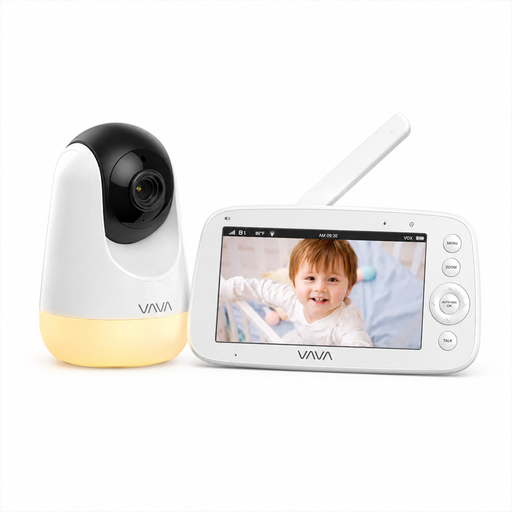
Why it fits the profile: A baby monitor without Wi-Fi for parents who want to watch locally and don’t need an app, account or cloud service.
The connection runs directly between the camera and parent unit. This avoids reliance on Wi-Fi, a smartphone and recurring cloud costs.
5-inch 720p screen, infrared night vision, two-way communication, 270° pan, 108° tilt and up to 24 hours of audio-only use according to the product information.
We’ve put together a full, up-to-date list of products that fully meet these strict selection criteria and comply with current European safety regulations.
Yes. A model with its own parent unit, such as the VAVA VA-IH006 PRO, can connect directly to the camera. You won’t be able to check in remotely via the internet, but the connection isn’t dependent on your home network.
The lifespan depends on usage, heat, the power adapter, software support and battery condition. A camera that runs continuously puts more strain on the power supply than occasional use. Place the device in a well-ventilated area, use the supplied or suitable adapter, and replace a damaged cable immediately.
In addition to the purchase price, costs can arise for a microSD card, cloud storage or a subscription. So check beforehand which features are available locally. A camera with local recording can work out cheaper in the long run, while cloud storage can be convenient for access from multiple locations.
