
Vandaag of morgen in huis

Kwaliteit gegarandeerd

Welkomstaanbiedingen ontgrendelen: GRATIS bezorging | Tot 80% korting | Gratis 30 dagen JoyPlus-proefperiode
Download de app
Building a new PC or upgrading an existing system starts with the foundation: the motherboard. If you're eyeing an Intel processor with an LGA 1700 socket, you're likely considering the Intel B760 chipset. It's a significant choice, with options for both the latest DDR5 memory and the trusted DDR4 standard.
Finding the right B760 motherboard can feel like navigating a maze of specifications. This article is designed to be a clear guide. We'll cut through the marketing jargon and focus on the specs that truly matter, so you can make an informed decision that fits your needs and budget.
Before we dive into specific models, here are a few key points to help you determine your priorities.
One of the most important decisions with a B760 motherboard is the memory standard.
Most B760 motherboards come in the Micro ATX form factor (also known as a B760M motherboard). This compact size (24.4 x 24.4 cm) is popular because it offers a great balance: it fits in most cases but typically has enough expansion slots and connections for the average user and gamer.
The Intel B760 chipset comes standard with modern features. When making your choice, pay attention to the details that are important to you:
Based on specifications and functionality, we've highlighted a few models that cater to different needs and budgets.
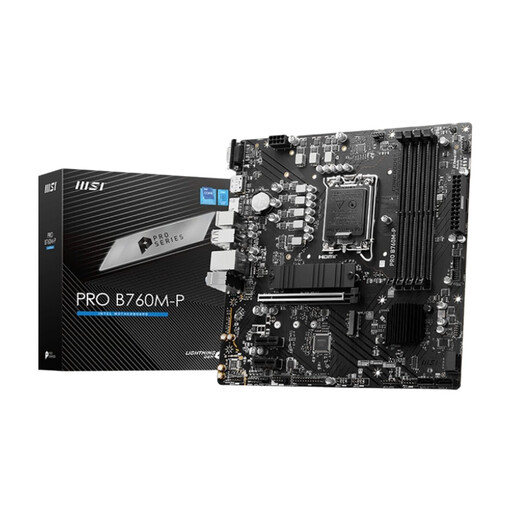
Why It Stands Out This MSI B760 motherboard is a solid and reliable entry point into the world of DDR5. It focuses on productivity and stability without unnecessary frills. With support for up to 192 GB of DDR5 memory and two M.2 slots for fast storage, it provides a modern foundation for both workstations and all-around PC builds.
Advantages
Who Is It For? For the PC builder who is assembling a new system and wants to invest in the DDR5 standard from the get-go. It's a no-frills LGA 1700 motherboard that delivers a stable base for office work, creative tasks, and mainstream gaming.
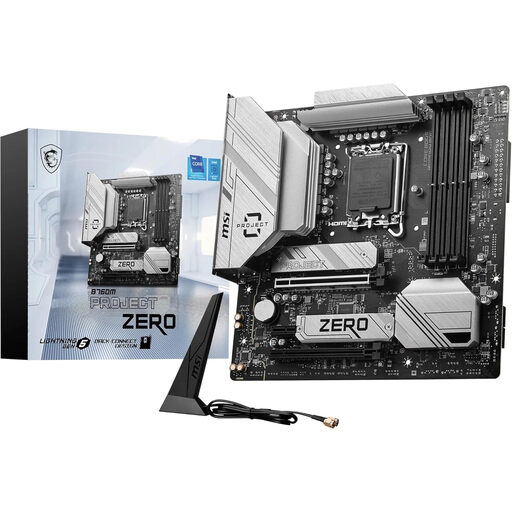
Why It Stands Out The Project Zero immediately catches the eye with its unique design: most connectors (power, SATA, fan headers) have been moved to the back of the board. This creates an exceptionally clean look at the front, with no visible cables. Beyond aesthetics, this board also offers high-end features like a PCIe 5.0 x16 slot, Wi-Fi 6E, Bluetooth 5.3, and 2.5 Gbps Ethernet.
Advantages
Who Is It For? For the PC enthusiast looking to combine aesthetics and performance. If you're building a showcase PC with a glass panel and hate cable clutter, this is an excellent choice. Its modern features also make it a future-proof option for gamers and power users. Note: A compatible case is required.
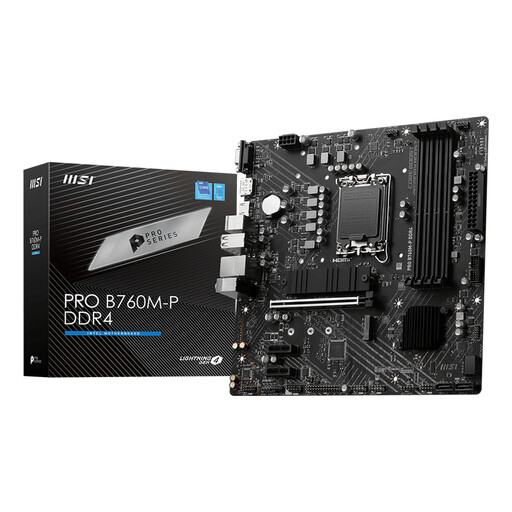
Why It Stands Out This motherboard is functionally almost identical to its DDR5 sibling, but with support for DDR4 memory. This makes it a very attractive option for those upgrading from an older Intel or AMD system who want to continue using a good set of DDR4 modules. You get a modern platform with PCIe 4.0 support for your GPU and M.2 SSD, without the extra cost of new memory.
Advantages
Who Is It For? Ideal for the budget-conscious upgrader. If you're moving to a 12th, 13th, or 14th Gen Intel processor but want to keep your DDR4 memory, this DDR4 motherboard offers an excellent price-to-performance ratio.
The choice of a motherboard is personal. If you're specifically looking for an upgrade that allows you to keep your current DDR4 memory, there are more options than the model mentioned above.
Check out our full range of DDR4 motherboards for more options.
Is a B760 motherboard good for gaming? Yes, a B760 motherboard is an excellent choice for most gaming PCs. It supports the latest Intel processors, fast PCIe 4.0/5.0 graphics cards, and M.2 SSDs. While you can't overclock the CPU itself (that's reserved for the more expensive Z-series chipsets), the B760 chipset does support memory overclocking via Intel XMP, which benefits gaming performance.
What's the difference between the Intel B760 and Z790 chipsets? The main difference is CPU overclocking. The Z790 chipset is designed for enthusiasts who want to overclock their Intel 'K' series processors for maximum performance. Z790 boards also often have more PCIe lanes and more extensive connectivity. The B760 chipset does not offer CPU overclocking capabilities but otherwise provides a similar set of modern features at a typically lower price, making it the smarter choice for most users.
Can I use DDR4 memory on a B760 motherboard? That depends on the specific model. Manufacturers like MSI often release two versions of the same motherboard: one for DDR5 and one for DDR4. It is therefore crucial to check the product name and specifications carefully. A board like the MSI PRO B760M-P DDR4 is specifically designed to work with DDR4 memory. You cannot simply insert DDR4 modules into a DDR5 slot, or vice versa.
