
Vandaag of morgen in huis

Kwaliteit gegarandeerd

Welkomstaanbiedingen ontgrendelen: GRATIS bezorging | Tot 80% korting | Gratis 30 dagen JoyPlus-proefperiode
Download de app
An AZERTY keyboard may seem easy to choose at first. But problems often only come to light after you’ve bought one: keys may be in different places than you expected, the wireless connection may rely on a USB receiver that isn’t compatible with your device, or there may be no numeric keypad. The terms Belgian and French AZERTY are also often used interchangeably.
Use this buying guide to compare the key features and avoid a costly mistake. Our selection is based on verifiable specifications such as layout, connection, size, key type and compatibility.
A Belgian AZERTY keyboard has a different layout from a French AZERTY keyboard. The position of punctuation marks, special characters and some function keys can also vary. So don’t just check that the title says “AZERTY”; look for the language variant too: Belgian, BE or French.
This is especially important with a laptop. A software setting can change how the keys respond, but it won’t change the labels on the physical keys.
A wireless AZERTY keyboard may connect via Bluetooth, radio frequency using a USB receiver, or both. Bluetooth is handy for a tablet or laptop, while a desktop PC may be easier to use with a USB dongle. Also check that your computer has a spare USB-A port.
With a wireless keyboard and mouse set, one receiver may connect both devices. This saves a USB port, but also makes it more important not to lose the receiver.
A TKL or 75% keyboard takes up less space, but usually doesn’t have a numeric keypad. If you work with numbers, spreadsheets or invoices, a keyboard with a numeric keypad may be a better choice. Gamers often prefer a compact design to leave more room for their mouse.
Check both the physical key labels and the software settings in Windows, macOS, Linux, Android or iPadOS. A Belgian keyboard works technically with several systems, but function keys and special characters may behave differently depending on the operating system.
Apple accessories are often model-specific. For example, Apple Magic Keyboard models for iPad Air are designed for a particular iPad size and use a Smart Connector. They aren’t universal USB keyboards.
Look out for these differences:
For battery-powered models, the battery type and stated battery life are useful specifications to check. The stated battery life will still depend on usage and settings.
Membrane and plunger keys are generally designed for quiet, everyday use. Scissor keys have a low-profile design, as found on some office and laptop models. Mechanical keys offer more distinct feedback, but can be louder and often cost more.
A mechanical AZERTY gaming keyboard usually includes extra features such as RGB lighting, anti-ghosting, macros or media keys. Check whether the model has a numeric keypad: TKL models generally don’t.
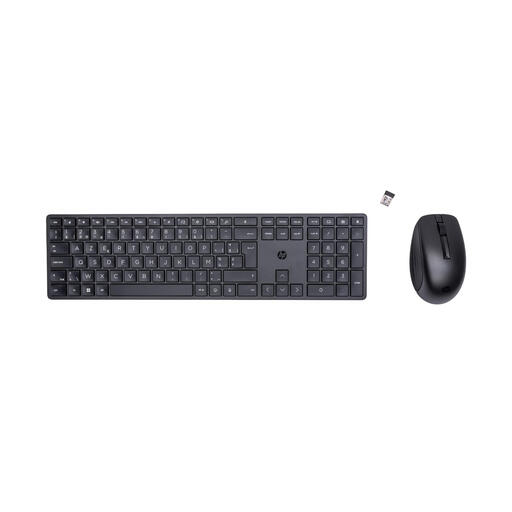
Why it suits this user: A practical set for people working from home and students who need a keyboard and mouse straight away.
The product details explicitly state that it has a Belgian AZERTY layout, an RF connection and a full-size design. The included mouse saves you from having to buy one separately.
Full-size layout, numeric keypad, 2.4GHz RF and a mouse with 4000 dpi, according to the product specifications.
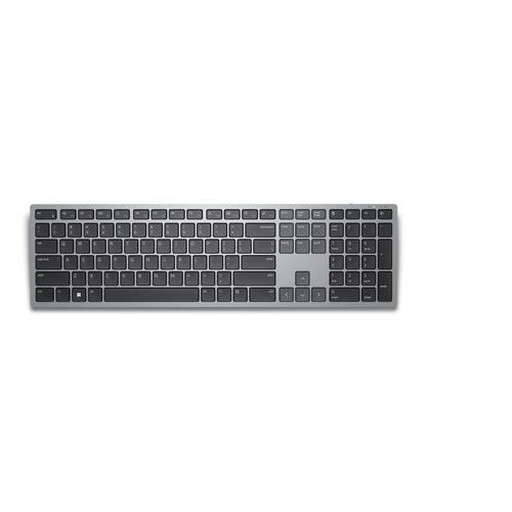
Why it suits this user: A good choice for business users who switch between several computers, tablets or other devices.
The layout is specified as Belgian AZERTY. Both Bluetooth 5.0 and RF are available, so you’re not limited to just one connection type.
Connects to up to three devices, with a numeric keypad, scissor keys and a stated wireless range of up to 10 metres.
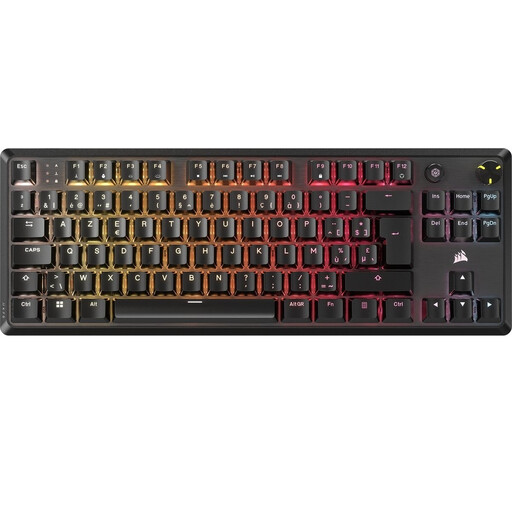
Why it suits this user: A great choice for gamers and heavy typists looking for mechanical key feedback, RGB lighting and programmable controls.
The specifications list BE ISO AZERTY, linear mechanical switches and NKRO. This makes it clear that it’s a compact gaming model without a numeric keypad.
USB-C cable, per-key RGB, five profiles, volume control and compatibility with Windows, Linux and consoles.
We’ve put together a complete, up-to-date list of products that meet these strict selection criteria and the applicable European safety regulations.
Yes. Windows, macOS and Linux support Belgian and French keyboard layouts. Set the same language variant in your system settings as the one shown on the physical keys. Otherwise, punctuation marks and symbols may appear in different places.
It depends on your workspace. Bluetooth or RF keeps your desk tidy and is handy if you use several devices. A USB model works straight away, doesn’t need batteries and is suitable for a fixed office setup. For RF models, check whether the USB receiver is included.
Its lifespan depends on the key type, usage and maintenance. Manufacturers may state a number of keystrokes, but this isn’t a guarantee for every usage scenario. Keep the keyboard dry, avoid pulling the cable tight, and check in advance whether replacement batteries or a cable are easy to find.
