What should you look for?
First, check that your audiobook service supports your preferred playback method. Then consider how the player connects to your speakers and where you’ll be listening.
| What to consider |
What to look for when buying |
Who it matters most to |
| Compatibility with your audiobook service |
Check your service, subscription, phone and playback method together. A Cast or AirPlay feature doesn’t automatically mean your app will work. |
If I want to keep using my existing audiobook app, the playback method I choose needs to work with it. Around 36% of consumers put playing audio through their chosen service at the top of their list. |
| Being able to hear clearly in different spots |
Consider where you’ll listen and where one or more speakers could go. A Sonos stereo pair requires two compatible speakers of the same model. |
If you listen in different parts of the living room, you’ll want to assess how the speakers work in each spot. Around 29% of consumers prioritise being able to hear clearly from different listening positions. |
| Connecting to your existing speakers |
Check whether your speakers are active or passive and which inputs are available. Passive speakers need a suitable amplifier. |
If I want to keep my current speakers, I need to find a player with the right connections and amplification. Around 21% of consumers prioritise reusing their existing audio system. |
| Subscription and everyday use |
Check the current terms of your audiobook service and decide whether you want to play audio through the service itself or your phone. |
If ongoing subscription terms and ease of use matter to you, factor them in before you choose. Around 14% of consumers put running costs and ease of use first. |
Joybuy products
This Joybuy selection features wireless speakers with the playback options listed in their product information. Before choosing one, check whether your audiobook app supports the Bluetooth, AirPlay or Wi-Fi connection you want to use. A listed connection doesn’t guarantee direct integration.
 No image available
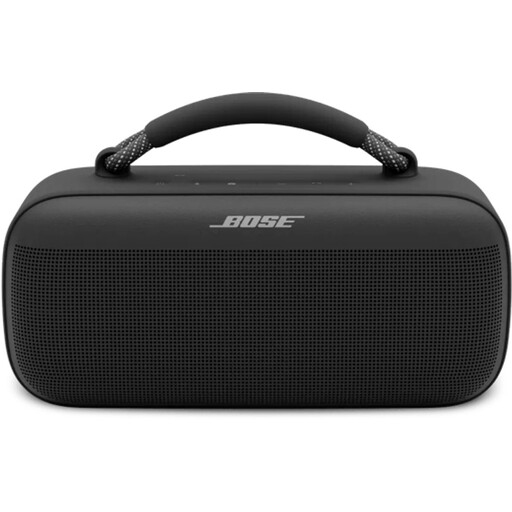
Bose SoundLink Max (Black)
An option if you’re looking for a speaker with Bluetooth or AirPlay. Check that your audiobook app supports the playback method you want to use.
The product information lists Bluetooth, AirPlay and control via a mobile app.
Listed battery life: up to 20 hours.
View at Joybuy
 No image available
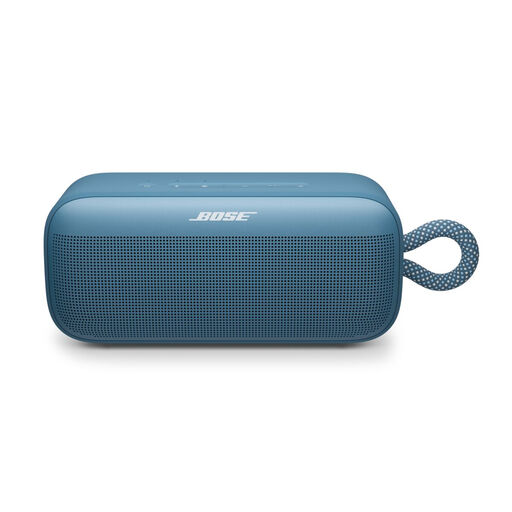
Bose SoundLink Plus (Blue Dusk)
A good fit if you want to play audio from a Bluetooth source. Check that your audiobook app supports this playback method.
The product information lists Bluetooth, battery life of up to 20 hours and IP67.
According to the product information, you can pair two SoundLink Plus speakers.
View at Joybuy
 No image available
Edifier ES300 (60 W)
An option if you’re looking for a speaker with Wi-Fi and several listed playback options. Check that your audiobook app supports the one you want to use.
The product name lists 60 W. The product information mentions Wi-Fi, Bluetooth, AirPlay 2 and multi-room playback.
USB and AUX inputs are also listed.
View at Joybuy
Frequently asked questions
Does Storytel automatically work with every player that has Google Cast?
No. A player having Cast doesn’t confirm that it will work. Storytel explains how to cast from Android to a Google Chromecast TV and says to check that both devices are on the same Wi-Fi network. Those instructions don’t confirm support for every standalone Cast audio player. Check the playback method with your app and device.
Which Storytel subscription do I need for the Sonos integration?
Sonos specifies a Storytel Unlimited account as a requirement for using Storytel within Sonos. Storytel’s installation help refers more generally to an active account, so check Sonos’s requirement for this specific integration.
How do I connect a standalone player to my existing audio system?
Connect the player’s output to a suitable input on your amplifier or active speakers, then select that input. Sonos describes this connection method for Port. First check whether your speakers are active or passive: passive speakers need a suitable amplifier.
What ongoing costs and warranty rights should I consider?
Check the current subscription plan and listening terms for your audiobook service, as they can vary by plan. In the Netherlands, there is no fixed general statutory warranty period. The Dutch government says that if there’s a problem with a product, the retailer is your point of contact for a solution.
Can I try out a player at home after buying it online?
ACM ConsuWijzer states that online purchases come with a statutory cooling-off period which ends 14 days after the product is delivered. Exceptions may apply, and there are rules about unpacking and trying out products. Read the information from ACM ConsuWijzer before you order.


