
Vandaag of morgen in huis

Kwaliteit gegarandeerd

Welkomstaanbiedingen ontgrendelen: GRATIS bezorging | Tot 80% korting | Gratis 30 dagen JoyPlus-proefperiode
Download de app
Buying a new set of audio equipment sounds simple, until you have to choose between Bluetooth speakers, a TV soundbar, wireless earbuds or active speakers. Manufacturers often emphasise high wattages, the latest Bluetooth versions and terms such as surround sound. That information does not always tell you enough about how suitable a product will be for your living room, car or desk.
The following pitfalls are common:
For a compact computer setup, 10 to 30 watts may be sufficient, depending on the room and listening distance. According to the product specifications, the Epson Active Speakers ELPSP02 have 2 x 15 watts RMS, a 2.0-channel layout and a built-in amplifier. This makes them suitable for a fixed audiovisual setup rather than outdoor use.
With a soundbar and subwoofer, look at the channel layout as well as the power. A 2.1 system consists of a soundbar and a subwoofer; a 5.1.2 or 7.1 system adds more speaker channels for immersive effects. However, the number of channels does not guarantee a particular listening experience. Speaker placement, the room and the source being used also matter.
Check in advance which outputs your TV, computer, phone or car stereo has. Important connections include:
According to the product information, the Logitech Bluetooth Audio Adapter uses Bluetooth 3.0, has a range of up to 15 metres with a clear line of sight, and works with speakers via 3,5 mm or RCA. This is a practical solution if you want to use your existing speakers wirelessly. However, check that your amplifier or speaker has the correct audio input.
For the car, a Bluetooth audio adapter with an FM transmitter is another option. According to the stated specifications, the Oxerbog Car FM Transmitter works with 12–24 volts, Bluetooth 5.0, USB and USB-C ports, and an adjustable FM range of 87,5 to 108,0 MHz. Choose a clear FM channel to minimise interference. Only set up the device when the car is stationary.
With portable Bluetooth speakers, the combination of battery life, weight and protection is more important than maximum volume alone. According to the product description, the Edifier ES60 has a 34-watt RMS output, Bluetooth 5.4, a battery life of up to 9 hours and IP66 protection against dust and water. This makes it suitable for use at home, on a patio or during a day out. IP66 does not mean that you can keep the speaker underwater for extended periods.
For earbuds, consider the battery life of both the earbuds and the charging case. Fit, microphone quality, latency and protection against sweat can also affect everyday use. According to the product information, the Edifier X1 Lite earbuds have Bluetooth 5.4, a stated low latency of 60 ms, IP54 protection and a total playback time of up to 26 hours with the charging case. These specifications come from the product description; actual battery life may vary depending on volume, codec and device.

Why it suits this profile: These compact gaming speakers are designed for a desk and offer Bluetooth 5.3, USB and 3,5mm AUX. This means you can connect a computer or mobile device without an additional amplifier.
The main connections and the stated peak power of 10 watts are clearly listed. So expect a desktop speaker set, not a large-room audio system.
USB power, Bluetooth 5.3, 3,5mm AUX and three sound modes for gaming, music and films.
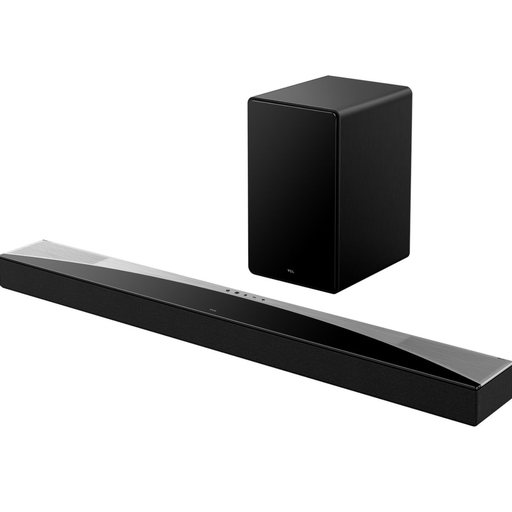
Why it suits this profile: This home cinema setup combines a 5.1.2 layout with a wireless subwoofer, HDMI eARC, Bluetooth 5.3 and support for Dolby Atmos and DTS:X, according to the product information.
The set lists the total RMS power of 620 watts and the subwoofer power of 180 watts separately. However, check whether your TV supports eARC or ARC.
Wireless subwoofer, HDMI eARC, app control, Apple AirPlay 2 and multiple audio inputs.

Why it suits this profile: This portable Bluetooth speaker is designed for use both indoors and outdoors. Its stated IP66 protection, Bluetooth 5.4 and battery life of up to 9 hours make it suitable for changing conditions.
The protection rating is clearly specified. This helps prevent IP66 from being confused with full submersion protection.
34 watts RMS, stereo pairing, USB-C, two simultaneous Bluetooth connections and a built-in microphone.
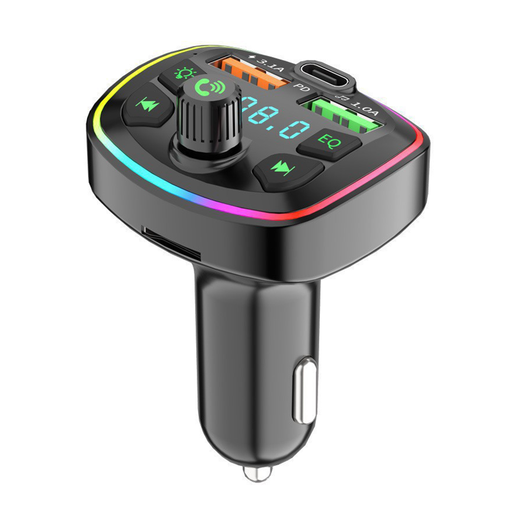
Why it suits this profile: This device is designed for cars without built-in Bluetooth audio streaming. According to the stated product details, it combines FM transmission with USB, USB-C, USB flash drive and MicroSD support.
The product specifies a suitable voltage range of 12–24 volts. Always check this before connecting it, and unplug the adapter after driving.
Hands-free calling, multiple charging ports, automatic Bluetooth reconnection and support for various audio files.
We have put together a complete, up-to-date list of products that fully meet these strict selection criteria and the applicable European safety regulations.
HDMI ARC or eARC is the preferred option if both your TV and soundbar have this connection. It allows the TV audio to be sent to the soundbar and often lets you control it using the TV remote. An optical cable is an alternative. Then check the TV menu to make sure the correct audio output has been selected.
Lifespan depends on usage, ventilation, moisture, battery care and mechanical strain. Wired speakers and soundbars can last for many years when kept dry and well ventilated. With wireless earbuds and Bluetooth headphones, the built-in battery is the main consideration. Avoid prolonged use at high volumes and use suitable charging accessories.
A portable Bluetooth speaker mainly uses battery power during playback. Consumption varies depending on volume, lighting and connection. A fixed soundbar or set of active speakers uses electricity for as long as it is switched on. Turn devices off when you are not using them and do not leave chargers plugged in unnecessarily.
