
Vandaag of morgen in huis

Kwaliteit gegarandeerd

Welkomstaanbiedingen ontgrendelen: GRATIS bezorging | Tot 80% korting | Gratis 30 dagen JoyPlus-proefperiode
Download de app
On paper, an ASUS Vivobook 15 X1504MA-BQ534W laptop looks like a sensible choice for students, families and office work. However, small differences in configuration, storage and keyboard layout can have a big impact on your experience. If you focus only on the processor or an attractive offer, you could later find yourself dealing with limited storage, an unsuitable connection or unclear product specifications.
This buying guide will help you check the key features before buying an ASUS Vivobook 15, another 15.6-inch ASUS laptop or a similar model.
A model name such as Core 3 or Core 5 doesn’t tell you everything about everyday performance. Check the number of processor cores, the generation, the memory and the type of storage too. For browsing the internet, word processing, video calls and streaming, 8GB RAM and an SSD are generally a practical starting point.
An entry-level laptop may, however, struggle with demanding video editing, modern games or large software projects. An integrated Intel UHD Graphics chip is mainly designed for everyday visuals and productivity, not demanding 3D applications.
The product name for the ASUS Vivobook 15 X1504MA-BQ534W states 256GB SSD, while the technical product specifications provided list a 512GB PCIe 4.0 SSD. That difference matters. Some of the storage will also be taken up by Windows 11 and pre-installed software.
So before you check out, verify the current product page, configuration and storage capacity included with your order. If you keep lots of photos, videos or study files, you may need additional external storage. You could also browse the range of 256GB SSD storage.
The Quiet Blue finish gives the laptop a distinctive look, but its practical features matter more. Check the keyboard layout, webcam, ports, Wi-Fi version, power adapter and warranty. A QWERTY keyboard isn’t necessarily the same as a UK QWERTY layout, with all the characters in the places you’re used to.
A 15.6-inch screen gives you more workspace than a compact 13- or 14-inch model. That’s useful for spreadsheets, online lessons and working with two windows side by side. The 1920 × 1080-pixel resolution, also known as Full HD, is well suited to text, video and everyday software.
Also check whether your chosen configuration has an anti-glare finish. The information provided for this version lists an LED-backlit Full HD display. Similar Vivobook models are also described as having an anti-glare screen. So check the exact configuration if you often work near a window or under bright lights.
8GB RAM is a useful starting point for browsing, Microsoft 365, online meetings and streaming. DDR5 is a modern type of memory, but the amount of RAM is just as important as the technology. With lots of browser tabs open, photo editing and several demanding programmes running at once, 8GB can soon reach its limits.
When buying, check whether the memory can be upgraded later. Upgrade options vary between slim laptops.
A PCIe 4.0 SSD can help your laptop start up quickly and give you fast access to files. Real-world performance also depends on the processor, cooling and software you use. Windows 11 Home is pre-installed according to the product specifications. After unboxing, you’ll still need to install updates, set up an account and review any privacy options.
According to the product information, the laptop has Wi-Fi 6, Bluetooth 5.3, an HD webcam and a full-size keyboard. Weighing around 1.70 kg and measuring 359.7 × 232.5 × 17.9 mm, it’s easy to move between home, school and the office.
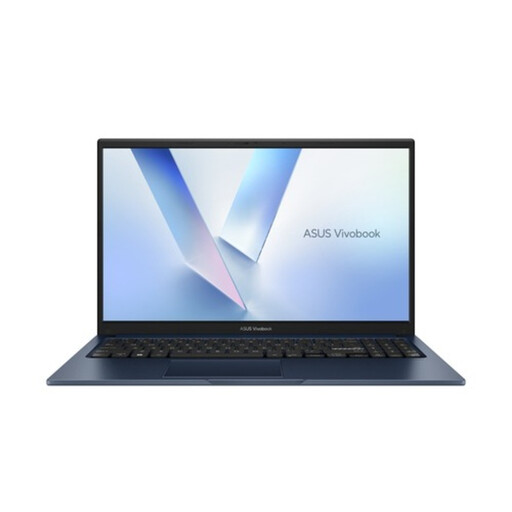
Why it suits this profile: This 15.6-inch Full HD laptop is designed for browsing the internet, word processing, online learning, video calls and streaming. Windows 11 Home and a full-size QWERTY keyboard mean there are fewer setup steps when you first get started.
The product specifications list 8GB DDR5, an SSD and Full HD. Before buying, make sure you check the discrepancy between the 256GB stated in the product name and the 512GB listed in the technical specifications.
15.6-inch screen, 8GB DDR5, Windows 11 Home, Wi-Fi 6, Bluetooth 5.3 and a weight of around 1.70 kg.
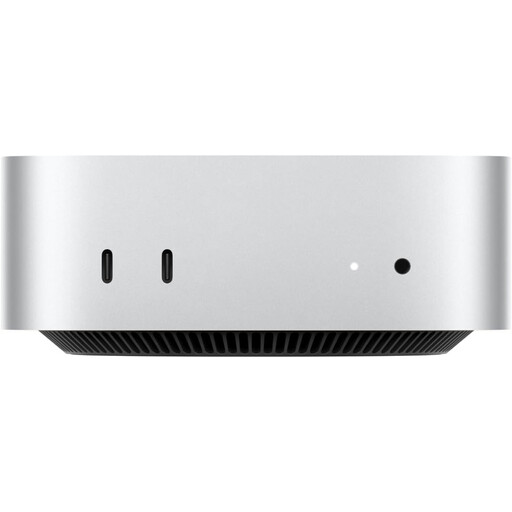
Why it suits this profile: For users who mainly work at a fixed desk and need more processing power and memory than an entry-level laptop typically offers.
16GB of memory and a 512GB SSD reduce the risk of running short on storage or being limited when multitasking. However, this is a desktop, not a portable Windows 11 laptop.
Apple M6 chip, 16GB of memory, 512GB SSD and support for up to three external displays, according to the product description.
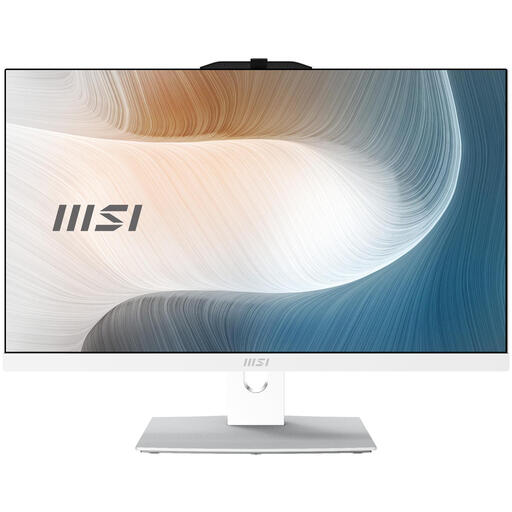
Why it suits this profile: A fixed workstation for the office, admin tasks or home users who want a large screen and built-in webcam without a separate computer tower.
The 23.8-inch Full HD screen, 8GB DDR5 and 256GB M.2 SSD are clearly specified. Check separately whether a power adapter is included.
Windows 11 Pro, Full HD touchscreen, 8GB DDR5, 256GB SSD, Wi-Fi 6E and an integrated webcam, according to the product information.
We’ve put together a complete, up-to-date list of products that meet these strict selection criteria and current European safety regulations.
Yes, the listed configuration is suitable for many study tasks, including word processing, online research, online lessons, presentations and video calls. Be sure to check the storage capacity and keyboard layout before ordering. For demanding technical software, 3D design or video editing, a more powerful model may be a better choice.
For email, documents, spreadsheets, calendars and browser-based applications, 8GB RAM, an SSD and Windows 11 Home are practical specifications. If you often multitask or work with large data files, check in advance whether the memory can be upgraded and how much storage space is actually available.
How long it lasts depends on maintenance, battery use, updates, storage space and how demanding your software is. A laptop with an SSD doesn’t have a moving hard drive, but that doesn’t mean every component has the same lifespan. Use the supplied adapter, or one that is electrically compatible, keep the ventilation openings clear and back up important files regularly.
