
Vandaag of morgen in huis

Kwaliteit gegarandeerd

Welkomstaanbiedingen ontgrendelen: GRATIS bezorging | Tot 80% korting | Gratis 30 dagen JoyPlus-proefperiode
Download de app
As a PC gamer, you want to play your favourite games anywhere, without compromising on performance. The market for portable gaming consoles has grown in recent years, but it's filled with marketing promises that don't always hold up. Before you invest in a premium handheld, it's crucial to know what to look for. We'll discuss the most common pitfalls and help you make an informed decision.
Many devices promise a desktop experience in the palm of your hand, but the reality is often different. Pay attention to these three points to avoid wasting money on a device that will just gather dust after a few months.
To bypass the pitfalls, you need to shift your focus to the specifications that truly matter for a smooth and flexible gaming experience.
The choice of operating system determines your freedom. A Windows 11 handheld like the Asus ROG Ally gives you direct access to virtually every PC game and launcher you're familiar with. This means you can effortlessly install your existing libraries from Steam, GOG, and Epic Games. More importantly, it offers full support for Xbox Game Pass handheld, allowing you to play hundreds of games instantly. This is in stark contrast to systems that force you into cumbersome workarounds or limit you to a selective offering.
Look beyond just the resolution. For a truly premium experience, a high refresh rate is essential. A gaming handheld 120Hz display, like the one on the ROG Ally, shows twice as many frames per second as a standard 60Hz screen. The result is noticeably smoother and more responsive gameplay, especially in fast-paced action games. Combined with a Full HD resolution (1920x1080) and good brightness, this ensures a sharp and vibrant image, wherever you play.
The engine of a portable gaming console must be powerful enough for modern games, but also efficient. The AMD Ryzen Z2 processor in the ROG Ally is specifically designed for this type of device. Paired with 16GB RAM, this ensures smooth performance. Also, pay attention to the storage: a ROG Ally 512GB NVMe SSD not only offers enough space for several large games but also provides significantly shorter loading times compared to older storage types.
Based on the criteria above, we have selected a few products that suit different user profiles.
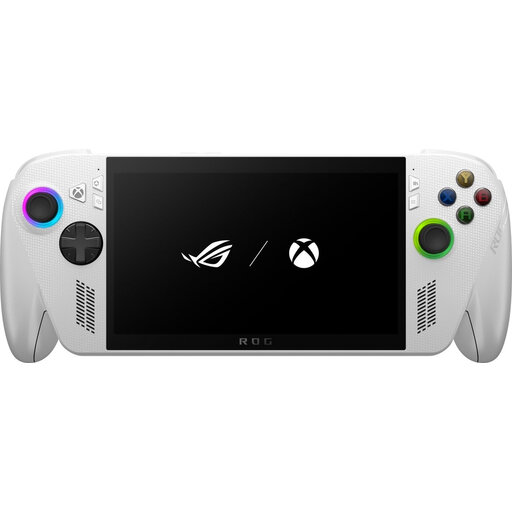
Why This Fits Their Persona: This is the ideal choice for the gamer who wants to take their extensive PC library and Xbox Game Pass subscription with them. You don't have to make any compromises and can pick up right where you left off on your desktop.
Thanks to Windows 11, you completely bypass the pitfall of a closed ecosystem. The 120Hz screen directly addresses the problem of a subpar display.
Complete freedom with Windows 11 for all your PC game launchers. The 120Hz Full HD screen provides an extremely smooth visual experience.
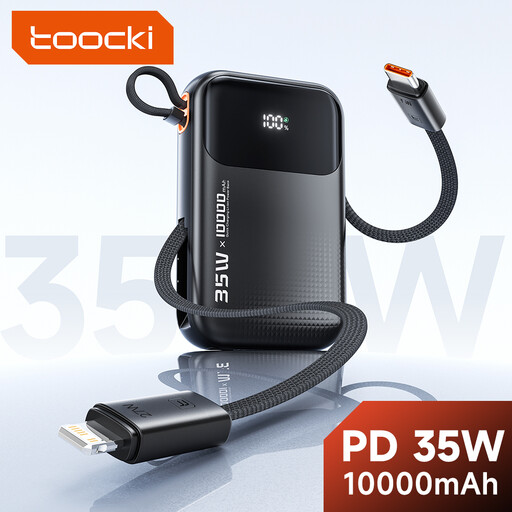
Why This Fits Their Persona: The ROG Ally is powerful, and that power demands energy. For long trips or gaming sessions away from an outlet, a power bank isn't a luxury, it's a necessity.
This is the direct solution to the limited battery life pitfall. Instead of getting frustrated, you simply extend your playtime by several hours.
Delivers 35W via Power Delivery (PD), enough to charge the ROG Ally or slow down power consumption during gameplay. Compact and easy to carry.
We have compiled a complete, up-to-date list of products that fully meet these strict selection criteria and local regulations.
Battery life is highly dependent on what you're doing. When playing graphically intensive AAA games on high settings, you can expect about 1.5 to 2 hours of playtime. For lighter indie games, emulation, or streaming video, this can extend to 4-6 hours. The device has several performance modes (Silent, Performance, Turbo) that allow you to find a balance between power and battery life.
For experienced PC users, setting up the ROG Ally feels like booting up a new laptop. You log in with your Microsoft account and can immediately install your favourite programs. Asus includes the Armoury Crate SE software, a special interface that simplifies launching games and adjusting settings (like controls and performance modes). It has a slightly steeper learning curve than a traditional console but offers infinitely more flexibility.
Absolutely. Because the Asus ROG Ally is a full-fledged Windows 11 handheld, you can install any PC game launcher. You simply download the Steam client, log in with your account, and you have access to your entire library. The same goes for the Epic Games Store, GOG Galaxy, Battle.net, and the EA App. All your games, one device.
