Who would benefit from a separate camera?

Card maker creating images for sales

When photographing a series of cards, a repeatable setup, neutral light and control over uneven lighting matter more than simply having more megapixels. Printbeat and Kunstwerkt offer practical advice on photographing artwork in daylight.

Maker of print-ready or archival files

If you want to preserve fine lines and subtle colour differences, consider both your shooting setup and how much flexibility you’ll need when editing the file. A Dutch print lab highlights the importance of suitable reproduction files.

Occasional documenter

For the occasional small card, try your current device first: shoot straight on in soft daylight and check the result at the card’s full size.

What should you look for when taking photos?

Existing smartphone or camera

Choose this option if: you photograph small cards occasionally and want to see whether a better angle and softer window light will do the job.

Trade-off: you may not need to buy anything new, but check the result against how you intend to use the photo.

Mirrorless camera with interchangeable lens

Choose this option if: you photograph cards regularly, want to edit RAW files or need to match the lens to the card and shooting distance.

Trade-off: check that the supplied lens frames the card appropriately. A wider choice of lenses also means you’ll need to think carefully about your setup.

What to consider What to look for Who it matters most to
Colour consistency Check RAW support for the exact camera body and take a test shot using your lighting setup. When I’m photographing a series of cards, I want the colours to match as closely as possible across the images. Around 31% of consumers prioritise colour consistency.
Reflections and light distribution Check the whole card for glare and uneven brightness. Only try a filter after checking the lens’s filter size. When photographing a glossy card, I want to spot any distracting bright patches before using the image. Around 25% of consumers prioritise controlling reflections.
Fine detail and straight edges Test sharpness at the final image size and check the minimum focusing distance of the exact lens. Position the camera directly opposite the card. If I want to preserve fine print details and straight edges, the card needs to look sharp and straight in the image. Around 25% of consumers prioritise capturing detail.
Ease of use and a complete kit Try your current equipment first. If you’re buying a camera kit, check the exact kit name and what’s in the box. When I want to get started without lots of extra settings, I look for a solution that suits the way I work. Around 19% of consumers prioritise ease of use and a complete kit.

Common pitfalls

  • Buying a new camera to fix a lighting problem

    A different camera won’t automatically correct uneven brightness caused by a single window or reflections on the card.

    First, try positioning your current equipment straight on and using soft light. Check the whole image for glare and differences in brightness.

  • Mistaking a body-only model for a complete kit

    A camera body without a suitable lens isn’t a complete setup for photographing cards.

    Before buying, check the exact model and kit name, as well as what’s included in the box.

  • Assuming a camera specification guarantees accurate print colours

    Ambient light, mixed light sources and the lighting you use to view a screen all affect how colours appear. Canon Europe emphasises that ambient light can influence colour assessment.

    Keep your lighting setup as consistent as possible. For reproduction work, use a colour reference and assess your screen and print under suitable lighting.

Camera brands to consider

Canon

The Canon EOS R50 with RF-S 18-45mm lens is a mirrorless camera kit worth comparing if you don’t already have a lens.

  • Canon lists a 24.2 MP APS-C sensor and support for RF and RF-S lenses for the EOS R50.
  • Canon doesn’t list in-body sensor-shift image stabilisation. These specifications alone don’t show how well the camera will reproduce art cards.

Nikon

The Nikon Z50II kit with NIKKOR Z DX 16-50mm VR is an option if you’re looking for a mirrorless camera supplied with a standard zoom lens.

  • Nikon lists 20.9 million effective pixels for the Z50II and VR image stabilisation in the lens supplied with this kit.
  • Image stabilisation won’t straighten a crooked card or even out the lighting.

FUJIFILM

The FUJIFILM X-M5 kit with XC15-45mm OIS PZ is a compact camera-and-lens combination worth comparing if you want to create RAW files.

  • FUJIFILM lists an APS-C sensor with 26.1 million effective pixels and 14-bit RAW for the X-M5.
  • The official specification lists digital image stabilisation for video mode only. The OIS label on the kit lens doesn’t mean the camera body has image stabilisation.

Cameras at Joybuy

These camera options range from a compact handheld camera to mirrorless models. For each model, check whether the controls suit still-life detail shots and which lens kit is included.
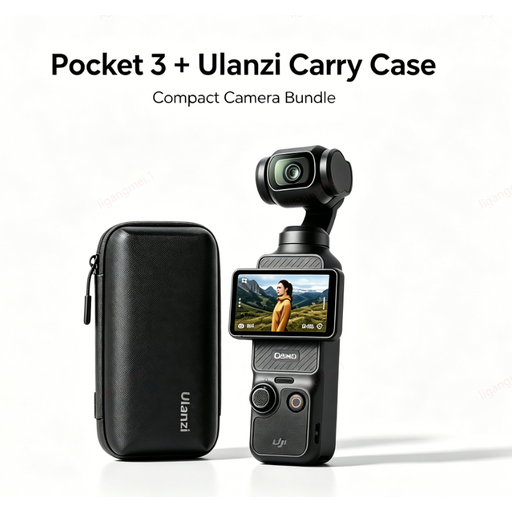
DJI Pocket 3 camera with custom-fit Ulanzi storage case

DJI Pocket 3 camera with custom-fit Ulanzi storage case

The product description focuses mainly on handheld filming and vlogging. Consider whether you can position it straight and securely for still card photography.

View at Joybuy

Sony ZV-E10 mirrorless camera, body only

Sony ZV-E10, body only

The body-only version is best suited to you if you already have a suitable lens. Check that it’s right for the size of your card and your shooting distance.

View at Joybuy

Sony ZV-E10 with 16–50mm zoom lens, black

Sony ZV-E10 with 16–50mm zoom lens, black

The product name lists a 16–50mm zoom lens. Check whether you can get the framing you want from your shooting position with your card size.

View at Joybuy

Sony Alpha A6100 with 16–50mm f/3.5-5.6 OSS II lens

Sony Alpha A6100 with 16–50mm f/3.5-5.6 OSS II

The product name lists a 16–50mm lens. Take a test shot to check whether the card looks sharp and straight from your shooting distance.

View at Joybuy

Frequently asked questions

Is window light on its own enough to photograph an art card?

Soft daylight can be a good starting point for a small card, but check the whole image. Printbeat warns that light from a single window can create uneven brightness. Turn off lamps with a different colour temperature and take a test shot first.

How should I position the card and camera?

Position the camera directly opposite the card and check that its edges look straight in the image. Look for reflections before taking the photo; Kunstwerkt recommends daylight and warns that direct sunlight can create harsh shadows.

Do I need a new camera straight away to edit colours?

Not necessarily: first assess the lighting, angle and a test file from your current device. If you want to edit RAW files, check whether the exact camera model supports this feature; FUJIFILM, for example, lists 14-bit RAW for the X-M5. Assess colours under suitable lighting, too.

Who should I contact about a faulty camera bought as a consumer in the Netherlands?

Report the problem to the retailer. The Dutch government explains that the Netherlands has no fixed statutory guarantee period and that a product must meet what you can reasonably expect from it. A manufacturer’s or extended guarantee doesn’t replace this right.

Can I post photos of other people’s printed art cards online?

Not automatically. According to Auteursrecht.nl, you’ll usually need permission from the rights holder to publish or share photos of protected visual artwork. The Dutch government distinguishes between private use and sharing or making something public; check the rights before publishing images.
