Start by choosing an arena game with local multiplayer, then check how many players and controllers it supports on a single console. If you don’t have a permanent TV setup, a Switch with tabletop mode gives you a built-in screen; PS5 and Xbox Series S are suited to playing on a shared TV. Check the local play mode for each game, and also consider disc use and what’s included in the exact bundle.
Who is this choice for?
Groups who want to fight together locally
Want to play against each other at the same time, rather than taking turns or playing online? Start by choosing an arena game and checking how many players it supports on a single console. Nintendo lists up to eight players at once for Super Smash Bros. Ultimate; the PlayStation Store lists one to four local players for Brawlhalla on PlayStation.
Players without a permanent TV setup
If your living room is small and there’s no TV setup available, a console with tabletop mode could be an option. Nintendo describes an adjustable stand for the Switch OLED and tabletop mode for Switch 2. Also consider the viewing distance and whether everyone can see the shared screen.
Players with existing games or controllers
If you want to keep using your games or controllers, check compatibility for each title and accessory. Nintendo lists some exceptions for Switch games on Switch 2; older Joy-Con controllers can be connected wirelessly, but can’t be attached to Switch 2.
What should you look for in a console for local arena games?
First check the game’s local play mode and controller setup; then choose between a built-in tabletop screen and a shared TV setup.
| What to consider |
What should you check? |
Who is this important for? |
| Local multiplayer |
Check the page for the exact game to see how many players can play on one console and which controllers are supported. |
If I want to fight alongside others at the same time, I need to know whether the game supports local multiplayer. Around 36% of consumers give local play the highest priority. |
| View of the screen |
Compare tabletop mode with the TV from the available seats and check whether everyone can follow the action on screen. |
In a small living room, I want to position the console so everyone can see the fight. Around 29% of consumers prioritise the screen setup. |
| Existing games and controllers |
Check compatibility for the specific game and controller version with the manufacturer. |
If I want to keep using my current games or controllers, I check each one before choosing a console. Around 21% of consumers give reusing what they own the highest priority. |
| Complete gaming setup |
Compare the number of controllers required with what’s included in the exact bundle, and check whether you own games on disc or digitally. |
I want to know in advance whether the chosen game and controllers will work for the whole group. Around 14% of consumers put having a complete gaming setup first. |
Common buying mistakes
-
Confusing eight players with eight players on one PS5
The PlayStation Store lists one to four local players for Brawlhalla on PlayStation, as well as eight online players. These are different play modes.
On the page for the exact platform version, check the number of local and online players separately.
-
Choosing a digital console when you own disc games
The PS5 Digital Edition and Xbox Series S don’t have a disc drive, so they can’t play your existing disc games.
Before buying a digital console, check whether the games you want are available digitally.
You can’t use your existing discs with these models; you’ll need digital versions of the games you want to play.
-
Assuming the included controllers will be enough for everyone
The number of players and controller setup vary by game, and bundle contents can vary too.
First compare the game’s player mode with its controller setup and the contents of the exact bundle.
You may need extra compatible controllers; the type and number depend on the game and bundle.
-
Assuming all Switch games and accessories work on Switch 2
Nintendo lists some exceptions for Switch games; compatibility can vary between games and accessories.
Check the specific game and controller on Nintendo’s compatibility pages.
You may need a different controller or game for some combinations.
Relevant brands to compare
Nintendo
A good choice if you want to play on a table without a permanent TV setup, or take your existing Switch library with you.
- Nintendo lists an adjustable stand for the Switch OLED and tabletop mode for Switch 2.
- Check compatibility for older Switch games and controllers, title by title and accessory by accessory.
PlayStation
A good fit for an existing TV setup and a game with a confirmed local play mode.
- The PlayStation Store lists local play modes for games including Boomerang Fu and Brawlhalla.
- The PS5 Digital Edition has no disc drive; also check how many controllers are included in your chosen bundle.
Xbox
The Series S is a digital console designed for a TV setup.
- Ubisoft lists Brawlhalla as available for Xbox Series X|S.
- The Series S can’t play disc games. For the exact Xbox game, check its local play mode and the controllers required.
Valve
A good choice if you want to play Steam games and might connect a portable system to a TV.
- Valve describes how to connect to a TV using the Steam Deck Docking Station.
- Local multiplayer and external controller support depend on the game and your chosen setup.
Joybuy products for tabletop play and a shared TV
This selection includes two Switch models for tabletop play without a permanent TV setup, and a PS5 Digital Edition for a shared TV setup.
 No image available
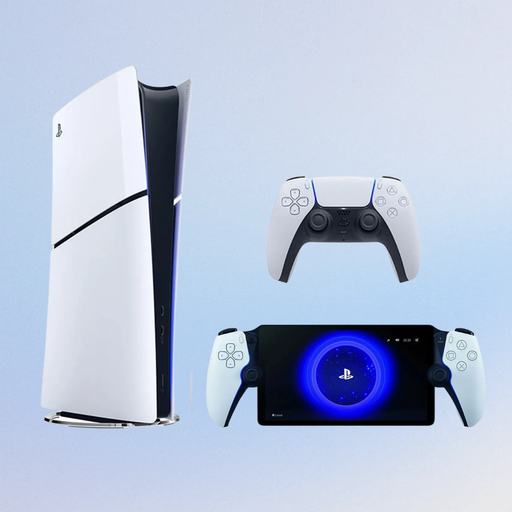
Sony PlayStation 5 Slim 825GB Digital Edition with PlayStation Portal Remote Player, White (PS5)
A good fit for an existing TV setup; the PlayStation Store lists local play modes for Boomerang Fu and Brawlhalla.
Digital Edition; 825GB; bundle listing: PlayStation Official Portal Remote Player.
This model has no disc drive.
View at Joybuy
 No image available
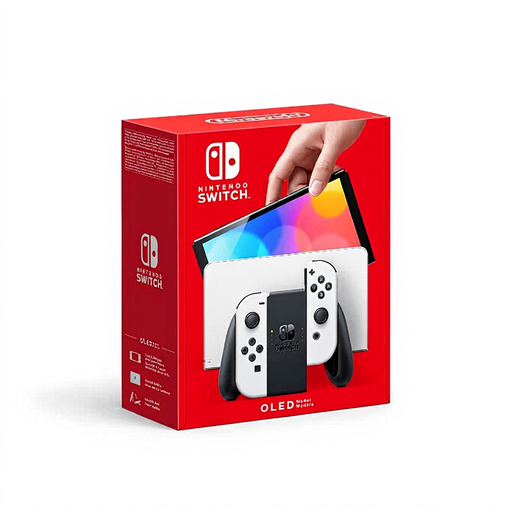
Nintendo Switch OLED White
A good fit for a small living room without a permanent TV setup; Nintendo describes tabletop play using the adjustable stand.
7-inch OLED screen; adjustable stand.
View at Joybuy
 No image available
Nintendo Switch 2 Console (EU)
A good fit for a portable tabletop setup; Nintendo describes tabletop mode for Switch 2.
7.9-inch screen.
Some Switch games aren’t supported or aren’t fully compatible with Switch 2; check the specific title.
View at Joybuy
Frequently asked questions
How do I set up a Switch when there’s no TV available?
Place the console on a table using the adjustable stand, then choose a controller setup supported by the game. Before buying, check whether everyone can see the built-in screen from where they’ll be sitting; tabletop mode doesn’t guarantee a good view for a larger group.
Can I use my old Joy-Con controllers with Switch 2?
Yes. According to Nintendo, you can connect standard Switch Joy-Con controllers to Switch 2 wirelessly. You can’t attach them to the console; also check how to charge them and whether the game you’ve chosen supports them.
What happens if a console is faulty or you buy one online?
According to ACM ConsuWijzer, if a product breaks sooner than you could reasonably expect during normal use, the seller must put things right under the statutory guarantee. For a console bought online, you generally have a statutory 14-day cooling-off period from delivery; different terms may apply to digital games.
Can a child play a game with a PEGI rating?
The PEGI rating gives a recommended minimum age based on the content, not the game’s difficulty. The Dutch Government provides age guidance for computer games. Check the rating for the specific game and, as a parent or carer, decide whether its content is suitable.


